This site uses cookies to enhance your user experience. By clicking any link on this site you are giving your consent to our cookie policy. Read more
Reject
Accept All
Calendly Mobile

Calendly Mobile

verified Verified App

Developer: Calendly LLC

  • category

    Category: Business

  • price

    Price: free

  • age rating

    Age Rating: Everyone

  • rating

    Rating: 4.4

  • download

    Downloads: 1,000,000+

  • version

    Version: 3.5.0

Screenshot 1
Screenshot 2
Screenshot 3
Screenshot 4
Screenshot 5
Screenshot 6

Features & Highlights

Automatic Time Zone Detection

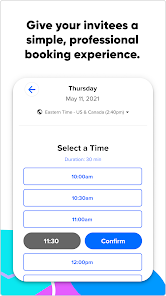
No more confusion about time zones when scheduling meetings with people across different regions. Calendly Mobile automatically detects and adjusts to the time zone of your invitees, making it easy for everyone to find a suitable meeting time without any hassle.

Calendar Integration

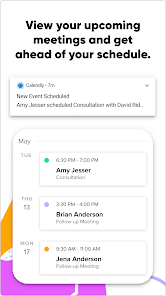
Seamlessly sync Calendly with your existing calendars, including Google, Outlook, and iCloud. This integration ensures you're always up-to-date on your commitments, preventing double bookings and allowing you to manage your time effectively while maintaining a clear view of your schedule.

Customizable Event Types

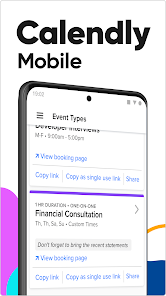
Create various event types tailored to your specific needs, whether it's a quick chat, a detailed consultation, or a team meeting. Each event can have its own settings, duration, and availability, giving you flexibility and control over how you connect with others.

Easy Scheduling

Calendly Mobile makes it a breeze to schedule meetings on the go. With just a few taps, you can set your availability, share your scheduling link, and let others book time with you without the back-and-forth emails, saving you precious time throughout your day.

Pros & Cons

Pros
  • Schedule appointments easily on the go
  • Receive instant notifications for new bookings
  • Sync seamlessly with your calendar apps
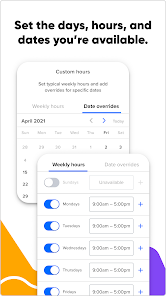
  • Customize availability to fit your lifestyle
  • Simplify team scheduling with shared links
Cons
  • Limited features compared to desktop version
  • Syncing issues can occur occasionally
  • User interface may feel cluttered on small screens
  • Notifications can be inconsistent or delayed

Real Experience Using Calendly Mobile

Application Scenarios

Calendly Mobile is designed to streamline the scheduling process for professionals across various fields. Whether you're a freelancer, a team manager, or an educator, this app simplifies the way you arrange meetings. Imagine a busy week filled with client calls, team meetings, and project deadlines; Calendly allows you to share your availability effortlessly. Users can create personalized scheduling links to share with clients and colleagues, eliminating the back-and-forth emails about meeting times. The app also integrates seamlessly with calendars like Google Calendar, Microsoft Outlook, and iCloud, ensuring that all your appointments are in sync, no matter where you are. This makes it especially useful for remote workers who need to coordinate across different time zones.

User Experience

The user experience of Calendly Mobile is intuitive and efficient. Upon opening the app, users are greeted with a clean interface that prioritizes ease of use. Setting up an event type is straightforward, allowing users to customize duration, location (in-person or virtual), and availability. Notifications and reminders are helpful features that keep users informed about upcoming appointments. The app also supports group scheduling, making it easy to find a time that works for multiple participants. Users have reported that the ability to send automatic follow-up reminders has significantly reduced no-show rates, enhancing productivity. Overall, the user experience is designed to minimize scheduling friction, allowing users to focus on what truly matters.

Pricing

Calendly Mobile offers a flexible pricing structure that caters to various user needs. There is a free tier that allows users to schedule unlimited one-on-one meetings, which is perfect for individuals or small teams. For those requiring more advanced features, such as group events, custom branding, and integrations with other software, there are premium plans available. These paid plans are competitively priced and offer significant value for organizations looking to enhance their scheduling capabilities. The transparent pricing model makes it easy for users to choose a plan that fits their budget and requirements without hidden fees.

Updates & Support

Calendly Mobile is frequently updated to enhance its functionality and user experience. The development team actively listens to user feedback, implementing new features and improvements regularly. For instance, recent updates have introduced enhanced analytics for tracking meeting engagement and performance. Support is readily available through various channels, including an extensive help center, email support, and community forums. Users have praised the responsiveness of the support team, which is always willing to assist with any questions or concerns. Overall, the commitment to ongoing updates and robust support contributes to a positive user experience.

verified Security & Privacy Review

The Calendly Mobile app takes user security and privacy seriously, implementing several measures to protect sensitive information. All data transmitted between the app and its servers is encrypted using industry-standard SSL protocols, ensuring that your scheduling details and personal information remain confidential during transit. When it comes to permissions, Calendly requires access to your calendar and contacts to function effectively. Users can manage these permissions easily, allowing them to control what data is shared. Importantly, Calendly does not store any calendar data longer than necessary, adhering to data minimization principles. The app's privacy policy is transparent, detailing how user data is collected, used, and shared. Calendly commits to not selling personal information to third parties and provides users with options to delete their accounts and associated data. Additionally, the company regularly undergoes security audits to identify and resolve vulnerabilities, further enhancing user trust. Overall, Calendly Mobile demonstrates a strong commitment to maintaining user privacy and data security.

Reviews

4.4

“Easy to use and schedule appointments quickly”

“Seamless integration with my calendar”

“User-friendly interface makes scheduling a breeze”

“Notifications help me stay organized”

“Great for managing multiple time zones effortlessly”

Editor's Choice