This site uses cookies to enhance your user experience. By clicking any link on this site you are giving your consent to our cookie policy. Read more
Reject
Accept All

Advertiser and Editorial Disclosures

Blinq: Digital Business Card

Blinq: Digital Business Card

verified Verified App

Developer: Blinq Technologies

  • category

    Category: Business

  • price

    Price: free

  • age rating

    Age Rating: Everyone

  • rating

    Rating: 4.9

  • download

    Downloads: 500,000+

  • version

    Version: /

Screenshot 1
Screenshot 2
Screenshot 3
Screenshot 4
Screenshot 5
Screenshot 6
Screenshot 7
Screenshot 8
Screenshot 9
Screenshot 10
Screenshot 11

Features & Highlights

Analytics Tracking

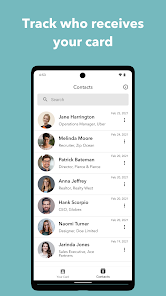
Gain insights into your networking efforts with Blinq's built-in analytics feature. You can track how many times your card is viewed and shared, giving you valuable data to optimize your outreach and improve your professional connections over time. It's all about making your interactions more effective.

Cross-Platform Compatibility

Blinq seamlessly integrates across multiple platforms, allowing you to share your card on social media, email, and messaging apps. This cross-platform compatibility ensures that your digital business card is always accessible, making it easier for others to connect with you regardless of their preferred communication method.

Customizable Designs

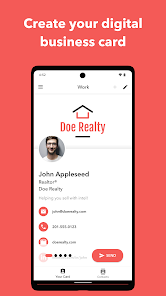
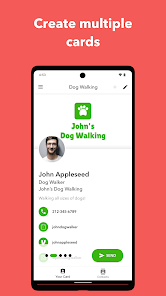
Blinq offers a range of stunning templates that can be customized to reflect your personal or brand identity. With easy-to-use design tools, you can add your logo, choose colors, and arrange information to create a unique digital business card that truly stands out.

Instant Sharing

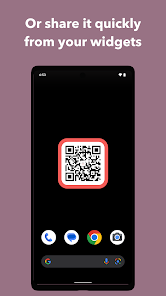
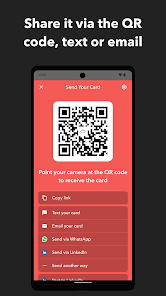
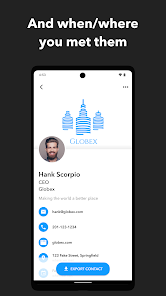
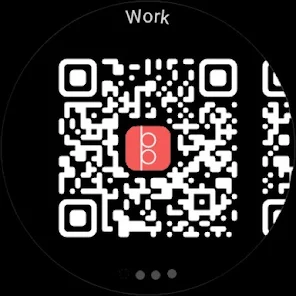
With Blinq, sharing your digital business card is as simple as a tap. Whether via QR code, NFC technology, or sharing links, you can effortlessly connect with others without the hassle of carrying physical cards. This instant sharing capability makes networking a breeze, anytime and anywhere.

Pros & Cons

Pros
  • Easily share your contact information with anyone.
  • Customizable designs to match your personal brand.
  • Reduce paper waste with eco-friendly digital options.
  • Instantly update your details without reprinting cards.
  • Access analytics to track engagement and connections.
Cons
  • Limited customization options for card design.
  • Connectivity issues can disrupt sharing functionality.
  • May not be widely recognized by all users.
  • Dependent on smartphone battery for access.

Real Experience Using Blinq: Digital Business Card

Application Scenarios

Blinq: Digital Business Card is designed to cater to a wide range of professional scenarios. Whether you are attending networking events, conferences, or casual meetups, Blinq provides a seamless way to share your contact information and professional profile with others. Users can create customized digital business cards that reflect their personal branding, complete with logos, social media links, and a personal message. The app is particularly beneficial for entrepreneurs, freelancers, and sales professionals who often find themselves in situations where quick and effective networking is essential. Additionally, Blinq can be used to replace traditional paper business cards, making it an eco-friendly choice for those looking to reduce their carbon footprint.

User Experience

The user experience on Blinq is intuitive and straightforward. Upon opening the app, users are greeted with a clean interface that makes navigation easy, even for those who are not tech-savvy. Customization options allow users to create unique cards that stand out, with features like QR codes for instant sharing. The card-sharing process is smooth; users can exchange their cards via email, text, or through a simple QR scan. Moreover, the app provides analytics to track how often your card has been viewed or shared, offering valuable insights into networking effectiveness. Overall, the user experience is enhanced by regular updates that introduce new features and improvements based on user feedback.

Pricing

Blinq offers a variety of pricing plans to accommodate different needs. The basic version is free and allows users to create a limited number of digital business cards with essential features. For more advanced options, including unlimited card creation, customization features, and analytics, users can opt for premium subscriptions starting at a reasonable monthly fee. This tiered pricing structure makes it accessible for individuals and businesses alike, ensuring that everyone can find a plan that fits their budget. The value for money is commendable, especially considering the potential networking benefits that come with a professional digital presence.

Updates & Support

The developers of Blinq are committed to providing ongoing updates and support to enhance user satisfaction. Regular software updates introduce new features, fix bugs, and improve overall performance, ensuring that the app remains competitive and user-friendly. The support system is robust, with a comprehensive FAQ section and customer service available through email and chat. Users appreciate the quick response times and helpful guidance provided by the support team. This commitment to user experience and responsive support adds significant value to the overall experience of using Blinq, making it a reliable tool for modern networking.

verified Security & Privacy Review

The Blinq app prioritizes user security and privacy, incorporating several features to safeguard personal information. It employs robust encryption protocols to protect data both in transit and at rest, ensuring that sensitive information remains confidential. Users have full control over the visibility of their digital business cards, allowing them to choose what information is shared and with whom. In terms of permissions, Blinq requests access to essential features such as contacts and camera for optimal functionality. However, it allows users to customize these permissions, minimizing unnecessary data access. The app does not collect excessive personal data, aligning with best practices for user privacy. Blinq also adheres to GDPR regulations, providing transparency regarding data handling and user rights. Users can easily access privacy settings and understand how their data is utilized. Overall, Blinq demonstrates a strong commitment to maintaining security and privacy, making it a reliable choice for digital networking.

Reviews

4.9

“User-friendly interface makes sharing contacts effortless!”

“Great customization options for personal branding.”

“Seamless integration with other apps is a plus.”

“Saves paper and promotes eco-friendly networking.”

“Reliable and fast performance every time I use it.”

FAQ

1

Does Blinq: Digital Business Card collect my personal data?

Yes, Blinq may collect personal data as part of its functionality, but it adheres to privacy policies that outline how your information is used and protected.

2

Does Blinq: Digital Business Card offer a free trial or free version?

Blinq offers a free version with basic features, and users can also opt for a free trial of premium features to explore additional functionalities.

3

Does Blinq: Digital Business Card require an internet connection?

While an internet connection is necessary for initial setup and sharing features, you can access your saved digital business cards offline once they are created.

4

How can I contact support or send feedback for Blinq: Digital Business Card?

To contact support or provide feedback, users can reach out via the app's help section, email customer support, or visit the Blinq website for additional resources.

5

How do I manage or cancel my Blinq: Digital Business Card subscription?

You can manage or cancel your subscription directly through the app settings or the account management section on the Blinq website, depending on how you subscribed.

How to use Blinq: Digital Business Card

1

How can I contact customer service for the Blinq app?

You can contact Blinq customer service through the app's help section or visit their official website for support options.

2

How do I activate my Blinq digital business card?

After downloading the app, follow the setup prompts to create and activate your digital business card using your information.

3

How do I log in to my Blinq account?

To log in, open the app and enter your registered email and password, then tap "Log In."

4

What is the customer number for Blinq?

Blinq does not publicly list a customer number; please refer to the app or website for contact details.

Editor's Choice