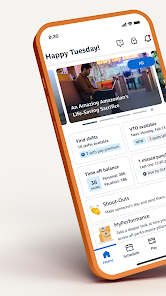
Amazon A to Z

Amazon A to Z

4.7
Screenshot 1
Screenshot 2
Screenshot 3
Screenshot 4
Screenshot 5
Screenshot 6

Information

  • Category: Business
  • Price: free
  • Age Rating: /
  • Rating: 4.7
  • Developer: Amazon Mobile LLC
  • Version: 4.0.71721.0

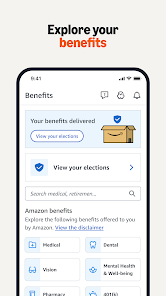
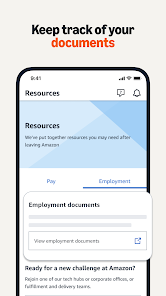
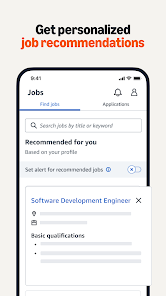
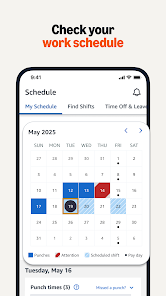
The Amazon A to Z app is a mobile application developed by Amazon for its employees. It provides a range of features and services to help employees manage their work life. The app allows employees to access their work schedule, view their pay stubs, manage their benefits, and more. It also provides access to Amazon’s internal tools and resources, such as the Amazon Learning Center, Amazon Connect, and Amazon Chime. Additionally, the app allows employees to connect with their colleagues, view their performance reviews, and access their Amazon Prime benefits. The app is available for both iOS and Android devices.

Features & Highlights

The Amazon A to Z app is a powerful tool for employees of Amazon, designed to streamline various aspects of their work life. Here are some of its most compelling features:

  • Employee Scheduling: The app allows users to view and manage their schedule seamlessly. For instance, if I need to swap my shift with a colleague, I can easily propose a change through the app, which saves time and avoids confusion.
  • Pay Stubs and Benefits Information: With a few taps, I can access my pay stubs and information about my benefits. This feature is particularly useful during tax season when I need to gather all relevant documents quickly.
  • Notifications and Alerts: The app keeps me informed with real-time notifications about schedule changes, upcoming events, or important company announcements. I remember receiving a notification about a last-minute team meeting, which allowed me to prepare in advance.
  • Time Off Requests: Submitting a request for vacation or personal time is a breeze. I once planned a family trip and used the app to submit my time off request, which was approved within hours, allowing me to finalize my travel plans without stress.

Real Experience Using Amazon A to Z

Application Scenarios

As an Amazon employee, I frequently find myself using the Amazon A to Z app in various scenarios throughout my work week. For example, on a particularly hectic Monday morning, I realized I had a scheduling conflict with a personal appointment. I quickly opened the app, navigated to the scheduling section, and was able to propose a shift swap with a co-worker. This spontaneous decision not only helped me manage my time better but also ensured my team was covered. Similarly, during my lunch breaks, I take a moment to check in on my pay stubs or upcoming benefits deadlines, ensuring that I’m always informed and up-to-date.

User Experience

The user interface of the Amazon A to Z app is intuitive and user-friendly. The layout is clean, with easy navigation that allows me to find what I need without unnecessary hassle. For instance, the scheduling feature is prominently displayed, making it easy to access my shifts and request changes. I’ve noticed that the app performs smoothly without lag, even during peak hours when many employees are likely using it simultaneously. Overall, my experience has been positive; the app feels like a reliable companion that keeps me organized and informed, enhancing my work-life balance.

Pricing

The Amazon A to Z app is free for all Amazon employees, which is a huge plus. There are no hidden fees or premium features that require payment, making it accessible to everyone in the company. This inclusivity ensures that all employees can take advantage of the app’s features without worrying about additional costs.

Updates & Support

Amazon frequently updates the A to Z app to enhance functionality and introduce new features. I appreciate that these updates are typically seamless, with no downtime to disrupt my use. Should any issues arise, the support section within the app provides quick access to help articles and a way to contact customer support directly. This has proven invaluable, especially when I had a minor technical hiccup that was resolved promptly by the support team.

Security & Privacy Review

As a user of the Amazon A to Z app, I have specific security and privacy concerns that I consider important. The app is available on both the App Store and Google Play, ensuring that it meets the security standards set by these platforms. During the registration process, it required essential personal data, such as my employee ID and contact information, which felt appropriate given the app's functionality. However, I appreciate that the app does not bombard me with ads or engage in intrusive tracking behavior. Instead, it focuses on providing a secure experience tailored to employee needs, which makes me feel more comfortable using it for sensitive information like pay stubs and benefits. Overall, Amazon A to Z prioritizes security and privacy, giving me confidence in managing my professional life through the app.

Pros
  • Stay organized with shifts
  • Instant access to pay info
  • Easy time-off requests made
  • Real-time notifications alerts
  • Access to company resources
Cons
  • Limited customization options
  • Cluttered user interface
  • Slow loading times occasionally
  • Lack of robust support

FAQ

Can I submit suggestions or feedback to the Amazon A to Z app?

Yes, users can provide feedback through the app or contact their HR department for suggestions.

Does the Amazon A to Z app collect my personal data?

Yes, the app collects personal data to manage employment-related tasks and improve user experience.

Does the Amazon A to Z app support offline use?

Yes, the app allows some functionalities to be accessed offline, but full features require an internet connection.

How do I cancel my Amazon A to Z subscription?

Since the app is free, there is no subscription to cancel. Simply uninstall the app if you no longer wish to use it.

How much does a subscription to the Amazon A to Z app cost?

There is no subscription fee; the app is provided at no cost to Amazon employees.

How to use Amazon A to Z

How can I contact Customer Service through the Amazon A to Z app?

Navigate to the "Help" section in the app. You’ll find options to chat, call, or email Customer Service for assistance.

How do I activate my Amazon A to Z account?

If prompted, enter the activation code sent to your email or phone. Follow the on-screen instructions to complete the activation process.

How do I log in to the Amazon A to Z app?

Open the app and enter your Amazon credentials. If you don't have an account, select "Sign Up." Follow the prompts to create one.

What is the Customer Service number for the Amazon A to Z app?

The customer service number can be found in the "Help" section of the app or on the Amazon website under "Contact Us."