This site uses cookies to enhance your user experience. By clicking any link on this site you are giving your consent to our cookie policy. Read more
Reject
Accept All

Advertiser and Editorial Disclosures

AI Art, Image & Logo Generator

AI Art, Image & Logo Generator

verified Verified App

Developer: Codespace Dijital

  • category

    Category: Art & Design

  • price

    Price: free

  • age rating

    Age Rating: Teen

  • rating

    Rating: 4.1

  • download

    Downloads: 500,000+

  • version

    Version: 1.1.7

Screenshot 1
Screenshot 2
Screenshot 3
Screenshot 4
Screenshot 5
Screenshot 6

Features & Highlights

AI-Powered Creativity

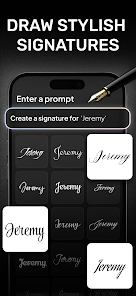
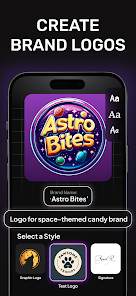
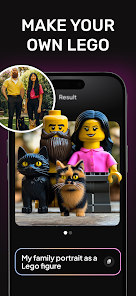
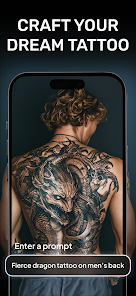
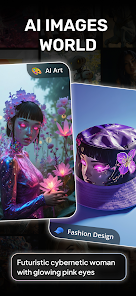
Harness the power of artificial intelligence to unleash your creative potential. This feature allows users to generate stunning artwork, logos, and images with just a few clicks, making professional-quality designs accessible to everyone, regardless of artistic skill level.

Customizable Templates

Choose from a wide array of customizable templates tailored for various industries and occasions. Whether you’re crafting a logo for a startup or designing promotional material, these templates provide a solid foundation that you can easily personalize to fit your unique vision.

High-Resolution Outputs

Generate high-resolution images suitable for both digital and print use, ensuring your designs look sharp and professional no matter the medium. This capability is perfect for businesses looking to create marketing materials or for artists wanting to showcase their work in high quality.

Real-Time Preview

Experience instant feedback with the real-time preview feature, allowing you to see your changes as you make them. This interactive element ensures that you can fine-tune your designs on the spot, resulting in a more efficient and satisfying creative process.

Pros & Cons

Pros
  • Generates unique designs tailored to your specific needs and preferences.
  • Saves time by quickly producing high-quality images and logos.
  • Offers a cost-effective solution compared to hiring professional designers.
  • Facilitates endless creativity with customizable options and styles.
  • Empowers users with an intuitive interface, no design skills required.
Cons
  • AI-generated art can lack the emotional depth of human creativity
  • Designs may lack uniqueness, leading to bland results
  • Copyright issues may arise, complicating ownership and use

Real Experience Using AI Art, Image & Logo Generator

Application Scenarios

The AI Art, Image & Logo Generator app is a versatile tool that caters to a wide array of creative needs. Whether you are a small business owner looking to create a unique logo, an artist seeking inspiration for your next masterpiece, or a social media manager in need of eye-catching visuals, this app provides an all-in-one solution. Users can generate stunning artwork for personal projects, promotional materials, or social media posts. Additionally, the app is suitable for educators and students, making it an excellent resource for creating engaging content for presentations or reports. The intuitive interface allows users to easily navigate through its features, making it accessible for both novices and experienced designers alike.

User Experience

User experience is a strong point for the AI Art, Image & Logo Generator app. Upon launching the app, users are greeted with a sleek and modern interface that is easy to navigate. The onboarding process is seamless, providing helpful tips without overwhelming new users. The AI-driven features yield impressive results, generating high-quality images and logos in a matter of minutes. The customization options are extensive, allowing users to tweak colors, styles, and layouts until they achieve their desired outcome. However, some users may find the initial learning curve steep when exploring advanced features. Overall, the app performs smoothly, with minimal lag times, ensuring that users can focus on their creative process.

Pricing

The app offers a tiered pricing model that accommodates various budgets and usage frequencies. Users can opt for a free version, which includes basic features and limited access to premium templates and styles. For those who require more advanced tools, the subscription plans are reasonably priced, offering monthly and yearly options. The premium plans unlock an extensive library of assets and provide additional capabilities like high-resolution downloads and commercial usage rights. In comparison to similar apps, the pricing is competitive, making it an attractive option for individuals and businesses alike.

Updates & Support

The development team behind the AI Art, Image & Logo Generator is committed to providing regular updates to enhance user experience and expand functionalities. Users can expect frequent improvements based on feedback, including the addition of new templates and styles, as well as performance enhancements. Support is readily available through an integrated help center and responsive customer service, ensuring that users can get assistance when needed. Overall, the app demonstrates a strong commitment to continuous improvement and user satisfaction, making it a reliable choice for those looking to explore their creative potential.

verified Security & Privacy Review

The AI Art, Image & Logo Generator app prioritizes user security and privacy through robust data handling practices. The app implements encryption protocols to protect user data during transmission and storage, ensuring that sensitive information remains secure. User permissions are clearly defined, with the app requesting only necessary access to functions such as camera and storage for optimal performance. Users can review and modify these permissions at any time, giving them control over their data sharing preferences. The app does not track user activity across other applications, maintaining a focus on privacy. Additionally, it adheres to relevant data protection regulations, providing users with transparency regarding data collection and usage. Users are encouraged to review the privacy policy to understand the specifics of data handling practices. Overall, the AI Art, Image & Logo Generator app demonstrates a commitment to protecting user privacy while delivering an engaging creative experience.

Reviews

4.1

“Intuitive interface, easy to create stunning logos!”

“Incredible artwork generation, exceeded my expectations.”

“Fast rendering and great variety of styles available.”

“Perfect for quick design solutions, highly recommend!”

“AI-generated images are impressive and unique!”

FAQ

1

Can I submit suggestions or feedback to AI Art, Image & Logo Generator?

Yes, users are encouraged to submit suggestions or feedback through the app's feedback feature or customer support channels to help improve the app and its offerings.

2

Does AI Art, Image & Logo Generator collect my personal data?

Yes, AI Art, Image & Logo Generator may collect personal data as outlined in its privacy policy, which typically includes information necessary for account management and app functionality.

3

Does AI Art, Image & Logo Generator support offline use?

Currently, AI Art, Image & Logo Generator requires an internet connection to access its AI capabilities and resources, so it does not support offline use.

4

How do I cancel my AI Art, Image & Logo Generator subscription?

Users can cancel their subscription through their account settings within the app or through the app store where they purchased the subscription, following the provided cancellation instructions.

5

How much does a subscription to AI Art, Image & Logo Generator cost?

Subscription costs for AI Art, Image & Logo Generator vary based on the plan selected, with options typically ranging from monthly to annual subscriptions; users can check the app for the most current pricing details.

How to use AI Art, Image & Logo Generator

1

Can I change my customer number?

Unfortunately, customer numbers cannot be changed. Please contact customer service if you have any concerns regarding your number.

2

Can I log in from multiple devices?

Yes, you can log in from multiple devices using the same customer number and password. Just ensure you're logged out from other sessions if needed.

3

How can I contact customer service if I have trouble logging in?

You can reach our customer service through the support section on our website or via email at support

4

How do I activate my account after signing up?

To activate your account, check your email for an activation link and follow the instructions provided.

5

How do I retrieve my password if I can't log in?

Click on the "Forgot Password?" link on the login page and follow the instructions to reset your password.

Editor's Choice