This site uses cookies to enhance your user experience. By clicking any link on this site you are giving your consent to our cookie policy. Read more
Reject
Accept All
Adobe Capture: Illustrator,Ps

Adobe Capture: Illustrator,Ps

verified Verified App

Developer: Adobe

  • category

    Category: Art & Design

  • price

    Price: free

  • age rating

    Age Rating: Everyone

  • rating

    Rating: 4.6

  • download

    Downloads: 5M+

  • version

    Version: 5.3 (1696)

Screenshot 1
Screenshot 2
Screenshot 3
Screenshot 4
Screenshot 5
Screenshot 6
Screenshot 7
Screenshot 8
Screenshot 9
Screenshot 10

Features & Highlights

Brush Creation

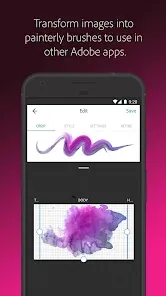
Design custom brushes that suit your artistic needs by capturing textures or patterns from your environment. With Adobe Capture, you can easily turn those inspirations into unique brushes for use in Illustrator and Photoshop, enhancing your creative toolkit.

Color Themes

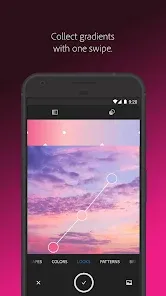
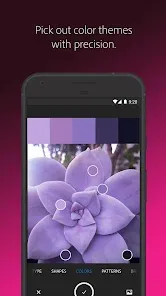
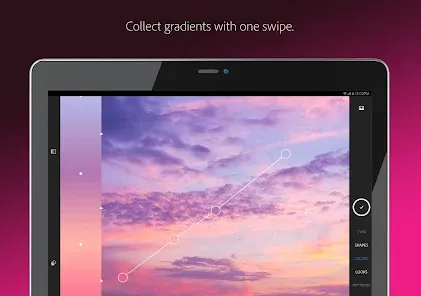
Capture and create stunning color palettes directly from your surroundings using your device's camera. This feature allows you to extract hues from images, ensuring that your artwork always has the perfect color inspiration, tailored to your unique style.

Shape Builder

Effortlessly create unique shapes by snapping pictures of objects or drawings. The Shape Builder feature allows you to extract and refine shapes, giving you the freedom to innovate and personalize your designs for various projects.

Vectorize Images

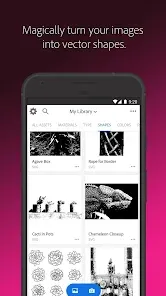
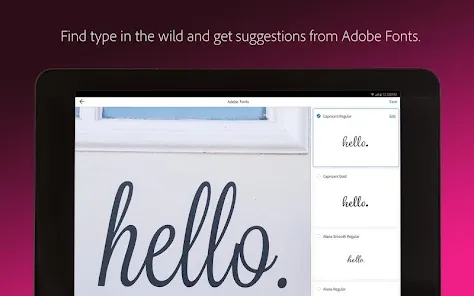
Transform your photos and sketches into scalable vector graphics with just a tap. Adobe Capture uses advanced algorithms to ensure that your designs maintain their quality and sharpness, making them perfect for any project, whether in Illustrator or Photoshop.

Pros & Cons

Pros
  • Easily convert images to vector graphics
  • Access a vast library of design assets
  • Seamlessly sync with Adobe Creative Cloud
  • Create custom color themes effortlessly
  • Transform sketches into digital artwork quickly
Cons
  • Limited functionality compared to desktop versions
  • Requires a stable internet connection for full features
  • Steeper learning curve for beginners
  • Compatibility issues with some file formats

Real Experience Using Adobe Capture: Illustrator,Ps

Application Scenarios

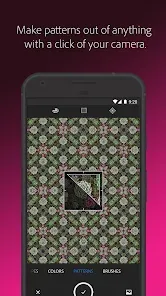
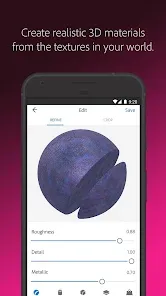
Adobe Capture serves as an invaluable tool for designers and artists looking to streamline their creative process. It allows users to convert photos into color themes, patterns, vector graphics, and brushes that can be used across Adobe's suite of products, such as Illustrator and Photoshop. For instance, graphic designers can use the app to capture a unique color palette from their surroundings, which can then be integrated into their digital artwork. Similarly, photographers can transform their images into high-quality vector graphics for print or web use, making it a versatile option for various artistic endeavors. Whether you’re in a bustling city or a quiet nature retreat, Adobe Capture makes it easy to harness inspiration anytime, anywhere.

User Experience

The user experience in Adobe Capture is intuitive and streamlined. The app features a clean interface that is easy to navigate, allowing users to quickly access different tools without unnecessary complexity. The capture functionality is impressive, enabling users to take a photo and instantly extract design elements. The precision and quality of the generated assets are commendable, although some users may need to spend time adjusting settings to achieve their desired results. Additionally, the integration with the Creative Cloud ensures that your creations are seamlessly synced across devices, enhancing workflow efficiency. Overall, Adobe Capture offers a satisfying experience, especially for those already familiar with Adobe's ecosystem.

Pricing

Adobe Capture is available for free, which is a major draw for aspiring artists and seasoned professionals alike. However, users should be aware that while the app itself is free, access to some advanced features may require a subscription to Adobe Creative Cloud. This subscription model can be a consideration for those looking to maximize their use of the app in conjunction with other Adobe products. Overall, the pricing strategy allows users to explore the app without committing financially upfront.

Updates & Support

Adobe is known for its commitment to regular updates, which keeps Adobe Capture fresh and functional with new features and improvements. Users can expect periodic enhancements that add more tools or refine existing functionalities, ensuring the app stays relevant in a rapidly evolving design landscape. Support is readily available through Adobe's extensive online resources, including tutorials, forums, and customer service. This level of support is beneficial for users who may face challenges or have questions about leveraging the app’s full potential. The combination of frequent updates and strong support makes Adobe Capture a reliable choice for creative professionals.

verified Security & Privacy Review

Adobe Capture prioritizes user security and privacy through a robust set of practices. The app requires permissions for camera access, storage, and network connections, which are essential for its functionality, such as capturing images and syncing assets with Adobe's cloud services. Users are informed about these permissions during the installation process, allowing for informed consent. Adobe employs industry-standard encryption protocols to safeguard user data both in transit and at rest. The app adheres to Adobe's privacy policies, which outline how user information is collected, used, and shared. Data is primarily utilized to enhance user experiences and improve app functionality. Additionally, Adobe Capture offers options for users to manage their data preferences. Users can opt-out of certain data collection practices, though this may limit some features. Overall, Adobe Capture demonstrates a strong commitment to data protection and user privacy, ensuring that sensitive information is handled responsibly and transparently.

Reviews

4.6

“User-friendly interface enhances creative workflow effortlessly.”

“Great for transforming photos into vector graphics.”

“Excellent tool for quick design inspiration on-the-go.”

“Syncs seamlessly with Adobe Creative Cloud.”

“Powerful features, but can be overwhelming for beginners.”

Editor's Choice