This site uses cookies to enhance your user experience. By clicking any link on this site you are giving your consent to our cookie policy. Read more
Reject
Accept All

Advertiser and Editorial Disclosures

Zillow Rental Manager

Zillow Rental Manager

verified

Zillow

4.4
Rating
1,000,000+ Downloads
8.8.0 Version
  • category

    Category: Productivity

  • price

    Price: free

  • age rating

    Age Rating: Everyone

  • rating

    Rating: 4.4

  • available on

    Available on: /

  • updated on

    Updated on: Jul 6, 2026

Screenshot 1
Screenshot 2
Screenshot 3
Screenshot 4
Screenshot 5
Screenshot 6
Screenshot 7

Features & Highlights

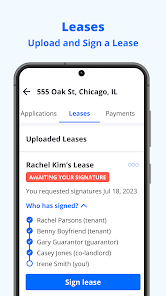
Lease Agreement Templates

Zillow Rental Manager provides customizable lease agreement templates that help landlords formalize their rental agreements efficiently. These templates are designed to comply with local laws and regulations, ensuring that your rental contracts are legally sound and tailored to your specific needs.

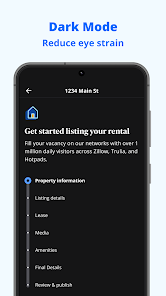
Listing Management

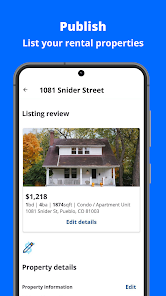
The platform offers seamless listing management, allowing landlords to create and publish property listings across multiple platforms with ease. You can showcase your rental with professional photos and detailed descriptions, reaching a wider audience and increasing your chances of finding the perfect tenant quickly.

Online Rent Collection

Zillow Rental Manager simplifies the rent collection process by allowing landlords to accept payments online. This feature enables tenants to pay their rent conveniently through various methods, ensuring timely transactions and reducing the hassle of cash or checks for both parties involved.

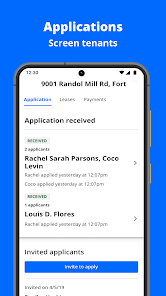
Tenant Screening Tools

With robust tenant screening tools, Zillow Rental Manager helps landlords make informed decisions by providing background checks, credit reports, and eviction history. This feature promotes peace of mind by ensuring that potential tenants meet the required criteria before signing a lease.

Pros & Cons

Pros
  • Streamlined online rental applications for tenants
  • Easy management of listings across multiple platforms
  • Automated rent collection simplifies payment processes
  • Comprehensive tenant screening ensures reliable applicants
  • User-friendly interface for efficient property management
Cons
  • Limited customer support options available
  • High fees for premium listings
  • Inaccurate rental estimates in some areas
  • Complicated interface for new users

Real Experience Using Zillow Rental Manager

Application Scenarios

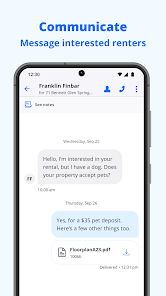
Zillow Rental Manager serves as an all-in-one platform for landlords and property managers, simplifying the rental process from listing to leasing. It is particularly beneficial for individuals managing multiple rental properties or those new to the rental market. Users can create listings that showcase their properties with high-quality photos and detailed descriptions, helping attract potential tenants. The application also allows landlords to screen applicants effectively through background and credit checks, making it easier to find reliable renters. Additionally, Zillow Rental Manager offers tools for setting up online rent payments, which streamlines cash flow management and enhances tenant convenience. Whether you are a seasoned property owner or a first-time landlord, this app provides the essential features needed to manage rentals efficiently.

User Experience

The user experience on Zillow Rental Manager is generally positive, characterized by an intuitive interface that is easy to navigate. Users appreciate the straightforward process of listing properties, with options to customize their listings according to unique features and amenities. The platform's mobile compatibility allows landlords to manage their properties on the go, which is a significant advantage for busy individuals. Tenants also benefit from the user-friendly application process, which includes submitting rental applications and documents digitally. However, some users have reported occasional glitches and delays in processing applications, which can be frustrating. Overall, the seamless integration of features like communication tools, payment processing, and applicant tracking contributes to a satisfying experience for both landlords and tenants.

Pricing

Updates & Support Zillow Rental Manager is regularly updated to enhance functionality and user experience. The development team actively listens to user feedback, implementing new features and improvements based on community suggestions. Users can expect updates that improve the app’s performance and introduce new functionalities aimed at making property management even easier. Support options are readily available, including a detailed help center and responsive customer service through email and chat. While response times can vary, most users report satisfactory interactions with support staff. The availability of resources like FAQs and how-to guides further aids users in navigating any challenges they encounter while using the app.

verified Security & Privacy Review

The Zillow Rental Manager app takes user security and privacy seriously, implementing robust measures to safeguard personal information. User data, including contact details and financial information, is encrypted during transmission and storage to prevent unauthorized access. The app transparently outlines its data collection practices in its privacy policy, ensuring users are well-informed about what data is collected and how it is used. Permissions required by the app are clearly stated, allowing users to make informed decisions before granting access. Users have control over their data, with options to manage privacy settings and limit information sharing. Zillow adheres to industry standards for data protection, including compliance with applicable privacy laws. However, users should remain vigilant, as sharing personal information inherently carries risks. Regular updates to the app enhance security features, addressing any potential vulnerabilities. Overall, Zillow Rental Manager demonstrates a commitment to protecting user data while providing transparency in its privacy practices, making it a reliable choice for managing rental properties.

User Reviews

  • Elisa Castaneda
    2026/06/13

    It can be very helpful at times, but it is a very stressful app. You do get scammers trying to scare you. You can get 20 tours booked and 2 show up. Lots of applications sent in and don't even want to tour the home. Setting up the online pay is awful. I still haven't been able to get it set up. It keeps booting me out on the step for linking the bank info. It sends me to the very beginning to start all over. It's embarrassing and has been a nightmare.

  • Matthew Garland
    2026/03/12

    there is no way to get to messages from calendar events so you need to back out to the main menu and go to messages to look up each person. It's really frustrating when you have a lot of inquiries. you can't schedule tours for people so if they can't figure it out you need to divide up your availability into before and after the tour. these are basic features and it's hard to believe so little thought was put into making it user friendly. You could literally ask ai to build them for you.

  • Robert Malunat
    2026/04/18

    It's useful, but not a great experience. For starters it has pre written messages for the tenants so any person with a pulse can send you "I'd like to set up a tour". This makes the barrier to low so you get absolutely flooded with messages from people who are a waste of your time. Second, why is there no block feature? You should be able to quickly block users. It would make this app way better

  • Shannon Shore-Garza
    2020/09/04

    It's off to a good start, but far from complete. I've had several people email me saying they have requested showings, but non of them are showing up. I wanted to upload a virtual tour, but apparently that's in the ios format only 🙄 At least give me the option to add online, but the desktop version pushes you towards the app. The metrics are skewed. I don't have a way to ignore my ip address. If I share the link, it logs my view as a metric as well. Just very frustrating.

  • Rod Hoffman
    2020/09/06

    I'm so conflicted. This is a great way to list your property. However this app, and even the full web versions need some help. -Messages.. Everyone selects a time they would like to tour.. WHY? In a hot market I need to know more about the candidate first. Also managing messages can only be done 1 at a time. I've learned to do everything via email. -Applications.. Great to get credit and background check.. The only option in app is to accept?! No way to reduce the number of apps.

Review Source: Google Play store public user reviews.

FAQ

1

Does Zillow Rental Manager collect my personal data?

Zillow Rental Manager may collect personal data as outlined in their privacy policy, primarily for the purpose of managing your account and providing services.

2

Does Zillow Rental Manager offer a free trial or free version?

Zillow Rental Manager offers a free version with basic features, and there may be additional premium features available for a fee, but a free trial is not typically provided.

3

Does Zillow Rental Manager require an internet connection?

Yes, Zillow Rental Manager requires an internet connection to access its features and manage your rental properties effectively.

4

How can I contact support or send feedback for Zillow Rental Manager?

You can contact support for Zillow Rental Manager through their help center on the website, where you can find FAQs and submit inquiries, or you can send feedback directly through the app.

5

How do I manage or cancel my Zillow Rental Manager subscription?

You can manage or cancel your Zillow Rental Manager subscription through your account settings on the platform or by contacting customer support for assistance.

How to use Zillow Rental Manager

1

How can I contact customer service for Zillow Rental Manager?

You can reach Zillow Rental Manager customer service by visiting their help center online or calling their support number found on the website.

2

How do I log in to my Zillow Rental Manager account?

To log in, visit the Zillow Rental Manager website, click on "Log In," and enter your email and password associated with your account.

3

Is there an activation process for Zillow Rental Manager?

Generally, there is no activation process; simply log in with your account credentials. If you’re new, create an account to get started.

4

What is the customer number for Zillow Rental Manager?

Zillow Rental Manager does not publicly list a customer number; support is primarily accessed through their online help center.

What's New

We fixed how the app handles links to your rental applications — tapping a notification or link now takes you directly to the right screen. We also made login with Google and Facebook more reliable, and resolved an issue that could affect app responsiveness during startup. Under the hood, we've modernized several screens and systems to keep things running smoothly.

Editor's Choice