This site uses cookies to enhance your user experience. By clicking any link on this site you are giving your consent to our cookie policy. Read more
Reject
Accept All
Google Docs

Google Docs

verified Verified App

Developer: Google LLC

  • category

    Category: Productivity

  • price

    Price: free

  • age rating

    Age Rating: Everyone

  • rating

    Rating: 4.2

  • download

    Downloads: 1,000,000,000+

  • version

    Version: 1.26.035.00.90

Screenshot 1
Screenshot 2
Screenshot 3
Screenshot 4
Screenshot 5
Screenshot 6
Screenshot 7
Screenshot 8

Features & Highlights

Cloud Storage Integration

All your documents are securely stored in the cloud, meaning you can access them from anywhere, anytime. This seamless integration with Google Drive ensures that your work is always backed up and easily shareable with others, enhancing productivity on the go.

Extensive Add-Ons Library

Google Docs boasts a wide range of add-ons that enhance its functionality, from advanced formatting tools to citation managers. This flexibility allows users to customize their writing experience, making it easier to meet various project needs with just a few clicks.

Real-Time Collaboration

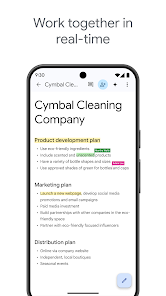
Google Docs allows multiple users to edit documents simultaneously, making teamwork seamless and efficient. Changes are visible in real time, so everyone stays up-to-date, creating a dynamic environment for brainstorming and feedback without the hassle of version control.

Smart Editing Tools

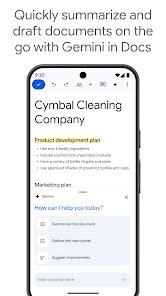
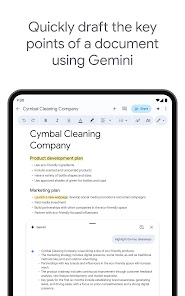
With built-in grammar and spell check, Google Docs helps you polish your writing effortlessly. The smart suggestions feature not only catches errors but also offers stylistic improvements, ensuring your documents are clear, concise, and professional.

Pros & Cons

Pros
  • Collaborate in real-time with team members easily.
  • Access your documents from any device, anytime.
  • Automatic saving prevents data loss and ensures security.
  • Intuitive interface makes document editing simple and fast.
  • Seamless integration with other Google services enhances productivity.
Cons
  • Limited offline functionality can hinder productivity.
  • Formatting issues may arise when exporting documents.
  • Collaboration can lead to version control challenges.
  • Privacy concerns regarding data storage and sharing.

Real Experience Using Google Docs

Application Scenarios

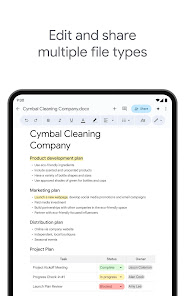
Google Docs is a versatile word processing tool that caters to a wide array of application scenarios, making it an invaluable asset for students, professionals, and casual users alike. For students, it serves as a platform for creating essays, reports, and collaborative projects, allowing for seamless sharing and real-time editing with classmates. Professionals can utilize Google Docs to craft business proposals, meeting notes, and presentations, with the added advantage of being able to work on documents from any device with internet connectivity. Furthermore, its integration with other Google Workspace tools like Google Sheets and Google Slides enhances its utility for comprehensive project management. Whether you are drafting a simple letter or collaborating on a complex research paper, Google Docs provides a user-friendly environment that adapts to your needs.

User Experience

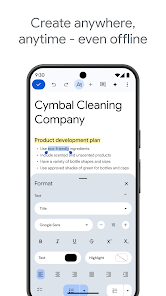
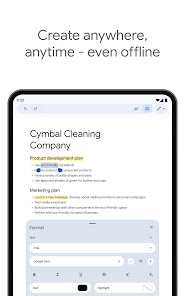
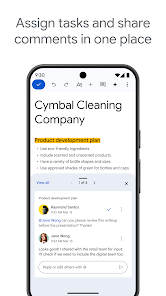
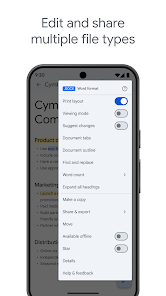
The user experience in Google Docs is characterized by its intuitive interface and collaborative features. Upon opening the app, users are greeted with a clean layout that makes navigation straightforward. The simplicity of the toolbar allows users to access formatting options effortlessly, ensuring that even those who are not tech-savvy can create polished documents. The real-time collaboration feature is a standout aspect, enabling multiple users to edit a document simultaneously while seeing each other’s changes live. This functionality eliminates the frustrations of version control and enhances teamwork. Additionally, the commenting and suggestion modes facilitate constructive feedback, making it easy to refine documents collaboratively. Overall, Google Docs delivers a smooth and engaging user experience that prioritizes accessibility and efficiency.

Pricing

Google Docs follows a freemium pricing model, which means that it is available at no cost to users who require basic functionalities. The free version offers ample storage and essential features suitable for most users. However, for those who need advanced capabilities or additional storage, Google offers Google Workspace plans that range from $6 to $25 per user per month, depending on the features required. These plans include enhanced security, administrative controls, and additional collaboration tools, making them ideal for businesses and organizations that demand more from their productivity software. Overall, Google Docs provides excellent value for money, whether you opt for the free version or choose to invest in a premium plan.

Updates & Support

Google Docs is consistently updated, ensuring that users receive the latest features and security improvements. The development team frequently rolls out enhancements based on user feedback, which demonstrates a commitment to user satisfaction. For support, Google provides a comprehensive help center filled with articles, tutorials, and troubleshooting tips. Users can also access community forums for peer assistance. Additionally, Google offers direct customer support for Workspace users, ensuring that businesses can resolve any issues promptly. With regular updates and robust support options, Google Docs remains a reliable choice for document creation and collaboration.

verified Security & Privacy Review

Google Docs prioritizes user security and privacy through robust measures designed to protect sensitive information. The application employs advanced encryption protocols both at rest and during transmission, ensuring that documents remain secure from unauthorized access. Additionally, Google adheres to strict compliance standards, including GDPR and CCPA, which bolster its commitment to user privacy. Users have granular control over document sharing and permissions, allowing them to set specific access levels for collaborators. This feature helps prevent unwanted modifications and ensures that sensitive data is only accessible to authorized individuals. Google also provides an activity dashboard, enabling users to monitor who has viewed or edited their documents, adding an extra layer of transparency. Furthermore, Google Docs does not sell user data to third parties, aligning with its privacy-focused approach. However, users should be aware that data may be analyzed to improve services, albeit in a manner that does not compromise individual privacy. Overall, Google Docs offers a secure environment for document creation and collaboration, making it a reliable choice for both personal and professional use.

Reviews

4.2

“User-friendly interface enhances collaboration and productivity.”

“Great for real-time editing with team members.”

“Offline mode is a game changer for accessibility.”

“Integration with other Google services is seamless and efficient.”

“Flexible formatting options make document creation easy.”

Editor's Choice