This site uses cookies to enhance your user experience. By clicking any link on this site you are giving your consent to our cookie policy. Read more
Reject
Accept All
Microsoft Outlook

Microsoft Outlook

verified Verified App

Developer: Microsoft Corporation

  • category

    Category: Productivity

  • price

    Price: free

  • age rating

    Age Rating: Everyone

  • rating

    Rating: 4.4

  • download

    Downloads: 1,000,000,000+

  • version

    Version: 5.2602.0

Screenshot 1
Screenshot 2
Screenshot 3
Screenshot 4
Screenshot 5
Screenshot 6
Screenshot 7
Screenshot 8
Screenshot 9
Screenshot 10
Screenshot 11
Screenshot 12
Screenshot 13

Features & Highlights

Advanced Search Functionality

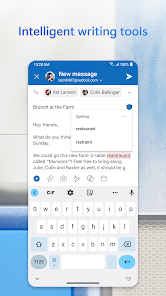
The advanced search functionality in Outlook allows you to quickly find specific emails, attachments, or calendar events with ease. By using powerful filters and keywords, you can narrow down your search results, saving you time and effort when looking for important information.

Calendar Integration

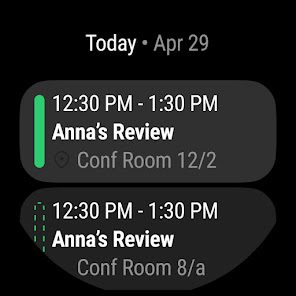
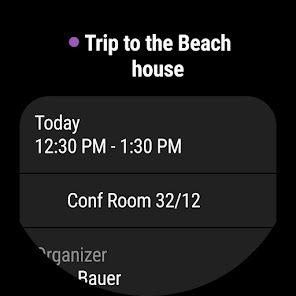
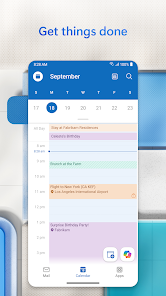
Microsoft Outlook seamlessly integrates your email and calendar, allowing you to manage your schedule alongside your messages. You can easily create events, set reminders, and share calendars with colleagues, enhancing collaboration and ensuring you stay organized throughout your day.

Focused Inbox

Focused Inbox helps you prioritize your emails by separating important messages from the rest. It intelligently sorts your inbox, making it easier to stay on top of what matters most, ensuring you never miss crucial communications amid the clutter.

Task Management Tools

Outlook's task management tools enable you to create, assign, and track tasks directly within the app. With the ability to set due dates, reminders, and even categorize tasks, you can ensure your projects stay on track and that no important deadlines are overlooked.

Pros & Cons

Pros
  • User-friendly interface streamlines email management
  • Integrated calendar enhances scheduling efficiency
  • Robust search capabilities quickly locate important messages
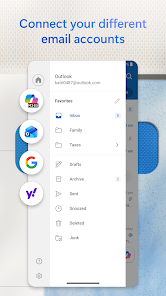
  • Customizable folders help organize emails effectively
  • Seamless integration with Microsoft Office applications
Cons
  • Cluttered interface can be overwhelming for users.
  • Sync issues can disrupt workflow and productivity.
  • Limited customization options for personalization and organization.
  • High resource usage may slow down older devices.

Real Experience Using Microsoft Outlook

Application Scenarios

Microsoft Outlook is more than just an email client; it serves as a comprehensive tool for managing various aspects of personal and professional communication. Users can seamlessly integrate their emails, calendars, tasks, and contacts into one cohesive platform. In a corporate setting, it facilitates efficient collaboration among team members, allowing for shared calendars and the scheduling of meetings with ease. For individuals managing their personal lives, Outlook serves as an effective organizer, helping users keep track of appointments, reminders, and important deadlines. The integration with other Microsoft Office applications enhances its functionality, making it an ideal choice for users who regularly utilize Word, Excel, and OneNote.

User Experience

The user interface of Microsoft Outlook is designed for both simplicity and functionality. Upon launching the application, users are greeted with a clean layout that organizes emails, calendar events, and tasks in a user-friendly manner. The ability to customize the view and settings according to personal preferences enhances the overall experience. The search functionality is robust, enabling users to quickly locate specific emails or documents amidst a sea of information. Additionally, the mobile version of Outlook maintains a similar aesthetic, ensuring that users can manage their communications on-the-go without sacrificing usability. However, some users may find the initial learning curve steep, especially when navigating through advanced features like rules and filters. Overall, the experience is generally positive, with the app's speed and reliability being standout aspects.

Pricing

Microsoft Outlook offers a range of pricing options to accommodate different user needs. For individual users, the app is available as part of the Microsoft 365 subscription, which includes access to other Office applications and cloud storage through OneDrive. This subscription model provides continuous updates and additional features, making it a worthwhile investment for frequent users. For businesses, Microsoft offers various plans that cater to different team sizes and requirements, ensuring that organizations can find a solution that fits their budget. While some users may initially balk at the subscription cost, the value provided through regular updates and support can justify the expense in the long run.

Updates & Support

Microsoft consistently rolls out updates to Outlook, enhancing features, improving security, and fixing bugs. Users can expect regular enhancements that keep the application aligned with technological advancements and user feedback. Support options are plentiful, including a comprehensive online help center, community forums, and direct customer support for subscribers. These resources ensure that users can resolve any issues they encounter promptly. While some users have reported delays in receiving assistance during peak times, the overall support structure remains strong, offering multiple avenues for help. This commitment to user satisfaction is a testament to Microsoft’s dedication to improving the Outlook experience continuously.

verified Security & Privacy Review

Microsoft Outlook takes data security and user privacy seriously, implementing a variety of measures to safeguard personal information. The app employs advanced encryption protocols, ensuring that emails and attachments are protected both in transit and at rest. This commitment to security helps to prevent unauthorized access and data breaches. In terms of privacy practices, Outlook adheres to strict compliance with global data protection regulations, including GDPR. Users can manage their privacy settings, allowing them to control what data is shared and with whom. The app provides clear options for data collection, giving users the ability to opt-out of certain features that may compromise their privacy. Outlook requests permissions that are essential for core functionalities, such as accessing contacts and calendar events. While these permissions are necessary for a seamless user experience, Microsoft emphasizes transparency regarding how user data is utilized. Overall, Outlook's robust security measures and privacy practices make it a reliable choice for users concerned about their data safety.

Reviews

4.4

“User-friendly interface, makes email management easy”

“Great integration with other Microsoft services”

“Search function needs improvement, often misses results”

“Mobile app is convenient but can be slow”

“Calendar features are excellent for scheduling meetings”

Editor's Choice