This site uses cookies to enhance your user experience. By clicking any link on this site you are giving your consent to our cookie policy. Read more
Reject
Accept All

Advertiser and Editorial Disclosures

Perplexity - Ask Anything

Perplexity - Ask Anything

verified Verified App

Developer: PerplexityAI

  • category

    Category: Productivity

  • price

    Price: free

  • age rating

    Age Rating: Teen

  • rating

    Rating: 4.6

  • download

    Downloads: 50,000,000+

  • version

    Version: 2.73.0

Screenshot 1
Screenshot 2
Screenshot 3
Screenshot 4
Screenshot 5
Screenshot 6
Screenshot 7
Screenshot 8

Features & Highlights

Conversational Interface

Engage in a natural dialogue with Perplexity, as it understands and processes your questions in a conversational manner. This user-friendly approach makes it easy to ask follow-up questions, clarifying your inquiries without feeling like you’re interacting with a machine, enhancing the overall experience.

Instant Answers

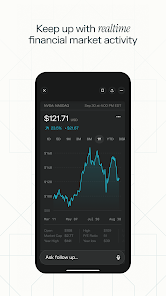
Perplexity - Ask Anything delivers quick and accurate responses to a wide range of queries, making information retrieval effortless. Whether you’re looking for facts, explanations, or recommendations, this feature ensures you get the answers you need in seconds, perfect for busy users on the go.

Multi-Topic Support

With the ability to handle diverse subjects, Perplexity - Ask Anything is your go-to companion for varied interests. From science and technology to arts and culture, this feature caters to all your curiosities, providing well-rounded insights no matter the topic.

Personalized Recommendations

Perplexity learns from your interactions to offer tailored suggestions that resonate with your preferences. This personalized touch not only enhances your experience but also helps you discover new content and ideas that align with your interests, making each session unique.

Pros & Cons

Pros
  • Offers instant answers to complex questions, saving time and effort.
  • Utilizes advanced AI for accurate and relevant information retrieval.
  • User-friendly interface makes navigation and interaction seamless.
  • Supports a wide range of topics, catering to diverse inquiries.
  • Continuously learns and improves, enhancing future responses and user experience.
Cons
  • Limited context understanding can lead to inaccurate or irrelevant responses.
  • May struggle with complex queries, providing overly simplistic answers.
  • Dependency on internet connectivity limits accessibility for offline use.

Real Experience Using Perplexity - Ask Anything

Application Scenarios

The Perplexity app shines in various scenarios, making it a versatile tool for users seeking quick information and answers. Whether you're a student preparing for exams, a professional conducting research, or simply someone curious about the world, Perplexity caters to your needs. In an academic setting, students can utilize the app to clarify complex topics, gather data for assignments, or verify facts. Professionals can leverage the app to stay informed about industry trends, gather insights for presentations, or brainstorm ideas. Additionally, casual users can engage with the app to satisfy their curiosity on topics ranging from entertainment to technology, enabling a richer understanding of everyday questions.

User Experience

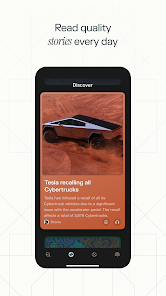
Perplexity offers a seamless user experience characterized by an intuitive interface and robust functionality. Upon launching the app, users are greeted with a clean, minimalistic design that prioritizes ease of navigation. The search feature is remarkably responsive, allowing users to input queries quickly and receive immediate results. The app's AI-driven approach not only provides answers but also curates relevant content to enhance the user’s understanding. Furthermore, the ability to ask follow-up questions creates an engaging interactive experience, encouraging users to dive deeper into subjects of interest. The app also offers personalized recommendations based on user behavior, enhancing usability and ensuring that relevant information is always at the user’s fingertips.

Pricing

Perplexity adopts a freemium model, offering both free and premium subscriptions. The free version provides users with access to a wealth of information and basic features, appealing to casual users and those who wish to explore the app without commitment. For users seeking an enhanced experience, the premium subscription unlocks additional features such as advanced search capabilities, personalized assistance, and an ad-free interface. The pricing strategy is competitive and reflects the app's value, making it accessible to a broad audience while encouraging upgrades for those who require more comprehensive tools.

Updates & Support

The development team behind Perplexity is proactive in providing regular updates, ensuring that the app remains relevant and functional. Users can expect frequent enhancements to the content database, along with improvements to the AI algorithms that power the search functionality. Additionally, the support system is robust, offering users various channels for assistance, including an FAQ section, live chat, and email support. The team is responsive to user feedback, continually refining the app based on community input, which fosters a sense of loyalty and trust among users. Overall, Perplexity not only prioritizes user engagement but also invests in the ongoing evolution of the app to meet the demands of its audience.

verified Security & Privacy Review

The security and privacy practices of the Perplexity app are commendable and align with industry standards. The app utilizes end-to-end encryption to protect user data during transmission, ensuring that sensitive information remains secure. Furthermore, Perplexity adheres to strict data protection regulations, which are crucial for maintaining user trust. When it comes to permissions, the app requires minimal access to device features, primarily focusing on what is necessary for its core functionality. Users are informed about the permissions being requested, allowing for informed consent. The app does not collect unnecessary data, which reduces the risk associated with data breaches. Perplexity also implements robust data handling practices, ensuring that user data is anonymized and stored securely. Regular audits and updates are conducted to maintain high security standards and to address any vulnerabilities promptly. Overall, users can feel confident in the privacy measures taken by Perplexity, making it a reliable choice for those concerned about data security.

Reviews

4.6

“Intuitive interface makes finding answers easy and quick.”

“Incredibly helpful for research and everyday questions.”

“Responses are often insightful and well-rounded.”

“Great tool for learning new topics effectively.”

“Occasional inaccuracies, but overall a valuable resource.”

FAQ

1

Can I submit suggestions or feedback to Perplexity - Ask Anything?

Yes, users can submit suggestions or feedback through the app's feedback feature or by contacting customer support via the official website.

2

Does Perplexity - Ask Anything collect my personal data?

Yes, Perplexity - Ask Anything may collect certain personal data to enhance user experience, but it adheres to strict privacy policies to protect user information.

3

Does Perplexity - Ask Anything support offline use?

No, Perplexity - Ask Anything requires an internet connection to function properly, as it relies on online databases and AI models to provide answers.

4

How do I cancel my Perplexity - Ask Anything subscription?

To cancel your Perplexity - Ask Anything subscription, navigate to your account settings within the app and follow the cancellation instructions provided.

5

How much does a subscription to Perplexity - Ask Anything cost?

The subscription cost for Perplexity - Ask Anything varies depending on the plan chosen, with options typically ranging from monthly to annual pricing.

How to use Perplexity - Ask Anything

1

Can I retrieve my customer number through the app?

Yes, you can retrieve your customer number by accessing the 'Profile' section in the app after logging in.

2

How can I log in if I haven’t activated my account yet?

You must activate your account first. Check your email for the activation link and follow the steps before logging in.

3

How can I reach customer service if I have issues logging in?

You can contact customer service via our website's support page or call the customer service hotline.

4

How do I activate my account after signing up?

To activate your account, check your email for an activation link and follow the instructions provided.

5

How do I update my customer service contact information?

You can update your contact information by logging into your account and visiting the account settings.

Editor's Choice