This site uses cookies to enhance your user experience. By clicking any link on this site you are giving your consent to our cookie policy. Read more
Reject
Accept All
Microsoft 365 Copilot

Microsoft 365 Copilot

verified Verified App

Developer: Microsoft Corporation

  • category

    Category: Productivity

  • price

    Price: free

  • age rating

    Age Rating: Teen

  • rating

    Rating: 4.6

  • download

    Downloads: 1,000,000,000+

  • version

    Version: /

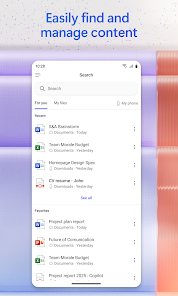
Screenshot 1
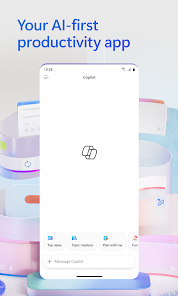
Screenshot 2
Screenshot 3
Screenshot 4
Screenshot 5
Screenshot 6
Screenshot 7

Features & Highlights

AI-Powered Assistance

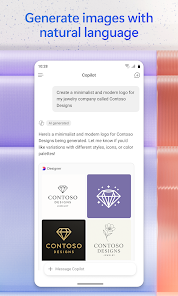
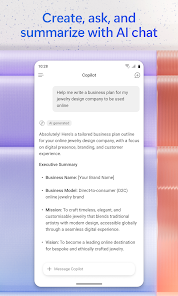
Microsoft 365 Copilot harnesses the power of AI to provide contextual suggestions and insights, making your work more efficient. It understands your content and offers relevant recommendations, allowing you to create documents, presentations, and reports with ease and precision, significantly enhancing your productivity.

Seamless Collaboration Tools

Collaboration is made simple with Microsoft 365 Copilot, which integrates seamlessly across all your favorite apps. It enables real-time co-authoring and communication, ensuring that teams can work together effortlessly, share ideas, and keep projects on track, no matter where they are located.

Smart Data Insights

With advanced data analysis capabilities, Microsoft 365 Copilot helps you interpret complex datasets effortlessly. It generates meaningful visualizations and actionable insights, empowering you to make informed decisions quickly and accurately, transforming raw data into valuable information without the usual hassle.

Task Automation Features

Microsoft 365 Copilot streamlines repetitive tasks through intelligent automation, saving you precious time. By handling mundane chores like scheduling or data entry, it allows you to focus on more critical aspects of your work, boosting overall efficiency and reducing burnout.

Pros & Cons

Pros
  • Enhances productivity with AI-driven assistance
  • Streamlines workflows through integrated tools
  • Improves collaboration in real-time environments
  • Offers personalized insights for better decision-making
  • Facilitates learning with intuitive user support
Cons
  • Limited customization options for specific user needs
  • May generate inaccurate or irrelevant information occasionally
  • High subscription costs for small businesses
  • Reliance on internet connectivity for functionality

Real Experience Using Microsoft 365 Copilot

Application Scenarios

Microsoft 365 Copilot is designed to enhance productivity across a variety of professional and personal tasks. It seamlessly integrates into applications like Word, Excel, and Outlook, allowing users to generate content, analyze data, and streamline communication with ease. For instance, in Word, Copilot can assist in drafting documents by suggesting text based on a few input keywords, saving users valuable time in the writing process. In Excel, it can analyze complex datasets, create visualizations, and even suggest predictive analytics, making it an invaluable tool for data-driven decision-making. In Outlook, Copilot can draft emails or summarize long threads, allowing users to manage their inbox more efficiently. Whether in a corporate setting or for individual projects, the application adapts to a wide range of professional scenarios, enhancing overall productivity.

User Experience

The user experience with Microsoft 365 Copilot is notably intuitive and user-friendly. The interface is consistent with other Microsoft 365 applications, reducing the learning curve for users already familiar with the suite. Copilot provides contextual suggestions that are relevant to the task at hand, allowing users to focus on their objectives without getting bogged down by technical details. Users have reported that Copilot's natural language processing capabilities enable it to understand and execute requests with impressive accuracy. Additionally, the ability to customize prompts and parameters gives users a sense of control over the output, making the experience feel personalized and tailored to their specific needs. Overall, the integration of Copilot into daily workflows is smooth and enhances productivity without being intrusive.

Pricing

Microsoft 365 Copilot is available as part of the Microsoft 365 subscription plans, which vary in pricing based on the features and number of users. While specific pricing details may fluctuate, the service is generally positioned as a premium enhancement, reflecting its advanced capabilities. Users can expect to pay a monthly or annual fee that includes access to Copilot alongside other Microsoft 365 services. Organizations looking to adopt Copilot should evaluate their existing plans and consider the potential return on investment through increased productivity and efficiency. For individuals, the addition of Copilot may justify the cost by significantly reducing the time spent on repetitive tasks.

Updates & Support

Microsoft is committed to continually enhancing Copilot through regular updates, ensuring that users benefit from the latest features and improvements. Feedback from users plays a crucial role in the development process, allowing Microsoft to address concerns and refine functionalities based on real-world usage. Support for Microsoft 365 Copilot is accessible through Microsoft’s extensive support channels, including online resources, community forums, and customer service. Users can find tutorials, troubleshooting guides, and best practice tips to maximize their experience. As the app evolves, users can expect ongoing enhancements that keep pace with technological advancements and changing user needs.

verified Security & Privacy Review

Microsoft 365 Copilot demonstrates a strong commitment to security and privacy, aligned with Microsoft’s rigorous data protection standards. The app employs encryption protocols both in transit and at rest, ensuring that user data is safeguarded from unauthorized access. Additionally, Microsoft implements robust identity and access management features, allowing users to control who can view and interact with their data. The app requests permissions that are consistent with its functionality, primarily focusing on accessing documents, emails, and calendar events to enhance productivity. Users are informed about the permissions needed and can manage these settings within their Microsoft account. This transparency helps maintain user trust and control over personal information. Microsoft’s privacy practices are governed by comprehensive policies that prioritize user consent and data minimization. The company adheres to international privacy regulations, including GDPR, ensuring that user data is handled responsibly. Moreover, users can review and manage their data through the Microsoft privacy dashboard, allowing for a tailored experience while maintaining a high standard of data protection.

Reviews

4.6

“Incredibly helpful for streamlining my workflow!”

“Transforms tedious tasks into quick solutions.”

“AI suggestions save me so much time.”

“Great integration with existing Microsoft tools.”

“Makes collaboration more efficient and enjoyable.”

Editor's Choice