This site uses cookies to enhance your user experience. By clicking any link on this site you are giving your consent to our cookie policy. Read more
Reject
Accept All
Zapya - File Transfer, Share

Zapya - File Transfer, Share

verified Verified App

Developer: Dewmobile USA, Inc.

  • category

    Category: Tools

  • price

    Price: free

  • age rating

    Age Rating: Everyone

  • rating

    Rating: 4.7

  • download

    Downloads: 100,000,000+

  • version

    Version: 6.6 (US)

Screenshot 1
Screenshot 2
Screenshot 3
Screenshot 4
Screenshot 5
Screenshot 6
Screenshot 7
Screenshot 8

Features & Highlights

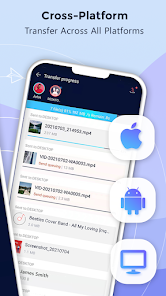
Cross-Platform Compatibility

Whether you're using Android, iOS, or even Windows, Zapya seamlessly connects different operating systems. This cross-platform functionality means you can easily share and receive files from friends and family, no matter what devices they're using.

Fast File Transfer

Zapya allows you to quickly share files of any size without the need for an internet connection. Utilizing Wi-Fi Direct technology, it ensures speedy transfers between devices, making it an ideal solution for sharing large files on the go.

Group Sharing Feature

With Zapya, you can share files with multiple users at once, making it perfect for group projects or gatherings. The group sharing feature enables easy collaboration, allowing everyone to contribute and access shared content simultaneously.

User-Friendly Interface

The app boasts an intuitive and straightforward interface, making it easy for users of all ages to navigate. With simple menus and clear instructions, anyone can start transferring files in just a few taps, eliminating the hassle of complicated setups.

Pros & Cons

Pros
  • Fast file transfer between devices
  • No internet required for sharing
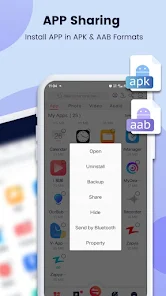
  • Supports multiple file types easily
  • User-friendly interface for quick navigation
  • Group sharing for multiple users simultaneously
Cons
  • Limited compatibility with some devices and platforms
  • Occasional connection issues during file transfer
  • Ad-supported interface can be distracting
  • User privacy concerns with data handling practices

Real Experience Using Zapya - File Transfer, Share

Application Scenarios

Zapya is a versatile file transfer and sharing application that shines in various scenarios. Whether you're looking to quickly transfer large files between devices without the need for an internet connection, or you want to share photos and videos during a gathering, Zapya has you covered. It's particularly useful for students who need to share lecture notes or project files, as well as for professionals who frequently exchange documents in a fast-paced environment. Families can also benefit from the app by sharing media files, such as videos or music, seamlessly across multiple devices. The app supports multiple platforms, including Android, iOS, and Windows, making it an ideal choice for users with diverse device ecosystems.

User Experience

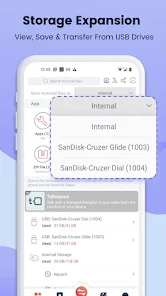
The user experience with Zapya is generally positive, characterized by its intuitive interface and straightforward functionality. Upon launching the app, users are greeted with a clean layout that makes navigation easy, even for those who may not be tech-savvy. File transfers are remarkably fast, utilizing Wi-Fi Direct technology to bypass the need for Bluetooth, which can be slow and cumbersome. The drag-and-drop feature simplifies the process, allowing users to select files quickly and initiate transfers with just a few taps. Additionally, the app offers a robust file manager that enables users to organize their files efficiently. However, some users have reported occasional connection issues, particularly in crowded Wi-Fi environments, which can disrupt the transfer process.

Pricing

Zapya is available as a free download, making it accessible to a wide audience. The app does not impose any fees for its core functionalities, which include file transfers, sharing, and media management. While it is ad-supported, the advertisements are not overly intrusive, allowing users to enjoy the app without major interruptions. There are no premium versions or subscriptions, which sets Zapya apart from many other file-sharing apps that require users to pay for enhanced features. This pricing model ensures that users can benefit from all the essential tools without financial barriers.

Updates & Support

Zapya is regularly updated to enhance its functionality and address any bugs or issues reported by users. The developers are proactive in listening to user feedback, often implementing changes based on community suggestions. This commitment to improvement can be seen in the app's updates, which frequently introduce new features and optimizations. Support options are readily available through the app, including a help center and FAQs that cover common questions and troubleshooting tips. While direct customer support may not be as robust compared to some competitors, the community forums provide a platform for users to share solutions and experiences, further enriching the overall user experience.

verified Security & Privacy Review

Zapya prioritizes user security and privacy in its file transfer services. The app does not require an internet connection for transferring files, which significantly reduces the risk of data exposure through online vulnerabilities. Instead, it utilizes local Wi-Fi or hotspot connections, ensuring that files remain within a closed network. However, users should be mindful of the permissions requested by the app. Zapya requires access to storage, location, and sometimes contacts, which may raise privacy concerns. Users are advised to review these permissions and consider granting only those necessary for the app's functionality. Zapya adheres to standard data handling practices, ensuring that user data is not stored or shared with third parties without explicit consent. The app does not collect personal information unless provided by the user, thus maintaining a level of anonymity. Nonetheless, as with any file-sharing platform, users should exercise caution when sharing sensitive information. Overall, Zapya offers a secure way to transfer files, but users must remain vigilant about the data they share.

Reviews

4.7

“Fast and efficient file transfers every time!”

“User-friendly interface makes sharing easy.”

“Reliable performance without internet connection.”

“Supports multiple file types seamlessly.”

“Great for sharing large files quickly.”

Editor's Choice