This site uses cookies to enhance your user experience. By clicking any link on this site you are giving your consent to our cookie policy. Read more
Reject
Accept All
Move to iOS

Move to iOS

verified Verified App

Developer: Apple

  • category

    Category: Tools

  • price

    Price: free

  • age rating

    Age Rating: Everyone

  • rating

    Rating: 3.7

  • download

    Downloads: 100,000,000+

  • version

    Version: 4.0.3

Screenshot 1
Screenshot 2
Screenshot 3
Screenshot 4
Screenshot 5
Screenshot 6

Features & Highlights

App Recommendations

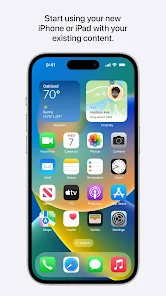
Upon transferring your data, Move to iOS provides tailored suggestions for apps that match your previous Android experience. This feature streamlines the onboarding process, making it easier to find and download familiar apps on your new iPhone, enhancing your user experience right from the start.

Secure Data Transfer

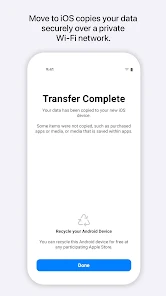
Move to iOS ensures a secure and seamless migration of your data from an Android device to your new iPhone. It encrypts your information during the transfer process, protecting your personal data from unauthorized access, so you can switch devices with peace of mind.

Transfer Various Data Types

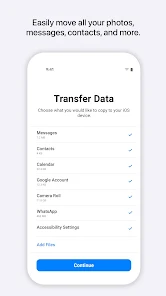
With Move to iOS, you can effortlessly transfer a wide range of data types, including contacts, messages, photos, and videos. This comprehensive approach ensures that you don’t lose any important information while switching to your new device, making the transition smoother and hassle-free.

User-Friendly Interface

The app boasts an intuitive, user-friendly interface that guides you through each step of the migration process. Even if you’re not tech-savvy, you’ll find the setup straightforward and easy to follow, ensuring that your transition to iOS is as seamless as possible.

Pros & Cons

Pros
  • Seamlessly transfers data from Android to iOS devices
  • Preserves contacts, messages, and photos effortlessly
  • Simplifies your transition to a new iPhone
  • Ensures a secure and private data transfer
  • User-friendly interface makes setup easy for everyone
Cons
  • Transfer speed can be slow for large data.
  • Limited compatibility with non-Apple devices.
  • Certain apps might not transfer seamlessly.
  • Requires a stable Wi-Fi connection to function.

Real Experience Using Move to iOS

Application Scenarios

The Move to iOS app is designed to facilitate a seamless transition for users switching from an Android device to an iPhone. This application is particularly beneficial for individuals who are upgrading their smartphones and wish to retain their essential data, such as contacts, messages, photos, videos, and more. For families looking to standardize devices for easier management or individuals who have decided to embrace the Apple ecosystem, this app simplifies the transfer process significantly. The application is also useful for businesses that provide employees with iPhones, ensuring that vital information is not lost during the switch. Additionally, it comes in handy for users looking to make a fresh start on a new device without the hassle of manually transferring data one file at a time.

User Experience

Users generally report a positive experience with the Move to iOS app, praising its straightforward interface and efficient functionality. The setup process is intuitive, guiding users through each step with clear instructions. Once both devices are connected to the same Wi-Fi network, the app quickly scans for available data to transfer, making the process feel smooth and hassle-free. Users appreciate the ability to select specific types of content to move, allowing for customization based on individual needs. However, some users have encountered minor connectivity issues or longer-than-expected transfer times, depending on the amount of data being moved. Overall, the app garners favorable reviews for its effectiveness, ease of use, and the peace of mind it offers during the transition.

Pricing

Move to iOS is a free application available on the Google Play Store. There are no hidden fees or premium features that require payment, making it an accessible tool for anyone looking to switch from Android to iOS. The free nature of the app is a significant advantage, as users can take advantage of its comprehensive data transfer capabilities without worrying about incurring additional costs. This aspect contributes to the app’s appeal, especially for those who may be hesitant about investing in new technology.

Updates & Support

The Move to iOS app receives regular updates from Apple to ensure compatibility with the latest Android and iOS versions. Users can rely on these updates to improve functionality and fix any bugs that may arise. Apple also provides support resources, including a detailed FAQ section and troubleshooting guides, to assist users who may encounter issues during the transfer process. The combination of regular updates and accessible support reflects Apple’s commitment to enhancing user satisfaction and ensuring a smooth transition for all who utilize the app.

verified Security & Privacy Review

The Move to iOS app prioritizes user privacy and data security during the transfer process from Android to iOS devices. The app employs end-to-end encryption, ensuring that data transferred between devices remains secure and inaccessible to unauthorized parties. Users can transfer contacts, messages, photos, and more without risking exposure of their personal information. In terms of permissions, Move to iOS requires access only to essential data on the Android device, such as contacts and media. This limited scope helps to minimize potential privacy risks. The app does not store any transferred data on its servers; everything is handled locally during the transfer session. Apple's commitment to user privacy extends to this app, as it does not collect or track user data beyond the transfer process. Users can feel confident that their personal information remains private and secure while transitioning to an iOS environment. Overall, Move to iOS demonstrates a strong dedication to protecting user data throughout the migration experience.

Reviews

3.7

“Easy transfer process, highly recommend!”

“Smooth transition from Android to iOS.”

“A lifesaver for switching devices.”

“User-friendly interface made moving simple.”

“Quick and efficient, saved me a lot of time!”

Editor's Choice