This site uses cookies to enhance your user experience. By clicking any link on this site you are giving your consent to our cookie policy. Read more
Reject
Accept All

Advertiser and Editorial Disclosures

YouCam Perfect - Photo Editor

YouCam Perfect - Photo Editor

verified Verified App

Developer: Perfect Mobile Corp.

  • category

    Category: Photography

  • price

    Price: free

  • age rating

    Age Rating: Teen

  • rating

    Rating: 4.0

  • download

    Downloads: 100,000,000+

  • version

    Version: /

Screenshot 1
Screenshot 2
Screenshot 3
Screenshot 4
Screenshot 5
Screenshot 6
Screenshot 7
Screenshot 8

Features & Highlights

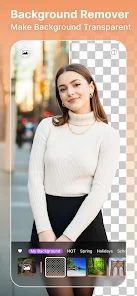
Background Change

Easily swap out backgrounds to create stunning new scenes for your photos. YouCam Perfect's background change feature enables you to replace dull or distracting backgrounds with beautiful new settings, giving your images a professional touch and endless creative possibilities.

Beauty Enhancements

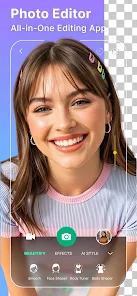
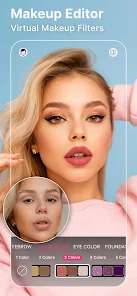
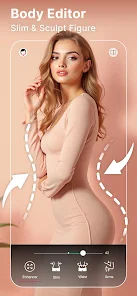
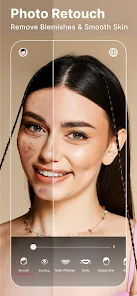
YouCam Perfect offers a wide range of beauty enhancement tools that allow you to smooth skin, brighten eyes, and add a perfect glow to your selfies. With just a few taps, you can look your best in every photo, making it easy to achieve that flawless look effortlessly.

Collage Maker

Unleash your creativity with the Collage Maker feature, which allows you to combine multiple photos into stunning layouts. You can choose from various templates and customize backgrounds, borders, and stickers, making it perfect for sharing memorable moments with friends and family.

Filters & Effects

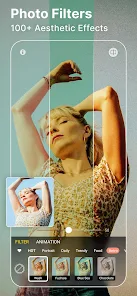
Transform your photos with an extensive library of filters and effects that can instantly elevate your images. Whether you want a vintage vibe or a modern twist, YouCam Perfect has options to suit every mood and style, helping you express your unique personality.

Pros & Cons

Pros
  • YouCam Perfect offers powerful retouching tools for flawless selfies.
  • Enjoy a wide range of filters for stunning effects.
  • Easily add fun stickers and text to personalize your photos.
  • The intuitive interface makes editing simple for everyone.
  • Quick sharing options let you showcase your edits instantly.
Cons
  • Limited free features reduce editing options for users.
  • Frequent ads can disrupt the user experience.
  • Some advanced tools require a subscription for full access.

Real Experience Using YouCam Perfect - Photo Editor

Application Scenarios

YouCam Perfect - Photo Editor is an incredibly versatile tool that caters to a wide range of photography needs. Whether you are a casual user looking to enhance your selfies, a social media influencer striving for the perfect feed, or a professional photographer needing quick edits on the go, this app has something for everyone. Users can apply filters, retouch images, and add artistic effects to their photos effortlessly. Additionally, YouCam Perfect is perfect for creating collages, allowing users to combine multiple images into a single stunning visual. The app also excels in providing features for makeup simulations, which is particularly popular among makeup enthusiasts who want to experiment with different looks before applying them. Moreover, its ability to create animated photos and use AR effects makes it a fun choice for users looking to stand out on platforms like Instagram and TikTok.

User Experience

The user experience offered by YouCam Perfect is largely positive, thanks to its intuitive design and straightforward navigation. The app's interface is clean and user-friendly, which means even beginners can quickly grasp its features. The editing tools are well-organized, enabling users to access filters, beautification options, and special effects with ease. With just a few taps, users can enhance their photos, adjust brightness, and apply various beauty filters that smooth skin and enhance facial features. The app also includes a real-time camera feature, allowing users to see edits applied live while taking photos. This enhances the overall experience, making it more interactive and engaging. Overall, YouCam Perfect strikes a balance between powerful editing capabilities and ease of use, making it suitable for all skill levels.

Pricing

YouCam Perfect operates on a freemium model, which means users can access a range of basic features at no cost. However, to unlock the full potential of the app, including premium filters, advanced retouching tools, and ad-free usage, users can opt for a subscription. The pricing is competitive, with options for monthly, yearly, or a one-time payment for lifetime access. This flexibility allows users to choose a payment plan that best fits their needs. Many users find that the investment in a premium subscription is worthwhile, given the extensive features and regular updates the app offers.

Updates & Support

YouCam Perfect is frequently updated, with the developers committed to enhancing user experience and introducing new features. Regular updates ensure that the app remains relevant and incorporates the latest trends in photo editing. The customer support provided by the app is commendable, with a dedicated team easily reachable through the app or website. Users can find comprehensive FAQs, tutorials, and community forums, which help in troubleshooting common issues or learning about new features. This commitment to user support significantly enhances the overall experience of using the app.

verified Security & Privacy Review

YouCam Perfect prioritizes user security and privacy, implementing robust measures to protect personal information. The app requires permissions to access your camera and photo library, which are essential for its core functionalities. However, it clearly outlines these permissions during the installation process, ensuring users are informed before granting access. The app employs industry-standard encryption protocols to safeguard user data during transmission, minimizing the risk of unauthorized access. YouCam Perfect also commits to not sharing personal information with third parties without user consent, enhancing its privacy stance. Users have control over their data, as the app provides options to manage and delete stored information. Regular updates are issued to address potential vulnerabilities and improve security features. Overall, YouCam Perfect demonstrates a strong commitment to protecting user privacy while delivering a feature-rich photo editing experience.

Reviews

4.0

“Amazing features for quick photo editing!”

“User-friendly interface makes editing fun.”

“Great filters, perfect for social media posts.”

“Love the beauty tools and effects available.”

“Fast and responsive, highly recommend this app!”

FAQ

1

Can I submit suggestions or feedback to YouCam Perfect - Photo Editor?

Yes, users can submit suggestions or feedback through the app’s support section or by contacting customer service directly via their website.

2

Does YouCam Perfect - Photo Editor collect my personal data?

Yes, the app may collect personal data as outlined in its privacy policy, primarily for improving user experience and offering personalized services.

3

Does YouCam Perfect - Photo Editor support offline use?

Yes, many features of YouCam Perfect can be used offline, although some functions may require an internet connection for full access.

4

How do I cancel my YouCam Perfect - Photo Editor subscription?

You can cancel your subscription through your account settings in the app store from which you downloaded the app, following the specific guidelines provided there.

5

How much does a subscription to YouCam Perfect - Photo Editor cost?

Subscription costs can vary based on the plan chosen, but typically range from a monthly fee to a discounted annual rate.

How to use YouCam Perfect - Photo Editor

1

Can I change my customer number if I need to?

Unfortunately, customer numbers cannot be changed. If you have issues, please contact customer service for assistance.

2

How can I contact customer service for issues with YouCam Perfect?

You can reach our customer service through the app's support section or by emailing support

3

How can I log in if I forgot my password?

Use the "Forgot Password?" option on the login screen to reset your password via email.

4

How do I activate my YouCam Perfect account after signing up?

After signing up, check your email for an activation link. Click on it to activate your account.

5

I forgot my customer number. How can I retrieve it?

Please check your account settings in the app or refer to the confirmation email you received during registration.

Editor's Choice