This site uses cookies to enhance your user experience. By clicking any link on this site you are giving your consent to our cookie policy. Read more
Reject
Accept All

Advertiser and Editorial Disclosures

Frameo: Share to photo frames

Frameo: Share to photo frames

verified Verified App

Developer: Frameo

  • category

    Category: Photography

  • price

    Price: free

  • age rating

    Age Rating: Everyone

  • rating

    Rating: 4.8

  • download

    Downloads: 5,000,000+

  • version

    Version: /

Screenshot 1
Screenshot 2
Screenshot 3
Screenshot 4
Screenshot 5
Screenshot 6

Features & Highlights

Instant Photo Sharing

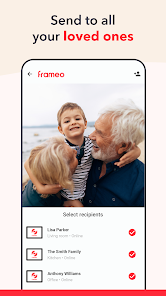
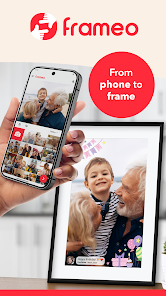
With Frameo, you can easily share photos directly to your loved ones' frames in real-time. Just select the images you want to send, and they appear instantly, creating a delightful surprise for family and friends, no matter where they are.

Multiple Frame Support

Frameo allows you to connect and manage multiple photo frames from a single app. This means you can share different moments with various frames, perfect for keeping family and friends updated with the latest memories from afar.

Privacy Control Options

Frameo takes your privacy seriously, offering robust control options for sharing photos. You can choose who can send images to your frame, ensuring that only approved friends and family can brighten your day with their snapshots.

User-Friendly Interface

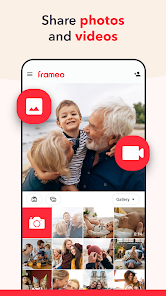
The app boasts an intuitive design that makes navigating through your photo library and managing frames a breeze. Whether you’re tech-savvy or a novice, you'll appreciate how effortlessly you can set up and customize your sharing experience.

Pros & Cons

Pros
  • Easily share photos with loved ones in real-time.
  • Simple app interface for seamless photo uploads.
  • Enhance your home decor with beautiful digital frames.
  • Connect multiple frames for broader family sharing.
  • Enjoy instant notifications when new photos arrive.
Cons
  • Limited photo editing options may hinder creativity.
  • Dependence on Wi-Fi can restrict usage flexibility.
  • Subscription costs can add up over time.

Real Experience Using Frameo: Share to photo frames

Application Scenarios

Frameo is designed to bridge the gap between digital communication and personal touch by allowing users to share photos directly to digital photo frames. It is perfect for families separated by distance, allowing grandparents to receive spontaneous pictures of their grandchildren without the need for constant tech support. Friends can also use Frameo to create a dynamic and ever-changing display of memories, making it an ideal choice for parties and gatherings. The app can be utilized in various settings, such as at home to showcase family photos, in offices for a professional yet personalized touch, or even in retail spaces to display customer experiences. The versatility of Frameo makes it suitable for anyone looking to keep cherished memories alive in a modern format.

User Experience

The user experience with Frameo is generally seamless and intuitive. Setting up the app is straightforward, with a user-friendly interface that guides you through the process. Users can easily connect their smartphones to their Frameo-compatible digital frames via Wi-Fi, allowing for instant photo sharing. The app provides options to add captions and customize settings, enhancing the overall experience. One standout feature is the ability to invite multiple users to share photos, making it a collaborative platform for family and friends. However, some users have reported occasional connectivity issues, particularly when dealing with slower Wi-Fi networks. Despite these minor setbacks, the overall impression is that Frameo delivers a delightful experience, blending technology with heartfelt moments.

Pricing

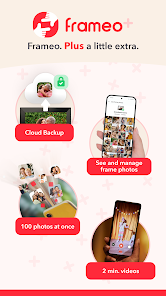
Frameo is a cost-effective solution for those looking to enhance their digital photo frame experience. The app itself is free to download and use, which is a significant advantage. However, the cost comes into play with the purchase of Frameo-compatible digital photo frames. These frames vary in price, typically ranging from $100 to $300, depending on the size, display quality, and additional features. While the initial investment may seem high, many users find that the joy of sharing memories easily justifies the cost. Additionally, there are no ongoing subscription fees, making it a budget-friendly option for families and friends looking to stay connected through photos.

Updates & Support

Frameo’s development team actively works on updates to enhance functionality and address user feedback. Regular updates are rolled out to improve the app's performance and introduce new features, ensuring that it stays relevant in the fast-paced tech landscape. The support system is also commendable, with a dedicated help center that offers FAQs, troubleshooting tips, and customer service options. Users have reported positive experiences when reaching out for assistance, with prompt responses and effective solutions. This commitment to user satisfaction is critical in maintaining a loyal user base and ensuring a smooth experience for everyone involved.

verified Security & Privacy Review

Frameo takes user security and privacy seriously by implementing several measures to protect personal information. The app requires minimal permissions, primarily accessing the device's photo library and internet connectivity, ensuring that users retain control over their data. All images shared through Frameo are transmitted using secure encryption protocols, providing a layer of protection against unauthorized access. Users can manage their privacy settings directly within the app, allowing them to choose who can send photos to their frames. Frameo does not store personal data longer than necessary, adhering to data minimization principles. The app's privacy policy clearly outlines how user data is collected, used, and shared, giving users transparency over their information. Additionally, Frameo does not sell personal data to third parties, further enhancing its commitment to user privacy. Regular updates and security patches are deployed to address potential vulnerabilities, contributing to a safe user experience. Overall, Frameo demonstrates a strong commitment to maintaining user privacy and security while providing a seamless photo-sharing experience.

Reviews

4.8

“User-friendly app for sharing photos effortlessly”

“Great way to connect with family”

“High-quality images on frames”

“Easy setup and usage”

“Loved the instant photo sharing feature”

Compare APP

FAQ

1

Can I submit suggestions or feedback to Frameo: Share to photo frames?

Yes, users can submit suggestions or feedback through the app's support section or contact information provided on the Frameo website.

2

Does Frameo: Share to photo frames collect my personal data?

Frameo respects user privacy and collects minimal personal data necessary for app functionality; however, users should review the privacy policy for detailed information on data collection.

3

Does Frameo: Share to photo frames support offline use?

Frameo requires an internet connection to send photos to frames, but once the photos are uploaded, they can be displayed on the frames without an active internet connection.

4

How do I cancel my Frameo: Share to photo frames subscription?

To cancel your Frameo subscription, you can go to the app store settings on your device, navigate to your subscriptions, and follow the prompts to cancel your subscription.

5

How much does a subscription to Frameo: Share to photo frames cost?

The subscription cost for Frameo may vary based on the plan selected, and users should check the app for the most current pricing information.

How to use Frameo: Share to photo frames

1

Can I change my customer number?

Unfortunately, customer numbers cannot be changed. If you need assistance, please contact our customer service team.

2

Can I log in to Frameo on multiple devices?

Yes, you can log in to your Frameo account on multiple devices using the same credentials.

3

How can I reach customer service for Frameo?

You can contact Frameo customer service through the support page on our website or by emailing our support team directly.

4

How can I reset my Frameo account password?

To reset your password, go to the login page and click on "Forgot Password." Follow the instructions sent to your email.

5

How do I activate my Frameo account after installation?

After installation, follow the instructions in your confirmation email to activate your account and start sharing photos.

Editor's Choice