This site uses cookies to enhance your user experience. By clicking any link on this site you are giving your consent to our cookie policy. Read more
Reject
Accept All

Advertiser and Editorial Disclosures

Shot Fx - Super power Video Fx

Shot Fx - Super power Video Fx

verified Verified App

Developer: Southern Studio

  • category

    Category: Photography

  • price

    Price: free

  • age rating

    Age Rating: Everyone

  • rating

    Rating: 4.6

  • download

    Downloads: 500,000+

  • version

    Version: 3.6

Screenshot 1
Screenshot 2
Screenshot 3
Screenshot 4
Screenshot 5
Screenshot 6
Screenshot 7
Screenshot 8
Screenshot 9
Screenshot 10
Screenshot 11
Screenshot 12
Screenshot 13
Screenshot 14
Screenshot 15
Screenshot 16
Screenshot 17
Screenshot 18
Screenshot 19
Screenshot 20
Screenshot 21
Screenshot 22
Screenshot 23
Screenshot 24

Features & Highlights

Extensive Effect Library

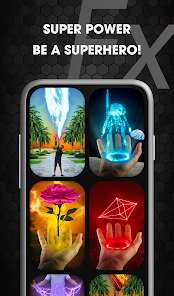
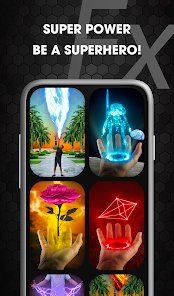
With a vast library of effects to choose from, Shot Fx empowers you to unleash your creativity. From dynamic overlays to eye-catching animations, you can mix and match various elements to create unique and engaging video experiences that capture your audience's attention like never before.

Realistic Visual Effects

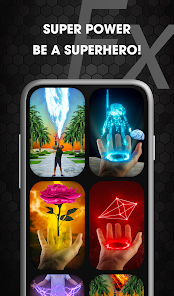
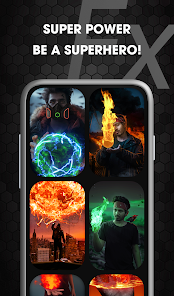
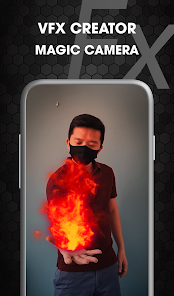
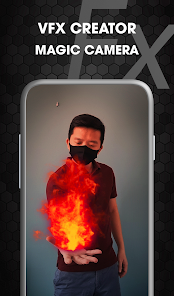
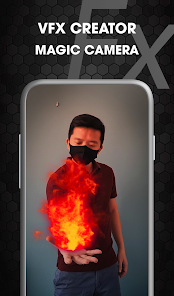
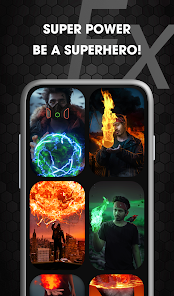
Shot Fx brings your videos to life with stunning, realistic visual effects that make every scene pop. Whether you want to add explosions, magical powers, or otherworldly elements, the app offers a wide range of options that seamlessly blend with your footage, enhancing your storytelling experience.

Social Media Integration

Sharing your creations is simple with Shot Fx's social media integration, allowing you to post directly to platforms like Instagram, TikTok, and Facebook. This feature ensures your stunning videos reach your audience quickly, making it easier to showcase your creativity and connect with friends and followers.

User-Friendly Interface

Navigating Shot Fx is a breeze, thanks to its intuitive design that caters to both beginners and seasoned editors. With easy-to-use tools and straightforward controls, you can quickly apply effects and customize your videos without any steep learning curve, making the editing process enjoyable and efficient.

Pros & Cons

Pros
  • Transform ordinary videos into captivating visual experiences with ease.
  • Access a diverse library of stunning effects and filters.
  • Enhance storytelling through dynamic motion graphics and animations.
  • Simplify editing with user-friendly tools for all skill levels.
  • Share your creations seamlessly on social media platforms.
Cons
  • Limited customization options restrict creative expression.
  • High resource consumption may slow down devices.
  • Steeper learning curve can deter casual users.

Real Experience Using Shot Fx - Super power Video Fx

Application Scenarios

Shot Fx - Super Power Video Fx serves a variety of creative needs, making it an ideal app for content creators, social media enthusiasts, and casual users alike. Whether you're looking to spice up your travel vlogs, create engaging social media posts, or simply have fun with friends, this app has you covered. It allows you to apply stunning visual effects to your videos, transforming ordinary footage into captivating experiences. Users can experiment with different themes, such as action, fantasy, or sci-fi, depending on the mood they wish to convey. Additionally, Shot Fx is perfect for those who want to create unique birthday greetings, festive videos, or even promotional material for small businesses.

User Experience

The user experience of Shot Fx is straightforward and intuitive, making it accessible for users of all skill levels. Upon launching the app, you are greeted with a clean interface that allows for easy navigation. The process of adding effects to your videos is seamless; simply select your video, choose from a wide array of effects, and preview your creation in real time. The app boasts high-quality visuals, which enhance the overall professional look of the final product. Furthermore, Shot Fx offers a community feature where users can share their creations, garner feedback, and gain inspiration from others. The social element adds to the enjoyment of using the app, making it not just a tool but a platform for creativity and collaboration.

Pricing

Shot Fx operates on a freemium model, allowing users to access a selection of basic effects at no cost. However, for those looking to unlock the full potential of the app, a subscription plan is available. The pricing is competitive compared to similar apps on the market, offering a monthly or yearly subscription option. Users can also benefit from periodic promotions or discounts, making it easier to explore premium features without breaking the bank. The value provided by the extensive library of effects and high-quality output justifies the investment for serious videographers and hobbyists alike.

Updates & Support

The developers of Shot Fx are dedicated to enhancing user experience through regular updates that introduce new features, effects, and bug fixes. Feedback from the user community is actively considered, resulting in an app that continues to evolve based on user needs. Support is readily available through the app’s help section, where users can find FAQs or contact customer service for more personalized assistance. This commitment to user satisfaction ensures that any issues are addressed promptly, making the overall experience smooth and enjoyable.

verified Security & Privacy Review

The Shot Fx - Super Power Video Fx app prioritizes user security and privacy through its data handling practices. The app is designed with a clear privacy policy that outlines how user data is collected, used, and shared. It primarily collects minimal personal information, ensuring that user privacy is respected throughout the video creation process. In terms of permissions, the app requests access to the camera and storage, which are essential for its functionality. Users are informed about these permissions and can choose to grant or deny access, providing a layer of control over their personal data. The app does not require excessive permissions that could compromise user privacy. Furthermore, Shot Fx employs encryption protocols to safeguard any collected data, minimizing risks associated with data breaches. Regular updates and security patches are implemented to enhance the app's security framework. Overall, Shot Fx - Super Power Video Fx demonstrates a commitment to maintaining user privacy while delivering an engaging video editing experience.

Reviews

4.6

“Great effects, easy to use for fun videos!”

“Amazing filters, my kids love it!”

“User-friendly interface, perfect for quick edits.”

“Creative tools, makes videos stand out!”

“Awesome app, highly recommend for video lovers!”

FAQ

1

Can I submit suggestions or feedback to Shot Fx - Super power Video Fx?

Yes, users can submit suggestions or feedback through the app's support section or by visiting the developer's website, where they can often find contact information for customer support.

2

Does Shot Fx - Super power Video Fx collect my personal data?

Shot Fx - Super power Video Fx may collect certain personal data, such as usage statistics and device information, but it typically emphasizes user privacy and complies with relevant data protection regulations.

3

Does Shot Fx - Super power Video Fx support offline use?

Yes, Shot Fx - Super power Video Fx allows users to create and edit videos offline, although some features may require an internet connection for downloading additional effects or content.

4

How do I cancel my Shot Fx - Super power Video Fx subscription?

Users can cancel their Shot Fx - Super power Video Fx subscription through their device's app store settings or within the app itself, depending on the platform used for subscription management.

5

How much does a subscription to Shot Fx - Super power Video Fx cost?

The subscription cost for Shot Fx - Super power Video Fx varies based on the selected plan, typically offering monthly and yearly options, with pricing details available within the app.

How to use Shot Fx - Super power Video Fx

1

Can I change my customer number after activating my account?

Unfortunately, customer numbers cannot be changed after activation. Please contact customer service for further assistance.

2

Can I log in from multiple devices?

Yes, you can log in to your Shot Fx account from multiple devices using the same credentials.

3

How can I contact customer service for Shot Fx?

You can reach our customer service via the support section in the app or by emailing support

4

How do I activate my Shot Fx account?

Follow the link in the activation email sent to you upon registration to activate your account.

5

How do I log in to my Shot Fx account?

Open the app and enter your registered email and password on the login screen to access your account.

Editor's Choice