This site uses cookies to enhance your user experience. By clicking any link on this site you are giving your consent to our cookie policy. Read more
Reject
Accept All

Advertiser and Editorial Disclosures

Yi Home

Yi Home

verified

Kami HK

2.8
Rating
5,000,000+ Downloads
6.8.5_20260115054026 Version
  • category

    Category: Lifestyle

  • price

    Price: free

  • age rating

    Age Rating: Everyone

  • rating

    Rating: 2.8

  • available on

    Available on: /

  • updated on

    Updated on: May 22, 2026

Screenshot 1
Screenshot 2
Screenshot 3
Screenshot 4
Screenshot 5
Screenshot 6

Features & Highlights

Cloud Storage Options

Yi Home provides flexible cloud storage options for your video recordings, ensuring that you never miss an important moment. With easy access to your footage anytime and anywhere, you can review past events and keep your peace of mind without worrying about running out of local storage.

Real-Time Video Monitoring

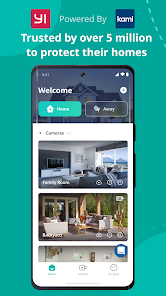
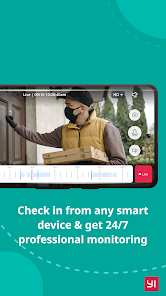
Yi Home offers seamless real-time video monitoring that allows you to keep an eye on your home from anywhere. With high-definition video quality and a user-friendly interface, you can easily check in on pets, kids, or your property at any time, right from your smartphone.

Smart Motion Detection

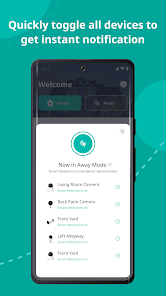
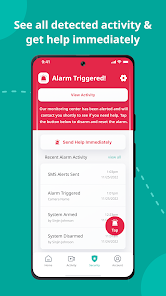
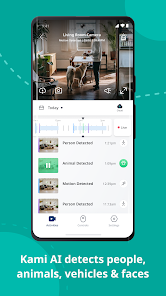
Equipped with advanced smart motion detection, Yi Home alerts you instantly when it detects movement. This feature helps you stay informed about any unusual activity around your home, providing an extra layer of security while minimizing unnecessary notifications for everyday occurrences.

Two-Way Audio Communication

Stay connected with your family and pets using the two-way audio feature. This allows you to communicate easily through the camera, whether you're at work or on vacation, giving you peace of mind knowing you can hear and speak to your loved ones whenever needed.

Pros & Cons

Pros
  • Smart monitoring for enhanced home security
  • Real-time notifications for instant alerts
  • User-friendly app for easy control
  • High-definition video quality for clear visuals
  • Two-way audio for seamless communication
Cons
  • Limited cloud storage options available for free users
  • App connectivity issues may disrupt user experience
  • Lacks advanced features found in competitor products
  • Camera quality may not meet professional standards

Real Experience Using Yi Home

Application Scenarios

Yi Home is designed primarily for users looking to enhance their home security and monitor their surroundings through smart technology. This app is particularly useful for homeowners who want to keep an eye on their property in real-time, whether they are at home or away. It is ideal for parents wanting to ensure their children’s safety, pet owners monitoring their furry friends, or individuals wanting to deter potential intruders. The application allows users to connect multiple Yi cameras, enabling them to manage various locations seamlessly. Additionally, it can be utilized in small businesses for surveillance and monitoring purposes, making it a versatile tool for a variety of users.

User Experience

The user experience with Yi Home is largely positive, with a user-friendly interface that makes navigation intuitive even for those who may not be tech-savvy. The app provides clear and concise options for live streaming, recording, and reviewing footage, allowing users to quickly access the information they need. Notifications are timely and relevant, ensuring that users are alerted to any unusual activity. The video quality is commendable, providing high-definition streaming, which is crucial for effective surveillance. However, some users have reported occasional connectivity issues, particularly with Wi-Fi interference, which can disrupt the functionality of the cameras. Despite these minor drawbacks, the overall experience remains satisfactory, as the app's features generally work as promised.

Pricing

Yi Home is available for free download, but users should be aware that some features require a paid subscription. The subscription plans vary, offering different levels of cloud storage and additional functionalities such as advanced motion detection and alert customization. These plans are competitively priced, making them accessible for users looking for enhanced features without breaking the bank. The free version still provides essential functionalities, allowing users to get started with basic monitoring. This tiered pricing model allows users to choose a plan that best fits their needs and budget.

Updates & Support

The Yi Home app is regularly updated, with developers actively working to improve the user experience and add new features. Users can expect periodic enhancements that address bugs and stability issues, keeping the app running smoothly. Customer support is also readily available, with a comprehensive FAQ section and a responsive help desk for troubleshooting. Many users have noted that their queries are handled promptly, which adds to the overall positive experience. Continuous updates and reliable support create trust and confidence in the product, making Yi Home a go-to choice for home surveillance.

verified Security & Privacy Review

The Yi Home app prioritizes user security and privacy, implementing various measures to protect sensitive information. The app utilizes end-to-end encryption for video feeds, ensuring that only authorized users can access live streams and recorded footage. This level of encryption helps safeguard against potential breaches and unauthorized access. When it comes to permissions, Yi Home requires access to the device's camera and microphone for optimal functionality. While these permissions are essential for using the app's core features, users are advised to review and manage permissions according to their comfort levels. The app also includes options to customize privacy settings, allowing users to control who can view their camera feeds. Yi Home adheres to strict data handling practices, with user data stored securely and not shared with third parties without explicit consent. The app's privacy policy is transparent, outlining how data is collected, used, and protected. Overall, Yi Home demonstrates a commitment to maintaining user privacy and data security, making it a reliable choice for home surveillance needs.

User Reviews

  • Angel Atily
    2026/04/08

    Not worth the purchase! They used to be a regular indoor camera option to choose from many, now they are a money hungry cash grabbing company. Adds are ridiculous on the app, very invasive and now they want to force a subscription for you to be able to use the most basic features, even imposing a limit timer of viewing if you are using it unsubscribed, more like buying a mirror and paying to see your own reflection. Very disapointed, sending it to the trash for any other less predatory option.

  • Paige J
    2024/09/29

    it's okay, not great. Miss a lot no matter the setting. Video quality is great. Constantly tries to get me to buy a subscription even though I have one, updates constantly (at least three times a week) & while it waits for $/update it won't record motions. Like holding a hostage for $ &/or update. Get random bird flying by, but miss package drop offs I set it up for, & my mechanic taking my vehicle from my driveway. My car is there, my car is gone, nothing in between. Make it make sense.

  • Sean Monahan
    2025/05/03

    12/20/23: As others have said... I've used Yi for years, generally happy with it. Now, full screen ads on startup. Do not offer me a discount on an ad-free subscription. I'm not getting it. Update 1/31/25: Wow, they're really hitting the startup ads hard. Update 5/2/25: I'm moving on to a different product. The inundation of ads is not worth the quality of this product.

  • Stacey Phillips
    2024/12/13

    Not sure what happened with this last update but I have lost the ability to see live feed. I haven't signed up with your service as I don't need that, but I was able to see the live feed. Now it says it can't connect to the network, but everything else in my house is able too. I've restarted it, deleted app and reinstalled but it still doesn't work. I'm about to give up on them and just get a Blink indoor camera(to go with my outdoor cameras(

  • Chris Sweany
    2025/09/10

    It is alright for the first month but then if you don't pay their monthly subscription you have to watch advertisement after advertisement. You hear something outside and want to check to see what it is you have to watch a 60 second ad before you can view the camera. Recently they added ads between switching cameras so you have to watch multiple ads just to view the live feed and ads pop up all over the app, sometimes in the app I will get a pop-up saying my phone is infected with a virus.....

Review Source: Google Play store public user reviews.

FAQ

1

Does Yi Home collect my personal data?

Yi Home may collect certain personal data, such as your account information and usage statistics, primarily to improve its services and enhance user experience.

2

Does Yi Home offer a free trial or free version?

Yi Home offers a basic version that is free to use, allowing access to essential features, but premium features may require a subscription.

3

Does Yi Home require an internet connection?

Yes, Yi Home requires an internet connection to connect and manage your devices effectively, as well as to stream live video feeds.

4

How can I contact support or send feedback for Yi Home?

You can contact Yi Home support through the app's help section or by visiting their official website, where you can find options for submitting feedback or queries.

5

How do I manage or cancel my Yi Home subscription?

You can manage or cancel your Yi Home subscription through the app settings under the subscription section, where you can follow the prompts to make changes.

How to use Yi Home

1

How can I delete my Yi Home account?

To delete your account, go to the app settings, find the account management section, and select the option to delete your account. Follow the instructions provided.

2

How can I reset my Yi Home account password?

To reset your password, go to the login screen, click "Forgot Password," and follow the instructions sent to your registered email.

3

How can I update the Yi Home app?

Update the Yi Home app via the App Store or Google Play Store by checking for available updates and tapping "Update."

4

How do I activate my Yi Home device?

To activate your Yi Home device, follow the in-app instructions, which typically involve connecting the device to your Wi-Fi network and signing into your Yi account.

5

How do I change my Yi Home account email?

In the app settings, navigate to account information and select the option to change your email. Follow the prompts to verify the new email.

What's New

1. User flow improved. 2. Functions improved.

Editor's Choice