This site uses cookies to enhance your user experience. By clicking any link on this site you are giving your consent to our cookie policy. Read more
Reject
Accept All
XMEye

XMEye

verified Verified App

Developer: Zhejiang JAIFY Co., Ltd.

  • category

    Category: Tools

  • price

    Price: free

  • age rating

    Age Rating: Everyone

  • rating

    Rating: 3.4

  • download

    Downloads: 10,000,000+

  • version

    Version: 1.6.6.0

Screenshot 1
Screenshot 2
Screenshot 3
Screenshot 4
Screenshot 5
Screenshot 6

Features & Highlights

Cloud Storage Options

With XMEye, users can take advantage of cloud storage solutions for their footage, ensuring that important video evidence is securely saved and easily accessible. This eliminates the risks associated with local storage, giving users the confidence that their data is safe and retrievable when needed.

Multi-Device Compatibility

XMEye supports multiple devices, allowing users to connect and manage various cameras from different manufacturers all in one place. This flexibility makes it easy to integrate XMEye into existing setups, ensuring seamless surveillance across all your devices without any hassle.

Real-Time Monitoring

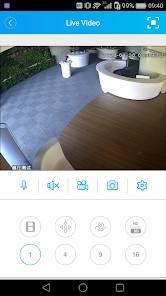
XMEye offers real-time monitoring capabilities, allowing users to view live feeds from their security cameras directly from their smartphones or tablets. This feature ensures that you can keep an eye on your property anytime, anywhere, providing peace of mind while you're on the go.

User-Friendly Interface

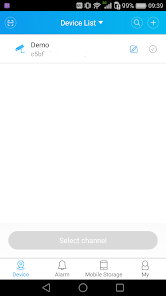
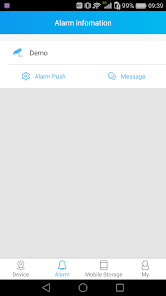
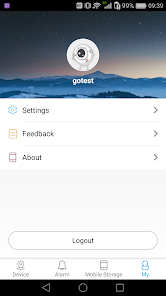
The app boasts an intuitive and user-friendly interface that makes navigation a breeze, even for those who may not be tech-savvy. Users can quickly access features such as camera settings, playback options, and alerts, enhancing the overall experience and making security management straightforward.

Pros & Cons

Pros
  • Easy remote access to live video feeds
  • User-friendly interface for seamless navigation
  • Supports multiple device connections simultaneously
  • Real-time alerts for enhanced security monitoring
  • Cloud storage options for secure video backup
Cons
  • Limited compatibility with certain devices
  • Poor customer support options available
  • Frequent connectivity issues reported by users
  • User interface can be confusing for newcomers

Real Experience Using XMEye

Application Scenarios

XMEye is designed primarily for users in need of remote surveillance and monitoring solutions, making it ideal for a variety of settings. Homeowners can utilize the app to keep an eye on their property while away, ensuring security and peace of mind. Small business owners benefit from the ability to monitor their premises in real-time, helping to prevent theft and ensuring a safe environment for employees and customers. Furthermore, the app is suitable for use in healthcare facilities, enabling staff to monitor patients remotely, and in educational institutions, where it can assist in overseeing student safety. With its user-friendly interface and compatibility with multiple devices, XMEye serves as a versatile tool for anyone looking to enhance their security framework.

User Experience

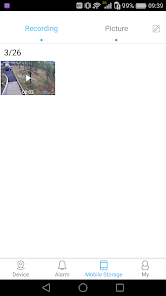
The user experience with XMEye is generally positive, as the app offers a straightforward and intuitive design that allows users to navigate through its features with ease. Upon logging in, users can quickly access their connected cameras and view live feeds without significant delays. The app supports multiple camera connections, making it convenient for users with several surveillance devices. Users appreciate the ability to record footage and take snapshots directly from the app, which adds a layer of functionality. However, some users have reported occasional connectivity issues, particularly with older devices or slower internet connections. The app's notification system is effective, alerting users to any motion detected by the cameras, which enhances its reliability in security settings.

Pricing

XMEye is available for free, which is a significant advantage for users looking for a cost-effective surveillance solution. The free version offers basic functionalities, including live viewing and camera management. For users seeking advanced features, such as cloud storage options or enhanced video quality, there may be in-app purchases or subscription models available. This tiered pricing structure allows users to tailor their experience based on their specific needs and budget, making XMEye accessible to a wide range of users.

Updates & Support

The development team behind XMEye is committed to providing regular updates to enhance user experience and address any bugs. Users can expect periodic improvements in functionality, security enhancements, and new features based on user feedback. Support is available through various channels, including the app's help center and community forums, where users can share experiences and troubleshoot common issues. While some users have expressed a desire for quicker response times from customer support, the overall impression is that the development team is proactive in maintaining the app's performance and user satisfaction.

verified Security & Privacy Review

The XMEye app prioritizes user security and privacy, implementing several features to enhance data protection. The app utilizes encryption protocols to safeguard the video streams and personal information, ensuring that user data is transmitted securely. However, users should be aware of the permissions required by the app, which may include access to the camera, microphone, and storage. These permissions are essential for the app's functionality but may raise concerns for privacy-conscious users. XMEye's privacy practices outline how user data is collected, used, and shared. While the app claims to adhere to strict data handling policies, it is crucial for users to review the privacy policy to understand the specifics of data retention and third-party sharing. Additionally, users are encouraged to enable two-factor authentication if available, to add an extra layer of security to their accounts. In summary, while XMEye offers robust security features, users must remain vigilant regarding the permissions granted and stay informed about the app's data handling practices to ensure their privacy is protected.

Reviews

3.4

“Easy to use and reliable for remote viewing.”

“Great app for monitoring security cameras.”

“User-friendly interface with excellent functionality.”

“Live feed is smooth and clear.”

“Occasional connectivity issues, but overall good.”

Editor's Choice