This site uses cookies to enhance your user experience. By clicking any link on this site you are giving your consent to our cookie policy. Read more
Reject
Accept All
WinZip

WinZip

verified Verified App

Developer: WinZip Computing, LLC

  • category

    Category: Productivity

  • price

    Price: free

  • age rating

    Age Rating: Everyone

  • rating

    Rating: 2.7

  • download

    Downloads: 10,000,000+

  • version

    Version: 7.1.1

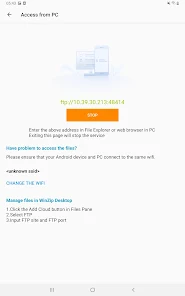
Screenshot 1
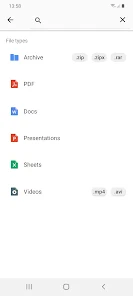
Screenshot 2
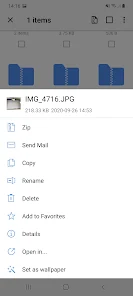
Screenshot 3
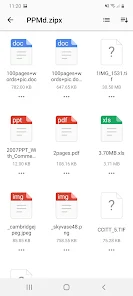
Screenshot 4
Screenshot 5
Screenshot 6
Screenshot 7
Screenshot 8
Screenshot 9
Screenshot 10
Screenshot 11
Screenshot 12
Screenshot 13

Features & Highlights

Batch File Processing

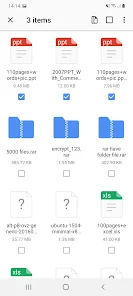
WinZip’s batch processing feature allows you to compress or extract multiple files simultaneously, saving you time and effort. This capability is especially useful for users who work with large volumes of data, making it easy to handle projects efficiently without repetitive tasks.

Cloud Integration

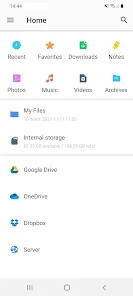
Seamlessly connect to popular cloud storage services like Dropbox, Google Drive, and OneDrive directly from WinZip. This integration allows you to easily back up, access, and share your files across multiple platforms, streamlining your workflow and keeping everything in one convenient location.

Easy File Compression

WinZip makes compressing files a breeze with its intuitive interface, allowing you to reduce file sizes effortlessly. Whether it’s for email attachments or saving storage space, this feature ensures that your files remain organized and manageable without sacrificing quality, making file sharing simple and efficient.

Encryption and Security

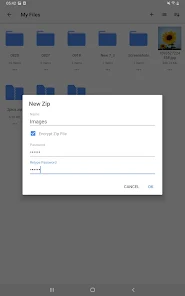
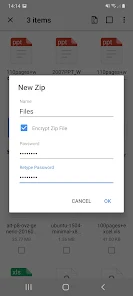
Protect your sensitive data with WinZip's strong encryption capabilities. You can easily secure your files with passwords and encryption methods, ensuring that your information remains private and safe from unauthorized access. This feature is perfect for users who prioritize confidentiality in their file transfers.

Pros & Cons

Pros
  • Efficiently compress files to save storage space
  • Easily share large files via email or cloud services
  • Secure sensitive data with strong encryption options
  • User-friendly interface simplifies file management tasks
  • Supports various file formats for versatile use
Cons
  • High cost compared to free alternatives
  • Limited features in trial version
  • Can be slow with large files
  • Frequent prompts to purchase license

Real Experience Using WinZip

Application Scenarios

WinZip is a versatile application that caters to a variety of file management needs, making it an essential tool for both personal and professional use. Whether you’re looking to compress large files to save storage space or to send multiple documents via email, WinZip streamlines the process significantly. It is particularly beneficial for users who frequently share files, as it reduces the file size and enhances the transfer speed. Additionally, WinZip supports cloud storage integration, allowing users to access and manage files directly from platforms like Google Drive, Dropbox, and OneDrive. This feature is invaluable for those who work remotely, as it enables seamless file management across different devices and locations. Furthermore, WinZip is useful for organizing large amounts of data, helping users create structured folders and easily accessible archives.

User Experience

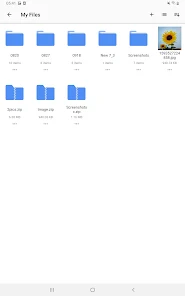
The user experience with WinZip is generally positive, characterized by its intuitive interface and user-friendly design. The application provides a simple drag-and-drop feature, making it easy for users to compress and decompress files without any technical knowledge. The layout is clean and organized, with clear labeling of functions, which enhances usability for both novice and experienced users. Users have praised the speed at which WinZip performs operations, making it a reliable choice for time-sensitive tasks. Additionally, the built-in file viewer allows users to preview documents before extracting them, which adds an extra layer of convenience. However, some users have noted that the extensive range of features can be overwhelming initially, but once familiarized, they find it enhances productivity significantly.

Pricing

WinZip offers a flexible pricing model, catering to different user needs. The app is available as a one-time purchase or through a subscription plan, which gives users the freedom to choose based on their preferences. The one-time purchase option provides full access to the application, while the subscription plan includes regular updates and additional features. WinZip also offers a free trial period, allowing users to explore its functionalities before committing to a purchase. This trial is a valuable opportunity for potential buyers to assess whether the app meets their requirements without any financial risk. Overall, the pricing structure is competitive compared to similar applications in the market, providing good value for the features offered.

Updates & Support

WinZip is committed to continuous improvement, regularly releasing updates to enhance performance and introduce new features. Users appreciate the frequent updates, which not only fix bugs but also ensure compatibility with the latest operating systems and file formats. The customer support offered by WinZip is commendable, providing various channels for assistance, including email support and an extensive knowledge base on their website. This resourceful knowledge base contains tutorials, FAQs, and troubleshooting guides, making it easier for users to find solutions independently. Additionally, the community forums allow users to share experiences and tips, fostering a supportive environment. Overall, WinZip’s dedication to updates and support contributes significantly to a positive user experience.

verified Security & Privacy Review

WinZip takes data security and user privacy seriously, implementing robust measures to protect sensitive information. The app utilizes strong encryption protocols to safeguard files during compression and decompression, ensuring that your data remains secure both in transit and at rest. Users can choose to encrypt their files with AES-256 encryption, adding an additional layer of security. In terms of privacy practices, WinZip adheres to strict data handling policies. The app does not collect unnecessary personal information, and any data shared with third parties is done in compliance with privacy regulations. Users are informed about data collection practices and have control over their preferences. Regarding permissions, WinZip requires access to files and storage on the device to function effectively. However, it does not request excessive permissions that might compromise user privacy. Users can manage permissions through their device settings, ensuring they maintain control over what data the app can access. Overall, WinZip demonstrates a commitment to security and privacy, making it a reliable choice for users concerned about data protection.

Reviews

2.7

“Easy to use and very effective compression tool”

“Reliable for file management and backups”

“Great for handling large files effortlessly”

“Intuitive interface makes zipping a breeze”

“Customer support is responsive and helpful”

Editor's Choice