This site uses cookies to enhance your user experience. By clicking any link on this site you are giving your consent to our cookie policy. Read more
Reject
Accept All

Advertiser and Editorial Disclosures

Wemo

Wemo

verified

Belkin

2.5
Rating
1,000,000+ Downloads
1.30.2 Version
  • category

    Category: Lifestyle

  • price

    Price: free

  • age rating

    Age Rating: Everyone

  • rating

    Rating: 2.5

  • available on

    Available on: /

  • updated on

    Updated on: Oct 30, 2025

Screenshot 1
Screenshot 2
Screenshot 3
Screenshot 4
Screenshot 5
Screenshot 6

Features & Highlights

Energy Monitoring

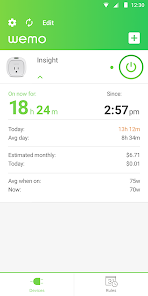
Wemo provides real-time energy monitoring, allowing you to track the energy usage of connected devices. This insight helps you make informed decisions about your consumption habits, potentially lowering your electricity bill and contributing to a more sustainable lifestyle.

Remote Access Control

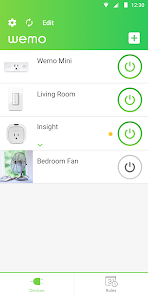
Wemo offers remote access capabilities, enabling you to control your devices even when you're away from home. This feature is particularly useful for managing lights and appliances while traveling, ensuring your home is secure and energy-efficient at all times.

Scheduling Options

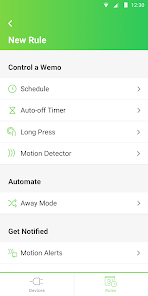
With Wemo's scheduling feature, you can automate your devices to turn on or off at specific times. This is perfect for creating routines or saving energy by ensuring lights and appliances are only active when needed, giving you peace of mind and convenience in daily life.

Smart Home Integration

Wemo seamlessly connects with various smart home ecosystems, allowing you to control your devices through voice commands or mobile apps. Whether you use Amazon Alexa, Google Assistant, or Apple HomeKit, Wemo makes it easy to manage your home’s lighting and appliances effortlessly from anywhere.

Pros & Cons

Pros
  • Easy app control from anywhere
  • Compatible with major smart home systems
  • Voice control with Alexa and Google Assistant
  • Energy monitoring to save on bills
  • Simple installation without professional help
Cons
  • Limited compatibility with some smart home systems
  • Connectivity issues with Wi-Fi networks
  • Lacks advanced automation features compared to rivals
  • Relatively higher price for basic functionalities

Real Experience Using Wemo

Application Scenarios

The Wemo app is designed to enhance the way users interact with their smart home devices. It is particularly useful in various scenarios such as automating home lighting, managing appliances remotely, and creating schedules for energy efficiency. For instance, users can set their lights to turn on at sunset or program their coffee maker to start brewing in the morning—all from the convenience of their smartphone. The app is also well-suited for those who frequently travel, as it allows for remote monitoring and control, ensuring that homes remain secure and energy usage is optimized. Furthermore, Wemo integrates seamlessly with voice assistants like Amazon Alexa and Google Assistant, making it an excellent choice for hands-free operation.

User Experience

The user experience with the Wemo app is generally positive, characterized by an intuitive interface that simplifies the management of smart devices. Upon installation, users are guided through the setup process, which is straightforward even for those who may not be tech-savvy. The app provides real-time updates and notifications, allowing users to monitor their devices effectively. Customization options are abundant; users can create scenes that control multiple devices simultaneously, enhancing convenience. However, some users have reported occasional connectivity issues, especially in larger homes with multiple devices connected to the same network. Despite these minor setbacks, the overall functionality and ease of use significantly contribute to a favorable user experience.

Pricing

The Wemo app itself is free to download and use, but it integrates with various smart devices that come at a range of price points. Users can find Wemo switches, plugs, and cameras at competitive prices, making it accessible for a variety of budgets. While the initial investment in smart devices can be a consideration, the potential for energy savings and enhanced convenience often justifies the cost. Wemo also occasionally offers promotions or bundles that can further reduce expenses, making it an appealing option for those looking to dip their toes into the world of smart home technology.

Updates & Support

Wemo frequently updates its app to improve functionality, address bugs, and enhance user experience. Users can expect regular updates that include new features, security enhancements, and performance improvements. Support is readily available through multiple channels, including a dedicated online help center, community forums, and customer service via email or phone. The response times are generally prompt, and the support team is knowledgeable about troubleshooting common issues. Overall, Wemo demonstrates a commitment to providing ongoing support and enhancements for its users, ensuring that the app remains relevant and effective in an ever-evolving technology landscape.

verified Security & Privacy Review

The Wemo app prioritizes user security and privacy through a combination of robust data protection practices and transparent privacy policies. The app employs encryption protocols to safeguard communication between devices, ensuring that user data remains secure during transmission. Additionally, Wemo does not store personal data on its servers, minimizing the risk of data breaches. When it comes to permissions, Wemo requires access to the local network for device discovery and control, which is essential for its functionality. Users are informed about these permissions during the installation process, allowing for informed consent. The app also provides options to manage notifications and location services, giving users greater control over their privacy settings. Wemo's privacy policy clearly outlines how user data is collected and used, emphasizing a commitment to transparency. Users can review and manage their data preferences within the app, ensuring that their privacy is respected. Overall, Wemo demonstrates a strong dedication to security and user privacy, making it a trustworthy option for smart home management.

User Reviews

  • Nuyoka Co
    2026/03/04

    now they bricked our devices, since they closed down the wemo service after trying to be a monthly subscription... constantly disconnect from the network, logs you out, and then says your password is incorrect, ask to send you password, it will never arrive, try to create account with the same email it tells you it already exists. Switching to kasa wifi plugs are better, faster and cheaper, a 4 pack for $22. You're welcome.

  • Gabe Gross
    2025/10/10

    Lights constantly disconnects but now I can't even open the app. i It just says "connected to wifi" and then does nothing. I've had lights turn off because the switch disconnected, and apparently, that means the light should shut off and then not be able to turn back on even with physically using the switch. If my house didn't come with wemo light switches in it, I'd be so much happier because I could have lights that function.

  • Ronnie Smith
    2025/06/18

    I've had nothing but trouble with the Belkin Wemo Light Switch and app. The devices constantly disconnect from the network, even when all other smart devices in my home are working perfectly. Reconnecting them is an exercise in frustration. To make matters worse, they refuse to link up with Google Home. Despite following every troubleshooting guide and even resetting the devices multiple times, integration never succeeds. I wouldn’t recommend Wemo as a dependable smart home solution.

  • Kathy Nesper
    2026/05/04

    Should be removed from the Play Store, because it is no longer supported. As of early 2026, you can download and install but won't be able to create an account so it's useless. This also means that WeMo devices no longer work with things like Alexa. Mine still has some kind of ghost command that still turns it on automatically, but it has to be turned off manually. And who knows how long the ghost command will last? Apparently some third-party apps may still work-- if you want to bother.

  • Ei
    2026/04/06

    Bought a 2 pack of sockets to control lamps when I'm not home. You can't do that:) Wemo only works when you're Bluetooth distance from the socket. It also performed very stubbornly, spent too many times resetting it. Wemos are too much trouble, no need for them. if I'm in the same room already I can hit the switch myself. Wemo gives calling from the living room to the kitchen energy, with bad reception and hardware bugs.

Review Source: Google Play store public user reviews.

FAQ

1

Does Wemo collect my personal data?

Wemo may collect certain personal data to provide its services, such as device information and usage data, but it follows privacy guidelines and allows users to manage their privacy settings.

2

Does Wemo offer a free trial or free version?

Wemo does not offer a free trial or free version; the app is free to download, but users must purchase Wemo devices to utilize its features fully.

3

Does Wemo require an internet connection?

Yes, Wemo requires an internet connection to control devices remotely and to enable features like scheduling and automation. However, devices can still operate locally without the internet if necessary.

4

How can I contact support or send feedback for Wemo?

You can contact Wemo support through the app or visit the Wemo website for assistance, where you can find FAQs, troubleshooting guides, and a contact form for feedback or inquiries.

5

How do I manage or cancel my Wemo subscription?

Since Wemo does not have a subscription model, there is no need for cancellation. Users can manage their devices through the app without any recurring fees.

How to use Wemo

1

Can I use the Wemo app without an internet connection?

No, the Wemo app requires an internet connection to control devices remotely.

2

Do I need an account to use the Wemo app?

Yes, you need to create an account to access and manage your devices through the Wemo app.

3

How can I contact customer service for the Wemo app?

You can reach Wemo customer service by calling 1-844-745-9450 or visiting their support page online.

4

How do I activate my Wemo device using the app?

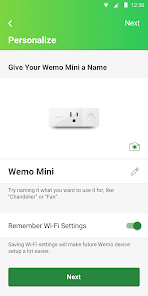
To activate, open the Wemo app, tap on your device, and follow the on-screen instructions to connect it to your Wi-Fi network.

5

How do I activate notifications for my Wemo devices?

To activate notifications, go to the app settings, select 'Notifications', and toggle on the alerts you want to receive.

What's New

1. WeMo End of Life reminder notice.2. Updated the app’s targetSdkVersion to 35 to ensure full compliance with Google Play.

Editor's Choice