This site uses cookies to enhance your user experience. By clicking any link on this site you are giving your consent to our cookie policy. Read more
Reject
Accept All
Vysor - Android control on PC

Vysor - Android control on PC

verified Verified App

Developer: ClockworkMod

  • category

    Category: Productivity

  • price

    Price: free

  • age rating

    Age Rating: Everyone

  • rating

    Rating: 3.2

  • download

    Downloads: 5,000,000+

  • version

    Version: 4.2.2

Screenshot 1
Screenshot 2
Screenshot 3
Screenshot 4
Screenshot 5
Screenshot 6

Features & Highlights

Cross-Platform Compatibility

Vysor supports multiple operating systems, including Windows, macOS, and Linux, ensuring that users can enjoy its features regardless of their setup. This versatility makes it an ideal tool for anyone looking to integrate their Android experience seamlessly with various desktop environments.

File Transfer

Easily transfer files between your Android device and PC with Vysor's intuitive drag-and-drop interface. This feature streamlines the process of moving photos, videos, and documents, making it a breeze to manage your files without the need for additional software or complicated procedures.

Screen Mirroring

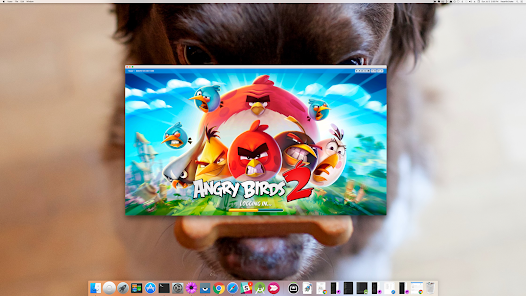
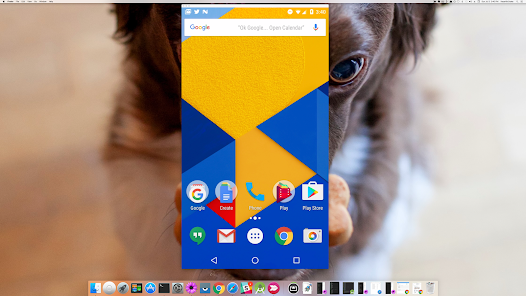
With Vysor's screen mirroring capabilities, you can view and interact with your Android device directly on your computer screen. This is perfect for presentations, app testing, or simply enjoying your mobile content on a larger display, enhancing both productivity and entertainment.

Wireless Connection

Vysor allows you to connect your Android device to your PC wirelessly, eliminating the hassle of cables and enabling easy access from anywhere within range. This feature provides a seamless experience, making it simple to control your phone or tablet without being tethered to your desk.

Pros & Cons

Pros
  • Seamlessly control your Android from your PC
  • Easily manage apps and notifications on a larger screen
  • Streamline multitasking between devices effortlessly
  • Enjoy high-quality mirroring for gaming and presentations
  • Quickly transfer files between Android and PC
Cons
  • Limited functionality in free version
  • Lag and performance issues
  • Requires USB debugging enabled
  • May not support all devices

Real Experience Using Vysor - Android control on PC

Application Scenarios

Vysor is an innovative tool that bridges the gap between Android devices and PC, offering users a seamless way to control their smartphones directly from their computers. This capability is particularly beneficial for developers looking to test applications in real-time, as well as for gamers who wish to play mobile games on a larger screen. Additionally, Vysor serves as a valuable asset for professionals who need to manage their business apps while multitasking on their computers. Users can effortlessly mirror their screens, access notifications, and even drag and drop files between devices. The versatility of Vysor makes it suitable for both personal and professional use, enhancing productivity and convenience.

User Experience

The user experience with Vysor is generally positive, with many users praising its intuitive interface and ease of setup. The installation process is straightforward, requiring minimal technical knowledge. Once connected, users can navigate their Android devices using a mouse and keyboard, which enhances usability compared to traditional touch controls. The screen mirroring feature is responsive, with minimal lag, making it ideal for tasks that require real-time interaction. Users also appreciate the ability to customize their experience, such as adjusting resolution settings and toggling between different control modes. However, some users have reported occasional connectivity issues, particularly with wireless setups, which can disrupt the overall experience. Despite this, Vysor remains a popular choice among those looking to enhance their Android control capabilities on a PC.

Pricing

Vysor offers a freemium model that appeals to a wide range of users. The free version allows basic functionality, enabling users to mirror their Android screens with some limitations, such as lower resolution and the presence of ads. For those seeking a more robust experience, Vysor Pro is available for a nominal monthly or annual fee. This premium option unlocks features such as higher resolution mirroring, full-screen mode, and the ability to access your device over the internet. The pricing structure is competitive compared to similar applications, providing good value for users who require advanced features and enhanced performance.

Updates & Support

Vysor is committed to ongoing development, with regular updates that improve functionality and address user feedback. The development team actively works to enhance the app's performance and expand its features, ensuring that it remains relevant in the fast-paced tech landscape. Users can access a comprehensive help center on the Vysor website, which includes tutorials, troubleshooting guides, and FAQs. For more personalized assistance, Vysor also offers email support, which is responsive to user inquiries. Overall, the combination of frequent updates and accessible support makes Vysor a reliable choice for those looking to control their Android devices from a PC.

verified Security & Privacy Review

The Vysor app prioritizes user security and privacy by implementing several key practices. Firstly, it requires minimal permissions to function effectively, primarily needing access to the user's display and input controls. This focus on limited permissions reduces potential vulnerabilities associated with excessive data access. Data transmitted between the Android device and PC is encrypted, helping to safeguard user information from interception during remote sessions. Vysor does not store personal data on its servers, ensuring that user activity remains private and local to the devices involved in the interaction. Users have control over their connections, as Vysor operates on a direct basis without third-party intermediaries. Additionally, the app offers options for using it in a secure, offline mode, further enhancing user privacy. However, it is essential for users to remain vigilant about the networks they connect to, as public Wi-Fi can pose security risks. Overall, Vysor demonstrates a commitment to data security and user privacy, making it a reliable choice for those looking to control their Android devices from a PC.

Reviews

3.2

“Great for mirroring Android on PC effortlessly.”

“Easy to use and set up.”

“Laggy performance during high-demand tasks.”

“Perfect for developers testing apps.”

“Reliable connection but needs better resolution options.”

Editor's Choice