This site uses cookies to enhance your user experience. By clicking any link on this site you are giving your consent to our cookie policy. Read more
Reject
Accept All
VooV Meeting

VooV Meeting

verified Verified App

Developer: Tencent Mobility Limited

  • category

    Category: Productivity

  • price

    Price: free

  • age rating

    Age Rating: Everyone

  • rating

    Rating: 2.7

  • download

    Downloads: 1,000,000+

  • version

    Version: 3.32.21.520

Screenshot 1
Screenshot 2
Screenshot 3
Screenshot 4
Screenshot 5
Screenshot 6

Features & Highlights

High-Quality Video Conferencing

VooV Meeting offers exceptional video quality, enabling users to connect seamlessly with colleagues and clients around the globe. The platform supports HD video calls, ensuring that every detail is crystal clear, which enhances collaboration and engagement during meetings.

Multi-Device Compatibility

VooV Meeting ensures that users can join meetings from a variety of devices, including smartphones, tablets, and desktops. This flexibility allows team members to connect from anywhere, making it easier to collaborate on the go and maintain productivity regardless of location.

Robust Security Features

Security is a top priority with VooV Meeting, which incorporates advanced encryption and privacy measures to protect user data. Features such as password-protected meetings and waiting rooms help ensure that only authorized participants can access sensitive discussions.

Screen Sharing Options

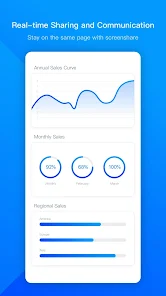
With VooV Meeting, users can easily share their screens, making presentations and collaborative work a breeze. This feature allows participants to view documents, slides, or applications in real-time, fostering a more interactive and productive meeting environment.

Pros & Cons

Pros
  • High-definition video and audio for clear communication
  • User-friendly interface for effortless navigation
  • Supports large groups for effective collaboration
  • Robust security features to protect your meetings
  • Cross-platform compatibility for all devices
Cons
  • Limited integration with third-party applications
  • User interface can be confusing for newcomers
  • Occasional connectivity issues during high traffic
  • Lacks advanced features found in competitors

Real Experience Using VooV Meeting

Application Scenarios

VooV Meeting is designed to cater to a variety of meeting needs, making it an ideal choice for professionals across different sectors. Whether you are a teacher conducting online classes, a project manager coordinating team efforts, or a business executive holding a crucial client meeting, VooV Meeting provides the tools necessary for seamless communication. The app supports video conferencing, screen sharing, and collaborative document editing, making it suitable for both one-on-one meetings and larger group discussions. With its high-definition video and audio quality, users can engage in meaningful conversations without the common disruptions often found in other platforms. Additionally, features like virtual backgrounds and meeting recording enhance the overall experience, making it versatile for casual catch-ups or formal presentations.

User Experience

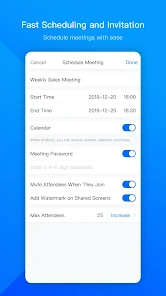
The user experience on VooV Meeting is designed to be intuitive and user-friendly. Upon launching the app, users are greeted with a clean interface that simplifies navigation. Joining or scheduling a meeting is straightforward, with options to integrate calendars for easy scheduling. The app’s features, such as chat functions and the ability to create breakout rooms, are easily accessible, allowing users to focus on the discussion rather than struggling with the technology. Participants report minimal lag and high-quality audio and video, contributing to a professional atmosphere. Moreover, VooV Meeting is compatible with multiple devices, including smartphones, tablets, and desktops, ensuring that users can join meetings from anywhere, at any time. Overall, the experience is smooth, making it a favorable option for both novices and tech-savvy users.

Pricing

VooV Meeting offers a competitive pricing structure designed to accommodate different user needs. The app provides a free tier, which is ideal for individuals or small teams, allowing users to host meetings for up to 40 minutes with up to 100 participants. For those requiring extended meeting durations and additional features, VooV Meeting offers several paid plans that cater to larger organizations. These plans include features such as unlimited meeting lengths, advanced administrative controls, and enhanced security options. The pricing is transparent, with no hidden fees, making it easier for organizations to budget their communication tools effectively. Overall, the value provided by VooV Meeting is commendable, especially given the high-quality features available at competitive rates.

Updates & Support

VooV Meeting regularly rolls out updates to enhance functionality and user experience, demonstrating a commitment to continuous improvement. Users can expect new features, bug fixes, and security enhancements to ensure a robust platform. The support team is responsive and available through various channels, including email and live chat, to assist users with any queries or technical issues. Comprehensive online resources, including FAQs and user guides, are also provided to help users navigate the app effectively. This level of support reinforces user confidence and satisfaction, ensuring that they can maximize their experience while using VooV Meeting. In summary, the combination of regular updates and dedicated support makes VooV Meeting a reliable choice for those seeking effective communication solutions.

verified Security & Privacy Review

The VooV Meeting app prioritizes security and privacy, implementing robust measures to protect user data. End-to-end encryption is employed during meetings, ensuring that conversations remain confidential and secure from unauthorized access. The app complies with international privacy regulations, which reflects its commitment to safeguarding personal information. VooV Meeting requires specific permissions to function effectively, such as access to the camera and microphone. Users are informed about these permissions and can manage them easily within their device settings. The app also offers features like password protection for meetings and waiting rooms to enhance security further. Data handling practices are transparent, with VooV Meeting clearly outlining how user data is collected, stored, and utilized. Users can access their data management settings, allowing them to delete or export their information as needed. Overall, VooV Meeting demonstrates a strong dedication to maintaining user privacy and providing a secure environment for virtual meetings.

Reviews

2.7

“User-friendly interface with seamless video quality”

“Excellent for large group meetings”

“Integration with other apps is smooth and efficient”

“Reliable performance even on weak connections”

“Great features for collaboration and screen sharing”

Editor's Choice