This site uses cookies to enhance your user experience. By clicking any link on this site you are giving your consent to our cookie policy. Read more
Reject
Accept All
Voice to text

Voice to text

verified Verified App

Developer: maruar

  • category

    Category: Tools

  • price

    Price: free

  • age rating

    Age Rating: Everyone

  • rating

    Rating: 4.1

  • download

    Downloads: 1,000,000+

  • version

    Version: 1.2.46

Screenshot 1
Screenshot 2
Screenshot 3
Screenshot 4
Screenshot 5
Screenshot 6

Features & Highlights

Customizable Vocabulary

Tailor the app to your needs with a customizable vocabulary feature, which allows you to add specific terms or phrases relevant to your profession or interests. This ensures higher accuracy and a personalized touch to your transcriptions, enhancing overall effectiveness.

Multi-Language Support

Break language barriers with robust support for multiple languages and dialects. Whether you're speaking English, Spanish, Mandarin, or more, the app accurately interprets and transcribes your speech, catering to a diverse user base and enhancing global communication.

Real-Time Transcription

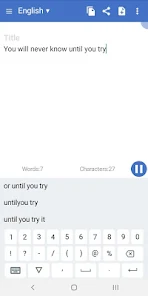
Experience instant transcription with our advanced voice recognition technology, which captures your spoken words in real-time. This feature ensures you can focus on your thoughts without worrying about missing any details, making it perfect for meetings, lectures, or personal notes.

Voice Command Functionality

Take control of your experience with intuitive voice commands that allow you to navigate the app effortlessly. From starting a new transcription to editing text, this feature streamlines your workflow, making it easy to use even when your hands are busy.

Pros & Cons

Pros
  • Increases typing speed and efficiency
  • Enhances accessibility for diverse users
  • Reduces strain on hands and wrists
  • Facilitates multitasking and productivity
  • Captures thoughts instantly for better recall
Cons
  • Accuracy can be affected by background noise.
  • Misinterpretations can occur with accents or dialects.
  • Limited support for specialized terminology or jargon.
  • Privacy concerns with sensitive information being recorded.

Real Experience Using Voice to text

Application Scenarios

The Voice to Text app excels in various application scenarios, making it a versatile tool for users across different fields. Writers and content creators can leverage its capabilities to transcribe their thoughts quickly, transforming spoken words into written text efficiently. This functionality is especially beneficial for those who find typing cumbersome or who are seeking to enhance their creative flow without the interruption of manual input. Additionally, students can utilize the app for taking lecture notes, allowing them to focus on the speaker rather than worrying about missing critical information. The app is also a boon for professionals in meetings, enabling them to record discussions and automatically transcribe them for future reference. With its accuracy and ease of use, Voice to Text caters to a wide audience, from bloggers to business executives.

User Experience

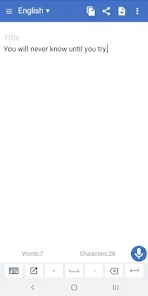
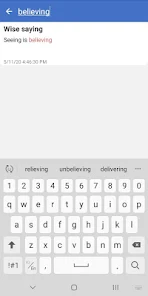
The user experience of the Voice to Text app is largely positive, with an intuitive interface that welcomes users of all technical proficiencies. Upon launching the app, users are greeted with a straightforward design that makes navigation seamless. The voice recognition technology is impressively accurate, handling different accents and speech patterns with ease. Users have reported a significant reduction in transcription errors compared to other similar applications, which enhances productivity. The app's responsiveness is commendable, with quick processing times that allow users to see their transcriptions in real-time. Furthermore, additional features such as the ability to edit text post-transcription and save files in various formats contribute to a satisfying overall experience. However, some users have noted occasional hiccups with background noise affecting transcription accuracy, a factor that can be easily mitigated with a quieter environment.

Pricing

The Voice to Text app adopts a competitive pricing model, offering various subscription tiers to accommodate different user needs. A free version is available, providing basic functionality that allows users to test the app's capabilities. For those seeking advanced features, the premium subscription unlocks functionalities such as unlimited transcription time and enhanced accuracy. This tier is reasonably priced, making it accessible for both casual users and professionals who require reliable transcription services. Additionally, the app often runs promotional discounts, enabling users to experience premium features at a reduced cost. Overall, the pricing structure is fair, given the app's performance and the convenience it offers.

Updates & Support

The developers of the Voice to Text app are committed to continuous improvement, regularly releasing updates that enhance functionality and user experience. These updates often include bug fixes, performance enhancements, and new features based on user feedback. The support system is robust, with multiple channels available for users to seek assistance, including email support and an extensive FAQ section on their website. Users have commended the responsiveness of the support team, noting that inquiries are typically addressed promptly. Overall, the combination of regular updates and excellent customer support fosters a reliable ecosystem, ensuring that users can depend on the app for their transcription needs.

verified Security & Privacy Review

The Voice to Text app prioritizes user security and privacy, implementing robust measures to protect sensitive information. The app encrypts voice recordings and transcriptions both in transit and at rest, ensuring that user data remains secure against unauthorized access. Upon installation, the app requests necessary permissions, such as microphone access, which is essential for its core functionality. Users are informed about these permissions and can choose to grant or deny them based on their comfort level. The app does not require excessive permissions, minimizing potential privacy risks. Voice to Text adheres to strict privacy policies, clearly outlining how user data is collected, used, and shared. The app does not sell user data to third parties, and users have the option to delete their recordings and transcriptions whenever they wish. Regular updates to the app include security patches to address potential vulnerabilities, demonstrating a commitment to ongoing user safety. Overall, Voice to Text offers a secure and privacy-conscious solution for converting speech to text, making it a reliable choice for users concerned about data security.

Reviews

4.1

“Accurate transcription, saves me so much time!”

“User-friendly interface, easy to navigate.”

“Great for taking quick notes on the go.”

“Sometimes struggles with background noise.”

“Loving the customization options for voice commands!”

Editor's Choice