This site uses cookies to enhance your user experience. By clicking any link on this site you are giving your consent to our cookie policy. Read more
Reject
Accept All
Voice Recorder

Voice Recorder

verified Verified App

Developer: Samsung Electronics Co., Ltd.

  • category

    Category: Tools

  • price

    Price: free

  • age rating

    Age Rating: Everyone

  • rating

    Rating: 4.0

  • download

    Downloads: 1,000,000,000+

  • version

    Version: /

Screenshot 1
Screenshot 2
Screenshot 3
Screenshot 4
Screenshot 5
Screenshot 6
Screenshot 7
Screenshot 8
Screenshot 9
Screenshot 10

Features & Highlights

Cloud Backup Support

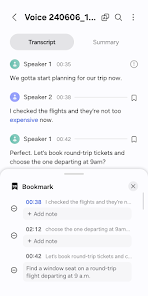
Never worry about losing your important recordings again, as Voice Recorder offers cloud backup options. This feature ensures that your audio files are safely stored and easily accessible from any device, giving you peace of mind and convenience.

Easy Recording

With just a tap, you can start recording high-quality audio instantly, making it perfect for capturing spontaneous ideas, lectures, or meetings. The intuitive interface ensures that you won't miss a moment, no matter how busy your schedule gets.

File Organization

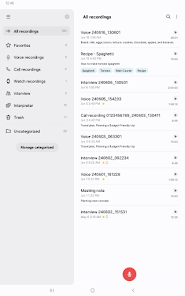
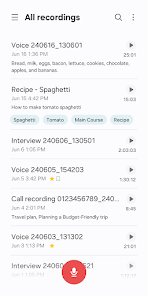
Voice Recorder allows you to easily categorize and label your recordings, so you can find what you need when you need it. This feature helps keep your audio files organized, making it simple to revisit important notes or memorable moments.

Playback Controls

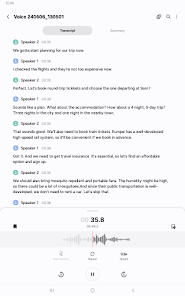
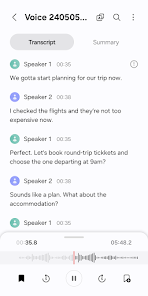
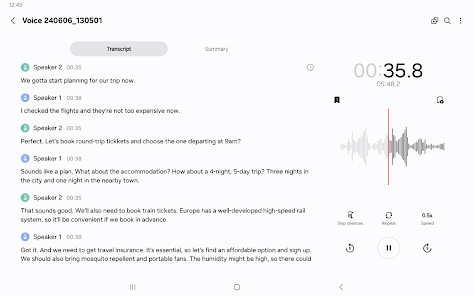
Enjoy seamless playback with adjustable speed and rewind options, allowing you to review your recordings at your own pace. Whether you need to catch a specific detail or listen to a long lecture, these controls make it easy to navigate your audio files.

Pros & Cons

Pros
  • Captures ideas instantly for later use
  • Enhances productivity by recording meetings easily
  • Improves memory retention through audio notes
  • Facilitates quick documentation of interviews
  • Allows hands-free operation for multitasking
Cons
  • Limited battery life affects recording duration.
  • Background noise can distort audio quality.
  • Playback can be time-consuming for long recordings.
  • Requires storage space for saved files.

Real Experience Using Voice Recorder

Application Scenarios

The Voice Recorder app is designed for a multitude of scenarios, making it an indispensable tool for various users. Whether you are a student needing to record lectures, a journalist conducting interviews, or a professional capturing important meetings, this app caters to all. It is also useful for musicians wanting to capture melodies on-the-go or anyone wishing to jot down ideas verbally. The app’s versatility allows for recordings in different environments, whether you are in a quiet room or a bustling cafe, thanks to its noise-cancellation features. Furthermore, its ability to save recordings in various formats makes it suitable for both casual and professional applications.

User Experience

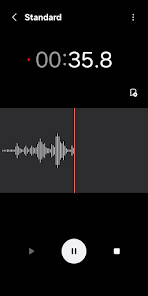
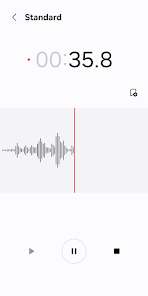
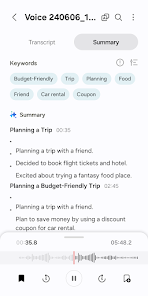
User experience is a standout feature of the Voice Recorder app. The interface is incredibly user-friendly, allowing even the most technologically challenged individuals to navigate with ease. With a simple tap, users can start and stop recordings, and a clear display shows recording time and remaining storage. The app also offers features such as tagging and organizing recordings into folders, which enhances usability. Playback options are intuitive, allowing users to easily rewind, fast forward, or adjust playback speed. The app's audio quality is impressive, providing crystal-clear recordings that are faithful to the original sound. Additionally, the ability to share recordings via email or social media adds a layer of convenience that many users appreciate.

Pricing

The Voice Recorder app adopts a freemium model, allowing users to access basic features at no cost. This free version is quite functional, meeting the needs of casual users. However, for those seeking advanced features such as unlimited recording time, cloud storage integration, and additional audio formats, a premium subscription is available. The pricing structure is competitive, offering monthly and yearly plans that provide good value for the enhanced functionalities. Users often find that the premium version is a worthwhile investment, especially for professionals who rely heavily on high-quality recordings.

Updates & Support

The developers of the Voice Recorder app are committed to providing regular updates, ensuring the app remains compatible with the latest operating systems and devices. Each update typically includes performance enhancements and bug fixes, contributing to a smoother user experience. Additionally, the app features an integrated help section that offers tutorials and troubleshooting tips. For more personalized support, users can reach out to the customer service team via email, and response times are generally quick. Overall, the combination of regular updates and accessible support helps maintain user satisfaction and trust in the app.

verified Security & Privacy Review

The Voice Recorder app prioritizes user security and privacy through a transparent approach to data handling. The app requires minimal permissions, primarily focusing on microphone access for recording audio. This limited scope helps mitigate potential privacy concerns associated with excessive data collection. User recordings are stored locally on the device, ensuring that sensitive audio files do not automatically upload to cloud services without explicit user consent. The app does not collect personal information or track user behavior, maintaining a strong commitment to user privacy. Additionally, the Voice Recorder implements encryption for stored recordings, adding an extra layer of protection against unauthorized access. Users have the option to set password protection for their recordings, further enhancing security. Regular updates ensure that any vulnerabilities are promptly addressed, keeping user data safe. Overall, the Voice Recorder app demonstrates a commendable focus on security and privacy, providing users with confidence in their data management practices while offering a seamless recording experience.

Reviews

4.0

“Easy to use, great sound quality!”

“Perfect for quick voice memos.”

“Reliable and efficient recording app.”

“User-friendly interface, love it!”

“Excellent for interviews and lectures!”

Editor's Choice