This site uses cookies to enhance your user experience. By clicking any link on this site you are giving your consent to our cookie policy. Read more
Reject
Accept All

Advertiser and Editorial Disclosures

VeSync

VeSync

verified Verified App

Developer: Vesync

  • category

    Category: Lifestyle

  • price

    Price: free

  • age rating

    Age Rating: Everyone

  • rating

    Rating: 4.5

  • download

    Downloads: 1,000,000+

  • version

    Version: 5.7.90

Screenshot 1
Screenshot 2
Screenshot 3
Screenshot 4
Screenshot 5
Screenshot 6

Features & Highlights

Real-Time Monitoring

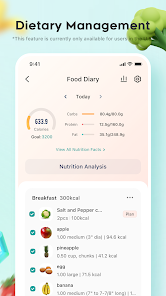
With VeSync, you can monitor your devices in real time, giving you insights into their performance and energy usage. This feature helps you make informed decisions about your cooking and energy consumption, ensuring efficiency in your daily routines.

Recipe Suggestions

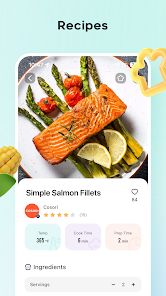
Explore a plethora of recipe suggestions tailored to your appliances, making meal preparation a breeze. The app provides step-by-step instructions and cooking tips, helping both novice and experienced cooks to create delicious meals effortlessly.

Smart Home Integration

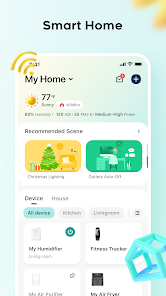
VeSync seamlessly connects with various smart home devices, allowing you to control your appliances with ease. Whether it's adjusting your air fryer or managing your smart lights, the app centralizes your smart home experience for maximum convenience.

User-Friendly Interface

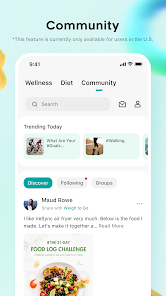
VeSync boasts a clean and intuitive user interface that simplifies navigation and device management. Whether you're setting schedules or adjusting settings, the app is designed to enhance your user experience, making smart cooking enjoyable for everyone.

Pros & Cons

Pros
  • Easy integration with smart home devices for seamless control
  • User-friendly app for convenient remote management
  • Energy monitoring features help reduce utility bills
  • Customizable schedules optimize appliance usage and efficiency
  • Voice control compatibility enhances hands-free functionality
Cons
  • Limited device compatibility restricts user options
  • Customer support can be slow and unresponsive
  • Occasional connectivity issues disrupt smart home integration
  • Updates may introduce bugs or functionality problems

Real Experience Using VeSync

Application Scenarios

VeSync is designed to enhance your smart home experience, making it an essential tool for anyone looking to streamline their daily routines. This app shines in various application scenarios, such as managing smart plugs, lights, and other appliances. For instance, users can schedule their coffee maker to start brewing as soon as they wake up, ensuring a fresh cup awaits them. The app also permits control of devices remotely, allowing users to turn off lights or appliances while away from home, which adds an extra layer of security and convenience. Additionally, VeSync can be integrated with Amazon Alexa and Google Assistant, enabling voice commands for effortless control. Whether you're at home or on the go, VeSync provides the flexibility to manage your smart devices with ease.

User Experience

The user experience with VeSync is generally positive, with a clean and intuitive interface that makes navigation a breeze. The onboarding process is straightforward, allowing users to quickly connect their devices without confusion. The app features customizable settings, enabling users to create personalized schedules and routines that fit their lifestyles. Notifications keep users informed about the status of their devices, which adds to the overall satisfaction. However, some users have reported occasional connectivity issues, especially when multiple devices are connected simultaneously. Despite this, the ability to control everything from one central app significantly enhances the overall user experience, making home automation easier than ever.

Pricing

VeSync operates on a freemium model, offering a range of features at no cost, which is appealing for budget-conscious users. While the basic version covers essential functionalities like device management and scheduling, premium features are unlocked through a subscription plan. This plan includes advanced functionalities, such as enhanced data analytics and additional integrations with various smart home devices. The pricing is competitive compared to similar apps in the market, making it a cost-effective choice for those looking to expand their smart home setup without breaking the bank.

Updates & Support

VeSync is committed to continuous improvement, regularly releasing updates that enhance app performance and introduce new features. Users can expect timely updates that address bugs and improve usability. Additionally, the app provides a comprehensive support section that includes FAQs, troubleshooting guides, and customer service contact options. Users have reported responsive support, with the team actively engaging in resolving issues and answering queries. This dedication to user support and regular updates ensures that VeSync remains a reliable choice for managing smart home devices.

verified Security & Privacy Review

VeSync prioritizes user security and privacy, implementing robust measures to protect personal data. The app employs end-to-end encryption for data transmission, ensuring that sensitive information remains safeguarded against unauthorized access. Users are informed about the data collected, which primarily includes device information and usage statistics, necessary for enhancing app functionality. The app requests certain permissions, such as location access and device storage, to provide an optimal user experience. However, VeSync allows users to manage these permissions, giving them control over their data sharing preferences. The privacy policy is transparent, detailing how user data is collected, utilized, and shared with third parties. Furthermore, VeSync adheres to relevant data protection regulations, ensuring compliance with industry standards. Users can rest assured that their personal information is handled responsibly, with options to delete their account and associated data at any time. Overall, VeSync demonstrates a strong commitment to maintaining user privacy while delivering a seamless smart home management experience.

Reviews

4.5

“User-friendly interface, easy to navigate and set up”

“Great connectivity with smart home devices”

“Reliable performance, no issues with syncing”

“Excellent customer support, fast response times”

“Versatile features, perfect for kitchen appliances”

FAQ

1

Does VeSync collect my personal data?

VeSync may collect personal data as outlined in its privacy policy. This data is typically used to enhance user experience and improve app functionality, but users should review the policy for specific details on data collection and usage.

2

Does VeSync offer a free trial or free version?

VeSync offers a free version that allows users to access basic features. However, certain premium features may require a subscription. Check the app for details on available features without a subscription.

3

Does VeSync require an internet connection?

Yes, VeSync requires an internet connection to control and manage your smart devices remotely. However, some local control features may be available when connected to the same Wi-Fi network.

4

How can I contact support or send feedback for VeSync?

To contact support or send feedback for VeSync, you can use the support feature within the app or visit the official VeSync website for additional contact options, including email and live chat support.

5

How do I manage or cancel my VeSync subscription?

You can manage or cancel your VeSync subscription through your account settings in the app or by visiting the subscription management section of your app store, depending on how you initially subscribed.

How to use VeSync

1

How can I contact customer service for the VeSync app?

You can reach customer service through the app's support section or visit their official website for contact details.

2

How do I find the customer number for VeSync?

Your customer number can typically be found in your account settings within the app or on your order confirmation email.

3

How do I log in to the VeSync app?

Open the app, enter your email address and password, then tap 'Log In' to access your account.

4

What steps do I need to take to activate my VeSync device?

Follow the setup instructions in the app after connecting the device to your Wi-Fi network to activate it.

Editor's Choice