This site uses cookies to enhance your user experience. By clicking any link on this site you are giving your consent to our cookie policy. Read more
Reject
Accept All
V380 Pro

V380 Pro

verified Verified App

Developer: Guangzhou Hongshi information Technology Co., Ltd

  • category

    Category: Tools

  • price

    Price: free

  • age rating

    Age Rating: Everyone

  • rating

    Rating: 4.0

  • download

    Downloads: 50,000,000+

  • version

    Version: 2.2.40

Screenshot 1
Screenshot 2
Screenshot 3
Screenshot 4
Screenshot 5
Screenshot 6

Features & Highlights

Cloud Storage Options

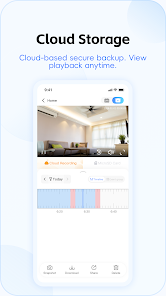
Take advantage of flexible cloud storage options that allow you to save and access your recordings anytime, anywhere. With V380 Pro, you won't have to worry about losing crucial footage, as everything is securely stored in the cloud for easy retrieval.

HD Video Quality

Experience crystal-clear visuals with V380 Pro's HD video quality. Whether you're monitoring your home or office, the high-definition feed ensures that every detail is captured, making it easier to keep an eye on your surroundings at all times.

Smart Motion Detection

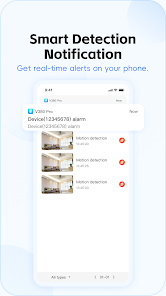
V380 Pro comes equipped with smart motion detection technology that alerts you instantly when movement is detected. This feature helps enhance security by ensuring you’re always aware of any unusual activity in real-time, giving you peace of mind.

Two-Way Audio

Stay connected with the two-way audio feature that allows you to communicate seamlessly. Whether you're checking in on pets or talking to family members, the built-in speaker and microphone make interactions feel natural and engaging.

Pros & Cons

Pros
  • High-definition video for clear image quality
  • Remote access for convenient monitoring anytime
  • Two-way audio for real-time communication
  • Night vision capability for 24/7 surveillance
  • Motion detection alerts for enhanced security
Cons
  • Limited compatibility with some smart home systems
  • Frequent connectivity issues reported by users
  • App interface can be confusing for beginners
  • Video quality may not meet all expectations

Real Experience Using V380 Pro

Application Scenarios

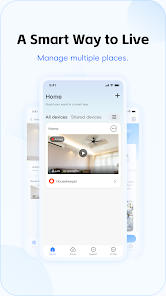
The V380 Pro app is designed primarily for managing IP cameras, making it an invaluable tool for home security and surveillance. Users can easily set up their cameras to monitor specific areas, whether it’s ensuring the safety of your home while on vacation, keeping an eye on your pets during the day, or monitoring your business premises. The app allows for real-time video streaming, motion detection alerts, and two-way audio, making it versatile for various security needs. Furthermore, the ability to access recorded footage remotely means users can review incidents at their convenience, providing peace of mind and enhanced security.

User Experience

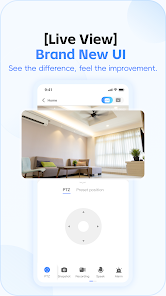
The user experience on V380 Pro is intuitive and user-friendly. The initial setup process is straightforward, guiding users through connecting their cameras to Wi-Fi and configuring settings. The interface is clean and organized, allowing users to navigate effortlessly between different features such as live view, playback, and camera settings. The quality of the video feed is generally impressive, with clear images and minimal lag. Users appreciate the customizable motion detection settings, which help to reduce false alarms by allowing them to set specific zones for monitoring. Additionally, the app's ability to send instant notifications when motion is detected ensures that users stay informed about any activity in real-time.

Pricing

V380 Pro is free to download, making it accessible for a wide range of users. However, while the core functionalities are available at no cost, there are optional in-app purchases and subscription plans for advanced features such as enhanced cloud storage and additional camera connections. This tiered pricing model allows users to choose a plan that best fits their needs, whether they require basic functionalities or more extensive surveillance capabilities. The affordability of the app, combined with its robust features, makes it an attractive choice for individuals and businesses looking to enhance their security.

Updates & Support

The developers of V380 Pro are committed to regularly updating the app to improve performance and user experience. Frequent updates not only fix bugs but also introduce new features that enhance functionality and security. Users can easily access support through the app or the official website, where they can find FAQs, troubleshooting tips, and customer service contact information. The responsiveness of the support team is commendable, with many users reporting quick resolutions to their inquiries and issues. Overall, the combination of regular updates and reliable support ensures that users can depend on V380 Pro for their surveillance needs.

verified Security & Privacy Review

The V380 Pro app prioritizes user security and privacy, implementing several measures to protect sensitive information. The app requires various permissions, including access to the camera and storage, which are essential for its core functionalities, such as live streaming and video recording. However, users should be cautious and review these permissions carefully to ensure they are comfortable with the app's access to their device. Data transmitted through the V380 Pro app is typically encrypted to safeguard against unauthorized access. Nevertheless, users should be aware that the app relies on cloud storage services, which may raise concerns about data handling and retention policies. It is advisable for users to familiarize themselves with the app's privacy policy to understand how their data is collected, used, and shared. While V380 Pro offers a user-friendly experience, it is essential for individuals to remain vigilant about their privacy settings and to regularly update the app to benefit from the latest security enhancements. Overall, while the app takes steps to ensure security, users should exercise discretion and awareness regarding their personal information.

Reviews

4.0

“User-friendly interface with great camera quality.”

“Reliable connectivity and easy setup.”

“Motion detection feature works perfectly.”

“Excellent value for money.”

“Live streaming is smooth and clear.”

Editor's Choice