This site uses cookies to enhance your user experience. By clicking any link on this site you are giving your consent to our cookie policy. Read more
Reject
Accept All
TP-Link Tether

TP-Link Tether

verified Verified App

Developer: TP-LINK SYSTEMS INC.

  • category

    Category: Tools

  • price

    Price: free

  • age rating

    Age Rating: Everyone

  • rating

    Rating: 4.7

  • download

    Downloads: 50,000,000+

  • version

    Version: 4.12.133

Screenshot 1
Screenshot 2
Screenshot 3
Screenshot 4
Screenshot 5
Screenshot 6
Screenshot 7
Screenshot 8
Screenshot 9
Screenshot 10
Screenshot 11
Screenshot 12

Features & Highlights

Easy Network Management

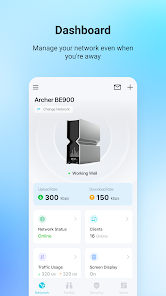
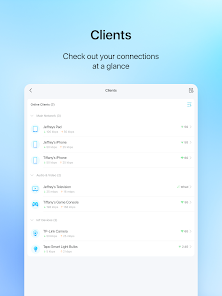
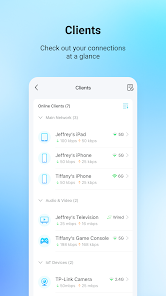
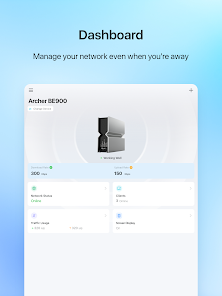
TP-Link Tether simplifies your home network management with an intuitive interface that allows users to monitor and control their network from anywhere. You can easily manage connected devices, check network status, and adjust settings all from your smartphone, making it a breeze to stay connected and in control.

Guest Network Setup

The app allows you to create a separate guest network with just a few taps, providing visitors with internet access while keeping your main network secure. This feature is perfect for maintaining privacy and security without compromising on convenience when hosting friends or family.

Parental Controls

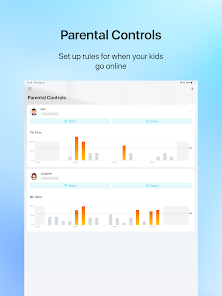
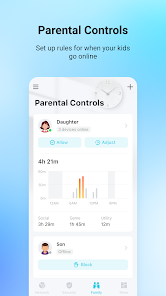
With TP-Link Tether, you can set up robust parental controls to manage your children's internet usage. This feature lets you block specific websites and limit internet access during designated times, ensuring a safer online experience for your family and peace of mind for parents.

Real-Time Speed Test

TP-Link Tether includes a built-in speed test feature that allows you to check your internet speed in real-time. This helps you ensure that you're getting the bandwidth you're paying for, troubleshoot connectivity issues, and optimize your network performance whenever necessary.

Pros & Cons

Pros
  • User-friendly interface simplifies network management
  • Remote access allows control from anywhere
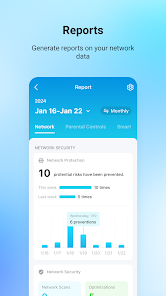
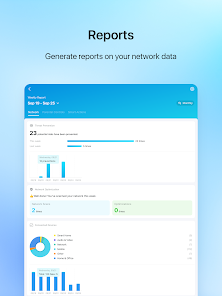
  • Real-time monitoring for network performance insights
  • Parental controls promote safer internet usage
  • Device management streamlines connectivity for all devices
Cons
  • Limited device compatibility with older routers
  • Lacks advanced features for power users
  • Interface can be confusing for beginners
  • Occasional connectivity issues reported by users

Real Experience Using TP-Link Tether

Application Scenarios

The TP-Link Tether app is designed to enhance user interaction with TP-Link networking devices, primarily routers and range extenders. One common scenario is home network management, where users can easily monitor and control their internet settings from a smartphone or tablet. This convenience is particularly beneficial for families who need to manage multiple devices connected to the network. Users can set parental controls to regulate internet access for children, ensuring a safer online environment. Another scenario involves troubleshooting connectivity issues. With the app, users can perform quick diagnostics to identify network problems, such as slow speeds or dropped connections, providing a streamlined solution without needing to consult technical manuals. Furthermore, the app is ideal for small business owners who need to manage guest networks and prioritize bandwidth for critical applications, enabling efficient and effective internet use in a commercial setting.

User Experience

The user experience of the TP-Link Tether app is generally positive, characterized by an intuitive interface that simplifies navigation. Upon logging in, users are greeted with a clean dashboard displaying essential information about their network status and connected devices. The app's design focuses on accessibility, making it easy for users of all technical backgrounds to manage their networks without feeling overwhelmed. However, some users have reported occasional glitches, such as slow loading times or difficulties in device recognition. Despite these minor setbacks, the overall responsiveness of the app and the ability to configure network settings seamlessly contribute to a satisfying user experience. Additionally, the app provides helpful notifications, alerting users to potential security issues or updates, further enhancing its functionality.

Pricing

TP-Link Tether is a free application available for both iOS and Android devices, making it an attractive option for consumers who want to manage their networking devices without incurring additional costs. There are no hidden charges or subscription fees associated with the app, which is a significant advantage compared to other network management tools that may require a premium subscription for advanced features. The app’s integration with TP-Link hardware means that users who have invested in TP-Link products can leverage the app's full functionality at no extra cost.

Updates & Support

TP-Link is committed to providing regular updates for the Tether app, ensuring that users have access to the latest features and security enhancements. The app frequently receives improvements that address user feedback, which demonstrates TP-Link's dedication to user satisfaction. The support system is also commendable; users can access comprehensive online resources, including FAQs and troubleshooting guides. For more personalized assistance, TP-Link offers customer support via email and phone, although response times may vary. Overall, the combination of regular updates and accessible support contributes to a positive user experience, making the TP-Link Tether app a reliable choice for managing home and office networks.

verified Security & Privacy Review

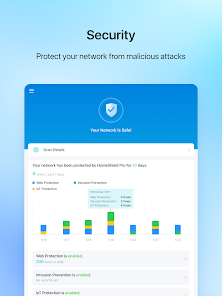
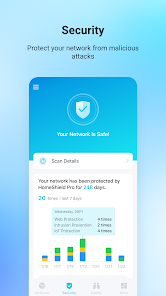
The TP-Link Tether app prioritizes user security and privacy while managing TP-Link networking devices. The app employs robust encryption protocols to safeguard data transmission between the user’s device and the router, ensuring that sensitive information remains protected from unauthorized access. Regarding permissions, TP-Link Tether requires access to certain device features, including location services to improve network management. However, users can control these permissions, granting access only when necessary. The app does not collect excessive personal data, aligning with best practices for user privacy. TP-Link has implemented a privacy policy that outlines how user data is handled. The policy specifies that data collected is primarily used for enhancing user experience and troubleshooting purposes. Furthermore, TP-Link commits to not selling user information to third parties, reinforcing their dedication to user privacy. Overall, TP-Link Tether demonstrates a solid commitment to security and privacy, making it a reliable tool for managing home networks while respecting user data and permissions.

Reviews

4.7

“User-friendly interface makes management easy and efficient.”

“Great for monitoring network performance and devices.”

“Reliable app with consistent functionality and updates.”

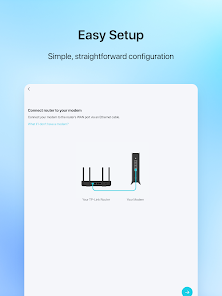
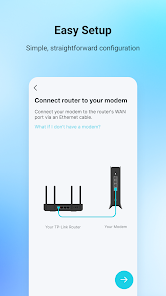
“Quick setup process saves time and hassle.”

“Excellent parental controls for managing children's internet access.”

Editor's Choice