This site uses cookies to enhance your user experience. By clicking any link on this site you are giving your consent to our cookie policy. Read more
Reject
Accept All
TP-Link Deco

TP-Link Deco

verified Verified App

Developer: TP-LINK SYSTEMS INC.

  • category

    Category: Tools

  • price

    Price: free

  • age rating

    Age Rating: Everyone

  • rating

    Rating: 4.7

  • download

    Downloads: 5,000,000+

  • version

    Version: 3.10.77

Screenshot 1
Screenshot 2
Screenshot 3
Screenshot 4
Screenshot 5
Screenshot 6

Features & Highlights

Advanced Security Features

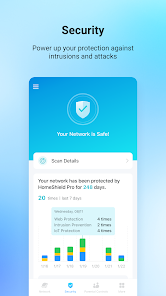
The Deco system comes equipped with advanced security features that help protect your network from potential threats. With built-in antivirus, malware protection, and parental controls, you can surf the web with peace of mind, knowing your devices and data are safeguarded against online risks.

Easy Setup and Management

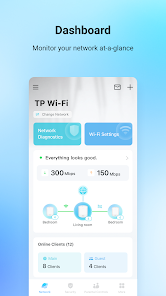
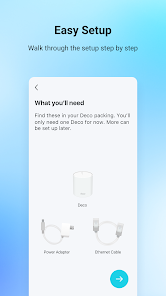
Setting up the TP-Link Deco is a breeze, thanks to its user-friendly mobile app that guides you through the process step-by-step. You can easily manage your network settings, monitor connected devices, and even pause internet access for specific users, all from the convenience of your smartphone.

Parental Controls

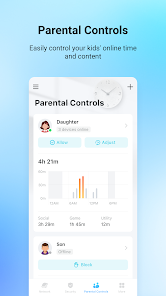
TP-Link Deco offers robust parental controls that allow you to manage screen time and filter content for your kids. With customizable settings, you can ensure a safer online experience for your family, giving you control over what your children can access while they browse the internet.

Seamless Wi-Fi Coverage

TP-Link Deco provides a robust mesh network that eliminates dead zones, ensuring seamless Wi-Fi coverage throughout your home. With multiple units working together, you can enjoy a strong and stable connection in every corner, whether you're streaming, gaming, or working remotely.

Pros & Cons

Pros
  • Easy setup with user-friendly app
  • Seamless Wi-Fi coverage throughout your home
  • Automatic updates ensure optimal security
  • Parental controls for safe browsing experiences
  • Supports multiple devices without slowing down
Cons
  • Limited advanced settings for power users
  • Expensive compared to competitors
  • Average customer support experiences reported
  • Dependency on mobile app for configuration

Real Experience Using TP-Link Deco

Application Scenarios

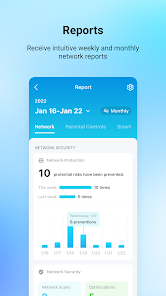
The TP-Link Deco app serves as a central hub for managing your home Wi-Fi network, making it ideal for various scenarios. For families with multiple devices, the app allows for seamless management of connected devices, ensuring that everyone gets a stable and fast internet connection. In a home office setup, users can prioritize bandwidth for work-related devices or applications, enhancing productivity. Additionally, the app is perfect for tech-savvy users who want to monitor their network activity in real time. It offers features like parental controls, enabling parents to set limits on screen time or restrict access to certain content, making it a versatile tool for modern households.

User Experience

User experience with the TP-Link Deco app is generally positive, thanks to its intuitive design and user-friendly interface. Navigating through the app is straightforward, allowing users to easily set up their network in just a few taps. The app provides a clear overview of connected devices and their data usage, which helps users manage their network more effectively. The setup process is guided with helpful prompts, making it accessible even for those who might not be tech-savvy. Additionally, the app's performance is stable, with minimal lag during operation, ensuring that users can quickly make adjustments as needed. However, some users have reported occasional connectivity issues, which can be frustrating, but these instances appear to be infrequent.

Pricing

The TP-Link Deco app itself is free to download, but it requires the purchase of TP-Link Deco hardware to function fully. The pricing for the Deco devices varies depending on the model and the number of units included in the package. Generally, users can expect to spend between $100 and $300 for a set of Deco units, which provides comprehensive coverage for homes of different sizes. While the initial investment may seem steep, many users find that the performance and features justify the price, especially when considering the long-term benefits of improved Wi-Fi coverage and network management.

Updates & Support

TP-Link is known for providing regular updates to the Deco app, enhancing its functionality and security features. Users can expect periodic enhancements that improve performance, fix bugs, and introduce new features based on user feedback. The support options are robust, including a comprehensive online help center, user manuals, and community forums where users can share tips and troubleshoot issues. For users needing direct assistance, TP-Link offers customer support via phone and online chat, ensuring that help is readily available for any concerns or inquiries. Overall, the ongoing updates and accessible support contribute positively to the overall user experience with the TP-Link Deco app.

verified Security & Privacy Review

The TP-Link Deco app demonstrates a strong commitment to security and privacy, essential for managing home networks effectively. The app utilizes robust encryption protocols to safeguard user data during transmission, ensuring that sensitive information remains protected from potential threats. In terms of permissions, the app requires access to location services to provide optimal network management and device placement suggestions. However, it emphasizes user consent, allowing individuals to control what information they share. The app also offers features like parental controls and security alerts, enhancing user oversight of network activities. TP-Link maintains a transparent privacy policy, outlining how user data is collected, used, and stored. Personal information is handled with care, and users have the option to opt out of data collection practices. Regular updates are provided to address vulnerabilities, further reinforcing the app's security posture. Overall, the TP-Link Deco app prioritizes user privacy and data security, making it a reliable choice for managing home networks while keeping user information safe.

Reviews

4.7

“Reliable coverage throughout my entire home.”

“Easy setup and management via the app.”

“Significantly improved my Wi-Fi speed and stability.”

“Great customer support when I had issues.”

“Sleek design fits well with my decor.”

Editor's Choice