This site uses cookies to enhance your user experience. By clicking any link on this site you are giving your consent to our cookie policy. Read more
Reject
Accept All
TimeTree - Shared Calendar

TimeTree - Shared Calendar

verified Verified App

Developer: TimeTree, Inc.

  • category

    Category: Productivity

  • price

    Price: free

  • age rating

    Age Rating: Everyone

  • rating

    Rating: 4.7

  • download

    Downloads: 10,000,000+

  • version

    Version: 14.41.3

Screenshot 1
Screenshot 2
Screenshot 3
Screenshot 4
Screenshot 5
Screenshot 6
Screenshot 7

Features & Highlights

Custom Notifications

Stay informed without being overwhelmed! TimeTree offers customizable notifications for events, allowing users to choose when and how they want to be reminded, ensuring they never miss an important occasion while keeping distractions to a minimum.

Event Collaboration

With TimeTree, collaborating on events is easy and effective. Users can add comments, attach files, and share details within the event, ensuring that all participants are on the same page and can contribute ideas or changes effortlessly.

Multiple Calendar Views

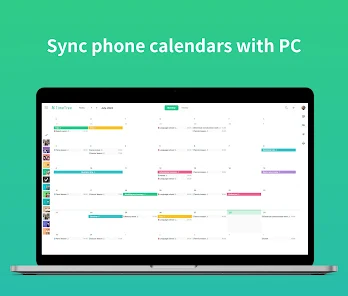
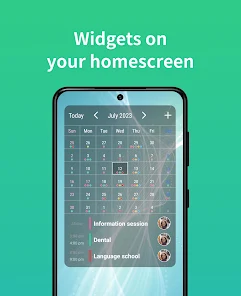
TimeTree provides various calendar views, including daily, weekly, and monthly layouts, catering to different planning styles. This flexibility helps users visualize their schedules in a way that works best for them, enhancing productivity and time management.

Shared Calendar

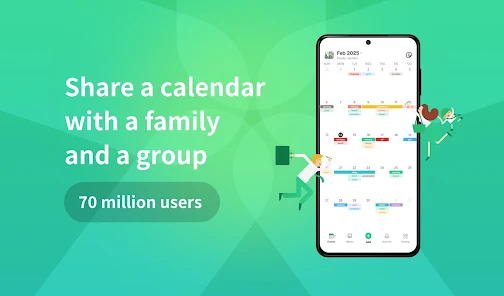
TimeTree allows users to create and share calendars seamlessly with friends, family, or colleagues. This feature ensures everyone stays in the loop with important events and appointments, making coordination a breeze for group activities or family schedules.

Pros & Cons

Pros
  • Seamless collaboration with family and friends
  • User-friendly interface for easy navigation
  • Real-time updates keep everyone informed
  • Customizable calendars for personalized organization
  • Event reminders to prevent missed appointments
Cons
  • Limited customization options for calendar views
  • Syncing issues with non-TimeTree calendars
  • Lack of advanced features for power users
  • User interface can be confusing for newcomers

Real Experience Using TimeTree - Shared Calendar

Application Scenarios

TimeTree - Shared Calendar is designed to facilitate collaboration among family members, friends, and coworkers. It excels in various scenarios, such as planning family events, coordinating schedules for group activities, or managing project timelines at work. Users can create different calendars for distinct purposes, allowing them to separate personal and professional commitments effortlessly. For instance, a family can use TimeTree to keep track of everyone’s appointments, school events, and social gatherings, while a project team might utilize it to establish deadlines and assign tasks. The app's shared calendar feature enables real-time updates, making it easy for all participants to stay informed about changes, ensuring everyone is on the same page.

User Experience

The user experience of TimeTree is intuitive and user-friendly, making it accessible even to those who may not be tech-savvy. Upon opening the app, users are greeted with a clean interface that allows for easy navigation. Adding events is straightforward; users can input details, set reminders, and invite others to join. The color-coding feature helps users visually distinguish between different calendars and events, enhancing organization. Moreover, the ability to leave comments and upload images within events adds a personal touch, making it more than just a scheduling tool. Notifications are timely and customizable, ensuring that users never miss important dates. Overall, the seamless integration of features fosters a collaborative atmosphere, making planning enjoyable rather than a chore.

Pricing

TimeTree offers a free version that provides ample features for casual users, including unlimited calendars, event creation, and basic sharing options. However, for those seeking advanced functionalities, such as enhanced storage for attachments or additional customization options, TimeTree provides a premium subscription model. The pricing is competitive, offering value for individuals and teams who rely heavily on shared scheduling. The subscription model makes it feasible for users to upgrade their experience while still allowing free access for those who need basic features. This flexible pricing structure caters to a wide range of users, from families to large organizations.

Updates & Support

TimeTree is consistently updated to improve user experience and introduce new features based on user feedback. The development team is proactive in addressing bugs and enhancing performance, ensuring that the app remains reliable. Users can access a comprehensive support section within the app, featuring FAQs and troubleshooting tips. Additionally, for more personalized assistance, TimeTree offers customer support via email, providing prompt responses to inquiries. The commitment to regular updates and responsive support reinforces TimeTree’s dedication to meeting user needs, making it a dependable choice for shared calendar solutions.

verified Security & Privacy Review

TimeTree - Shared Calendar takes user security and privacy seriously, implementing several measures to protect personal information. The app employs end-to-end encryption for calendar data, ensuring that only authorized users can access shared events and details. This encryption helps prevent unauthorized access, providing users with peace of mind regarding their shared schedules. When it comes to privacy practices, TimeTree is transparent about its data collection policies. The app collects only the necessary information to provide its services, such as email addresses for account creation and user authentication. TimeTree does not sell user data to third parties, reinforcing its commitment to user privacy. Regarding permissions, TimeTree requires access to the user’s calendar and contacts to facilitate event sharing and collaboration. Users are informed of these permissions during the app setup process, allowing them to make informed decisions about their data. Additionally, the app provides options for users to manage their sharing settings, giving them control over who can view or edit their calendars.

Reviews

4.7

“Great for coordinating family schedules!”

“User-friendly interface, easy to navigate.”

“Love the shared event feature!”

“Custom reminders keep us organized.”

“Perfect for managing group activities!”

Editor's Choice