This site uses cookies to enhance your user experience. By clicking any link on this site you are giving your consent to our cookie policy. Read more
Reject
Accept All

Advertiser and Editorial Disclosures

Talking Translator - Languages

Talking Translator - Languages

verified

idealappcenter

4.6
Rating
10,000,000+ Downloads
3.5.1 Version
  • category

    Category: Tools

  • price

    Price: free

  • age rating

    Age Rating: Everyone

  • rating

    Rating: 4.6

  • available on

    Available on: /

  • updated on

    Updated on: Jun 22, 2026

Screenshot 1
Screenshot 2
Screenshot 3
Screenshot 4
Screenshot 5
Screenshot 6
Screenshot 7
Screenshot 8
Screenshot 9
Screenshot 10
Screenshot 11
Screenshot 12
Screenshot 13
Screenshot 14
Screenshot 15
Screenshot 16
Screenshot 17
Screenshot 18

Features & Highlights

Real-Time Translation

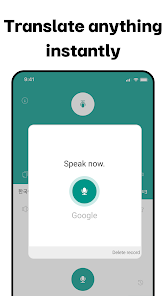
Experience seamless communication with real-time translation capabilities that support a wide range of languages. Whether you're traveling or chatting with friends from different cultures, this feature ensures you stay connected without language barriers, making conversations smoother and more enjoyable.

Text Translation

With the ability to translate written text instantly, you can easily read signs, menus, or documents in different languages. Simply point your device's camera at the text, and watch as it transforms into your preferred language, making navigation and comprehension a breeze.

User-Friendly Interface

The app is designed with a clean and intuitive interface, making it easy for users of all ages to navigate. With just a few taps, you can access translation features, adjust settings, and explore language options, ensuring a hassle-free experience.

Voice Recognition

Talking Translator - Languages boasts advanced voice recognition technology, allowing you to speak naturally and have your words accurately translated. This hands-free feature is perfect for on-the-go situations, enabling you to focus on your conversation rather than typing out text.

Pros & Cons

Pros
  • Instant translations enhance communication in real-time conversations.
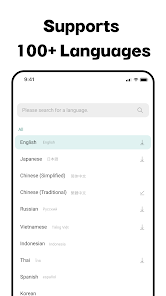
  • Supports multiple languages for global connectivity and understanding.
  • User-friendly interface makes navigation simple and efficient.
  • Voice recognition feature ensures accurate translations for spoken language.
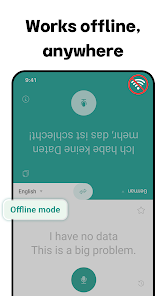
  • Offline functionality allows use without internet access anywhere, anytime.
Cons
  • Limited language support may hinder communication in diverse settings.
  • Offline functionality is often restricted, requiring internet access.
  • Accuracy can vary, leading to misunderstandings in translations.

Real Experience Using Talking Translator - Languages

Application Scenarios

Talking Translator - Languages is an essential tool for travelers, students, and professionals who need to communicate across language barriers. Whether you are exploring the bustling streets of Tokyo, attending a business meeting in Paris, or studying a new language in a classroom, this app proves invaluable. With its capability to translate spoken words in real-time, users can engage in fluid conversations without the typical interruptions caused by language differences. Additionally, it serves as a handy assistant for tourists looking to navigate menus, ask for directions, or understand local customs. The app also caters to language learners, providing them with a practical platform to practice pronunciation and comprehension through interactive features.

User Experience

The user experience of Talking Translator is designed to be intuitive and user-friendly. Upon launching the app, users are greeted with a clean interface that makes it easy to select languages and input text or speech. The voice recognition technology is generally accurate, quickly converting spoken language into text and then translating it into the desired language. Users appreciate the option to hear translations spoken aloud, which aids in learning correct pronunciation. Moreover, the app's offline mode is a significant advantage, allowing users to download specific language packs for use in areas with limited connectivity. However, some users have reported occasional glitches, particularly with less common languages, but these instances are generally rare and do not detract significantly from the overall experience.

Pricing

Talking Translator offers a freemium model that allows users to access basic translation features without any cost. However, for those who require advanced functionalities, such as unlimited offline access or additional language packs, there is a subscription option available. The pricing is competitive compared to similar translation apps, making it a cost-effective choice for users who need reliable translation services. The app often provides promotions or discounts for long-term subscriptions, which can appeal to frequent travelers or business professionals who rely heavily on its capabilities.

Updates & Support

The developers of Talking Translator are committed to continuous improvement, frequently releasing updates that enhance performance and expand language options. Users can expect regular enhancements based on feedback, ensuring that the app stays relevant in a rapidly evolving technological landscape. Customer support is accessible through the app, with a dedicated team ready to assist with inquiries or troubleshooting. Users have reported prompt responses, which adds to the overall satisfaction with the service. Additionally, the app includes a comprehensive FAQ section that addresses common concerns and helps users maximize their experience.

verified Security & Privacy Review

The Talking Translator - Languages app prioritizes user security and privacy through robust data handling practices. The app employs encryption protocols to safeguard user data during transmission, ensuring that sensitive information remains protected from unauthorized access. In terms of permissions, the app requests access to the microphone and storage, which are essential for its translation features. Users are advised to review these permissions carefully, as they can affect personal privacy. The app does not collect unnecessary personal information, focusing solely on the data required for its functionality. Furthermore, the app's privacy policy clearly outlines how user data is collected, used, and shared. It emphasizes a commitment to not selling personal information to third parties, providing users with peace of mind regarding their data. Overall, the Talking Translator - Languages app demonstrates a conscientious approach to security and privacy, making it a reliable choice for users seeking translation services without compromising their personal information.

User Reviews

  • Rae Baby
    2026/04/29

    this app helped me a lot while working at clubs but now with the update it won't translate my name from other languages and tries to guess what I mean instead. I think a good addition to the app would be a personal translation dictionary where you can add your own names and words for certain translations. edit: still won't say my name.... plus the ads are annoying now... I literally just opened the app translated one thing twice and got an ad right after

  • Stephen Adams
    2026/02/27

    I used to think this app was amazing. but they've really ruined the app over the winter with their updates. you actually used to be able to have conversations with another person. but now your constantly waiting for their messedup up mic settings to pick up what you say. then it waits an extra 30 seconds before trying to process the translation. never know how long that'll take. cant have an actual conversation anymore, its cute they still call it that in app tho. "instantly" lmfao OK

  • TxDanzChic Getch
    2026/01/08

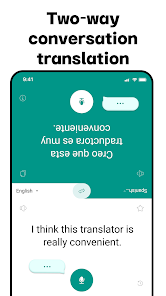
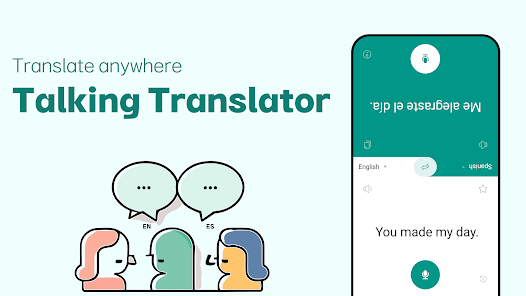
    I like the two-sided layout where are you just hand the phone to them to read and talk into. It works great for talking translation in common languages like Spanish and English,but wish it offered talking translation for Creole Haitian . It's a pain when they have to scroll down that tiny screen to see what I wrote instead of just listening to it. But for now it's the best talking translation app that I've used.

  • Lisa Dupere
    2023/12/27

    My favorite app for translating! It makes communication with the non-english speaking students in my classroom seamless! It helps them understand exactly what I've said. In return, they can speak (or type) right into my phone and I instantly know what they are saying. It is free to use and I don't have to wait for pop-ups or ads to play for things to be translated. Works perfectly anywhere you need to communicate with others.

  • levi barrett
    2024/02/14

    The app is really great, I got a new student who speaks a different language and now I can efficiently speak to them, thanks to this app. The only problems are 1) there are not many languages available when you try to use the conversate button, could be very useful. 2) it doesn't work offline, it would be good if you go travel somewhere without proper internet and still be able to talk to the people. Download it if you want to. Very nice

Review Source: Google Play store public user reviews.

FAQ

1

Can I submit suggestions or feedback to Talking Translator - Languages?

Yes, users are encouraged to submit suggestions or feedback through the app's support or feedback section, helping the developers improve future updates and features.

2

Does Talking Translator - Languages collect my personal data?

Talking Translator - Languages may collect some personal data to enhance user experience and provide personalized services, but it adheres to privacy policies to protect user information.

3

Does Talking Translator - Languages support offline use?

Yes, Talking Translator - Languages offers offline translation capabilities, allowing users to translate languages without an internet connection by downloading specific language packs.

4

How do I cancel my Talking Translator - Languages subscription?

Users can cancel their subscription to Talking Translator - Languages through the app settings or their respective app store account settings before the next billing cycle.

5

How much does a subscription to Talking Translator - Languages cost?

Subscription costs for Talking Translator - Languages vary based on the plan chosen, with options for monthly or yearly subscriptions available for users seeking additional features.

How to use Talking Translator - Languages

1

Can I log in using my social media accounts?

Yes, you can log in using your Facebook or Google account for easier access to your Talking Translator.

2

How can I contact customer service for help with my Talking Translator?

You can reach customer service via the support section in the app or by emailing support

3

How do I activate my Talking Translator account?

To activate your account, click the activation link sent to your email after registration and follow the prompts.

4

How long does it take to activate my account?

Account activation is usually instantaneous; however, check your email for the activation link. If not received, contact customer service.

5

I forgot my customer number; how can I retrieve it?

You can retrieve your customer number by checking the confirmation email sent during your account registration.

What's New

·Talking Translator Update· ConversationImprove application usability and stabilityThe app has been improved remarkably after fixing minor errors.The app has been perfectly renewed. Spread the word around you.

Editor's Choice