This site uses cookies to enhance your user experience. By clicking any link on this site you are giving your consent to our cookie policy. Read more
Reject
Accept All

Advertiser and Editorial Disclosures

T-Mobile FamilyWhere

T-Mobile FamilyWhere

verified

T-Mobile USA

3.6
Rating
1,000,000+ Downloads
tmofw-10.10.5-b62-0c049ba7f Version
  • category

    Category: Lifestyle

  • price

    Price: free

  • age rating

    Age Rating: Everyone

  • rating

    Rating: 3.6

  • available on

    Available on: /

  • updated on

    Updated on: Dec 5, 2024

Screenshot 1
Screenshot 2
Screenshot 3
Screenshot 4
Screenshot 5
Screenshot 6
Screenshot 7

Features & Highlights

Activity Monitoring

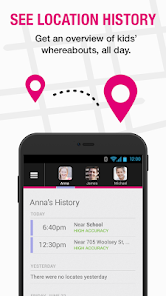
T-Mobile FamilyWhere offers activity monitoring to keep an eye on the movement patterns of your family members. With this feature, you can see where they've been and how long they stayed, giving you insight into their daily routines.

Geofencing Alerts

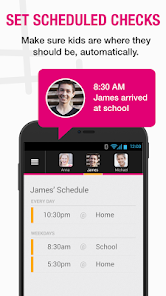
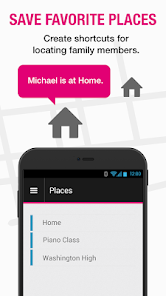
Set up custom geofences to receive alerts when family members enter or leave designated areas. This feature helps you keep track of your children's whereabouts and ensures they stay safe within predefined boundaries, providing an extra layer of security.

Location Tracking

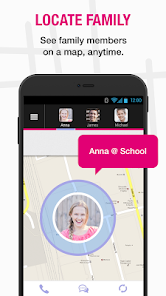
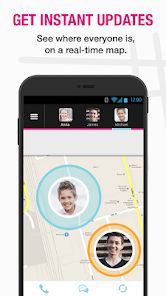
Stay connected with real-time location tracking of family members. T-Mobile FamilyWhere allows you to view the precise location of your loved ones on a map, ensuring peace of mind whether they are at school, work, or out with friends.

Privacy Controls

Empower your family with privacy controls that let them manage their own location sharing. T-Mobile FamilyWhere respects individual privacy while ensuring that family members can choose when to share their whereabouts, fostering trust and open communication.

Pros & Cons

Pros
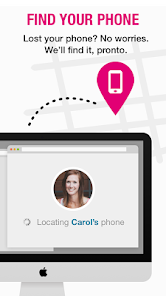
  • Easily locate family members' devices anytime
  • Receive alerts when family arrives or leaves locations
  • Monitor device usage for better family safety
  • Customize settings for privacy and control
  • Access location history for added security
Cons
  • Limited accuracy in location tracking capabilities
  • Not available for all devices
  • May drain battery quickly
  • Privacy concerns with location sharing

Real Experience Using T-Mobile FamilyWhere

Application Scenarios

T-Mobile FamilyWhere is designed to enhance family safety and connectivity by allowing users to share their real-time locations with family members. This app is particularly useful for parents wanting to keep track of their kids' whereabouts, especially in busy environments or during outings. For instance, during a family trip to a theme park, parents can easily locate their children if they wander off. Additionally, the app can be beneficial in emergency situations, providing peace of mind when family members are traveling alone or in unfamiliar areas. Users can set geofences to receive alerts when loved ones enter or exit designated locations, making it easier to manage daily routines and schedules.

User Experience

The user experience of T-Mobile FamilyWhere is generally positive, marked by a user-friendly interface that is easy to navigate. Upon opening the app, users are greeted with a clean dashboard that displays the real-time locations of family members on a map. The app also offers customizable settings, allowing users to adjust notifications and privacy settings to match their comfort levels. However, some users have reported occasional inaccuracies in location tracking, which can be frustrating. Overall, the app provides a reliable service, and the benefits of knowing where family members are at any given time outweigh the minor drawbacks. Furthermore, the ability to communicate directly through the app enhances the overall experience, creating a seamless connection among family members.

Pricing

T-Mobile FamilyWhere is included at no additional cost for T-Mobile customers, making it an attractive option for families already using T-Mobile services. This is a significant advantage, as many similar applications require separate subscriptions, which can add up over time. For those considering switching to T-Mobile, the app adds value to the service package, making it a worthwhile investment for families seeking enhanced safety features. Users should check with T-Mobile for any promotional offers that may further reduce costs or provide additional features.

Updates & Support

T-Mobile is proactive in providing updates to FamilyWhere, ensuring that the app remains functional and incorporates user feedback for improvements. Regular updates not only enhance performance but also introduce new features that cater to evolving user needs. In terms of support, T-Mobile offers comprehensive customer service options, including online resources, FAQs, and direct support via phone or chat. Users can easily access assistance for any technical issues or inquiries they may have, ensuring a positive experience with the app. Overall, T-Mobile FamilyWhere combines essential features, user-friendly design, and solid support, making it a reliable choice for family safety and connectivity.

verified Security & Privacy Review

The T-Mobile FamilyWhere app prioritizes user security and privacy while providing location tracking services. It utilizes encryption protocols to safeguard the transmission of location data, ensuring that information is securely shared between devices. Users have control over their privacy settings, allowing them to customize who can access their location information. When it comes to permissions, the app requires access to location services, which is essential for its core functionality. Users are prompted to grant these permissions during the setup process, and they can modify them at any time in their device settings. The app does not collect unnecessary personal information, focusing solely on data relevant to its services. FamilyWhere adheres to T-Mobile's privacy policy, which outlines how user data is collected, used, and protected. The company commits to not selling user data to third parties, enhancing user trust. Overall, T-Mobile FamilyWhere demonstrates a strong commitment to data security and user privacy, making it a reliable choice for families seeking location tracking tools.

User Reviews

  • A Google user
    2019/03/22

    Before the one month trial period is even up, I only get an error message telling me to try again. I uninstalled and reinstalled, to no avail. Update. nearly 3 years later, I use the app often. It generally works well, though there are occasional location hiccups. Urban locations seem problematic, especially if on a higher floor of a building; it seems to throw off the signal timing to get an accurate location.

  • Jamie Renshaw
    2020/04/30

    App stopped working. I've uninstalled and reinstalled and still isn't working. App opens and as soon as it opens it automatically closes. Frustrated. Please fix. I've had this app for several years and this is the first time I've had problems. Need it for tracking my teenage driver's. T Mobile your response to my review is not applicable. As I have the app and know that it is active. It just is not working your app has bugs and is malfunctioning. No longer works on WiFi.

  • Tim Blake
    2021/03/08

    the problem with the service is that it is way too unspecific as to locations. where Google's find my phone will pinpoint a location to within a few feet, this app never locates closer than a tenth of a mile, usually a quarter mile or more radius. come on T Mobile...you've got to do better than this, especially for what you change for this service.

  • Bonnie Jasper
    2024/03/11

    Worst location information ever. It's not even close to the actual location at any point and time. Most of the time its way off by a couple miles. I used to get notifications via text throughout the day, now I get zero. I have to manually go into the app and refresh the location map in order to get any updates. None of my scheduled alerts are being sent through via my text preference. This is a big waste of my money, but I keep holding out hoping they will finally fix it to be as good as others.

  • A Google user
    2019/12/22

    This app is great if I'm tracking Android phones, i can actually pinpoint exactly where the phone is in a house, but if I need to track my family on their Apple devices, the location is very poor. With Apple phones, it only gives a low accuracy. I really hope that this gets corrected, especially since i pay $10 every month for this service! If it gets fixed, I will change my rating from 3 stars to 5 stars.

Review Source: Google Play store public user reviews.

FAQ

1

Does T-Mobile FamilyWhere collect my personal data?

T-Mobile FamilyWhere may collect certain personal data, such as location information and device identifiers, to provide its services. Users should review the privacy policy for details on data collection and usage.

2

Does T-Mobile FamilyWhere offer a free trial or free version?

T-Mobile FamilyWhere may offer a limited free trial or promotional period, but generally, it requires a subscription for full access to its features. Check the T-Mobile website for current offers.

3

Does T-Mobile FamilyWhere require an internet connection?

Yes, T-Mobile FamilyWhere requires an internet connection, either through Wi-Fi or mobile data, to function effectively, as it relies on GPS and data services to provide real-time location updates.

4

How can I contact support or send feedback for T-Mobile FamilyWhere?

You can contact T-Mobile customer support through their website or app, or you can call their support hotline. Feedback can usually be sent through the app or by reaching out via official T-Mobile channels.

5

How do I manage or cancel my T-Mobile FamilyWhere subscription?

You can manage or cancel your T-Mobile FamilyWhere subscription through your T-Mobile account online or by contacting T-Mobile customer service for assistance.

How to use T-Mobile FamilyWhere

1

Can I retrieve my FamilyWhere account if I lost my customer number?

Yes, you can retrieve your customer number by logging into your T-Mobile account or contacting customer service for help.

2

How can I change my FamilyWhere account details?

Log in to your T-Mobile account online to update your FamilyWhere account details or contact customer service for assistance.

3

How can I check my FamilyWhere account status with customer service?

You can call T-Mobile customer service to inquire about your account status or check it online through your T-Mobile account.

4

How can I contact T-Mobile customer service for FamilyWhere?

You can reach T-Mobile customer service by calling 1-800-937-8997 or using the T-Mobile app for support.

5

How do I log in to my FamilyWhere account?

Visit the FamilyWhere website and enter your T-Mobile phone number and password to log in.

What's New

This release contains minor updates to clarify how FamilyWhere uses some phone settings.

Editor's Choice