This site uses cookies to enhance your user experience. By clicking any link on this site you are giving your consent to our cookie policy. Read more
Reject
Accept All
Sync - Secure cloud storage

Sync - Secure cloud storage

verified Verified App

Developer: Sync.com Inc.

  • category

    Category: Productivity

  • price

    Price: free

  • age rating

    Age Rating: Everyone

  • rating

    Rating: 4.2

  • download

    Downloads: 1,000,000+

  • version

    Version: 3.8.42.5

Screenshot 1
Screenshot 2
Screenshot 3
Screenshot 4
Screenshot 5
Screenshot 6

Features & Highlights

Automatic Backup

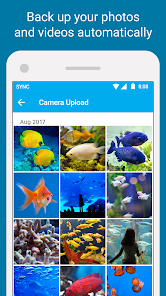
With Sync’s automatic backup feature, your important files are continually safeguarded without you needing to lift a finger. This ensures that your data is always up-to-date and retrievable, allowing you to focus on what truly matters while keeping your memories and work secure.

Cross-Platform Access

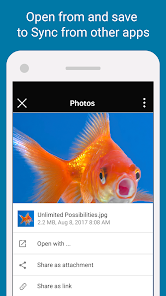
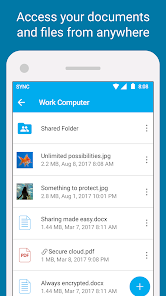
Sync offers seamless cross-platform access, enabling you to retrieve your files from any device, anytime, anywhere. Whether you're on your smartphone, tablet, or computer, your data is always at your fingertips, making collaboration and sharing effortless.

End-To-End Encryption

Sync prioritizes your privacy with robust end-to-end encryption, ensuring that your files are protected at every stage. Only you hold the key to your data, meaning that even Sync cannot access your files, giving you peace of mind with every upload and share.

User-Friendly Interface

Navigating through Sync’s user-friendly interface is a breeze, even for those who aren’t tech-savvy. Its intuitive design allows for easy file management and quick sharing, making cloud storage a hassle-free experience for everyone.

Pros & Cons

Pros
  • End-to-end encryption ensures your data is safe.
  • Access files anytime, anywhere with internet connection.
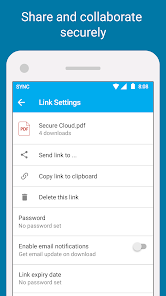
  • Seamless file sharing with friends and colleagues.
  • Automatic backup protects against data loss.
  • User-friendly interface makes navigation effortless.
Cons
  • Limited free storage capacity for users
  • Sync may experience slower upload speeds
  • Customer support can be difficult to reach
  • Lack of advanced file sharing options available

Real Experience Using Sync - Secure cloud storage

Application Scenarios

Sync - Secure cloud storage is designed for a variety of application scenarios that cater to both individual users and businesses alike. For personal use, it allows users to securely store and share family photos, important documents, and sensitive information without the fear of unauthorized access. Students can benefit from its features by storing class notes, research papers, and collaborative projects in a central location accessible from any device. For businesses, Sync provides a reliable platform to store sensitive client data, project files, and financial documents, ensuring that team members can collaborate seamlessly while maintaining strict security protocols. Additionally, the app can be utilized for backup purposes, allowing users to safeguard their data against hardware failures or accidental deletions.

User Experience

The user experience offered by Sync is remarkably intuitive and user-friendly. Upon downloading the app, users are greeted with a clean and organized interface that makes navigation straightforward. The onboarding process is seamless, guiding users through account setup and file uploading. Sync's drag-and-drop functionality simplifies the process of adding files, and the ability to create shared folders enhances collaboration. Users appreciate the robust search feature, which allows them to quickly locate files, even in large collections. Moreover, the app is compatible across various platforms, including Windows, macOS, iOS, and Android, ensuring that users can access their files anytime and anywhere. The advanced security features, such as end-to-end encryption and two-factor authentication, provide an added layer of trust, making users feel secure about their data management.

Pricing

Sync offers a range of pricing plans tailored to meet different user needs. For individual users, there is a free plan that provides a decent amount of storage, which is great for casual users. For those requiring more space or advanced features, paid plans are available on a monthly or annual basis. These plans cater to varying storage requirements, from a few gigabytes to several terabytes, making Sync an attractive option for both light users and heavy data consumers. Business plans also come with additional features such as enhanced collaboration tools and priority support, making it a viable solution for organizations looking to manage their data securely and efficiently. Overall, Sync's pricing is competitive when compared to other cloud storage services, especially considering the high level of security it provides.

Updates & Support

Sync is committed to continuous improvement, regularly rolling out updates that enhance functionality and address user feedback. The app's development team is proactive in fixing bugs and introducing new features, ensuring that users always have access to the latest technology. Users can easily check for updates within the app, which are typically installed automatically. Support is another strong point for Sync, with a comprehensive help center that includes FAQs, user guides, and troubleshooting tips. Additionally, users can reach out to customer support via email or chat for more personalized assistance. The responsiveness of the support team has been praised, as they are known to resolve issues quickly and effectively, ensuring a smooth user experience.

verified Security & Privacy Review

The Sync app prioritizes security and privacy, employing end-to-end encryption to ensure that user data is protected both in transit and at rest. This means that files are encrypted on the user's device before being uploaded to the cloud, making them accessible only to the user. Sync does not have the encryption keys, so even in the event of a data breach, user files remain secure and unreadable. In terms of privacy practices, Sync adheres to strict data protection regulations and does not sell or share user data with third parties. Users maintain control over their information, with options to manage sharing permissions for individual files and folders. The app requires minimal permissions, focusing only on those necessary for optimal functionality, which reinforces its commitment to user privacy. Additionally, Sync offers features such as two-factor authentication and customizable security settings, allowing users to enhance their account protection. Overall, Sync stands out for its robust security measures and transparent privacy practices, making it a reliable choice for individuals seeking secure cloud storage solutions.

Reviews

4.2

“Easy to use and reliable for file backup.”

“Great security features give me peace of mind.”

“Syncing across devices works flawlessly and quickly.”

“User-friendly interface makes managing files a breeze.”

“Excellent customer support, very responsive and helpful.”

Editor's Choice