This site uses cookies to enhance your user experience. By clicking any link on this site you are giving your consent to our cookie policy. Read more
Reject
Accept All
Spark Mail: AI Email, Calendar

Spark Mail: AI Email, Calendar

verified Verified App

Developer: Spark Mail App

  • category

    Category: Productivity

  • price

    Price: free

  • age rating

    Age Rating: Everyone

  • rating

    Rating: 4.1

  • download

    Downloads: 1,000,000+

  • version

    Version: 3.16.2

Screenshot 1
Screenshot 2
Screenshot 3
Screenshot 4
Screenshot 5
Screenshot 6
Screenshot 7
Screenshot 8

Features & Highlights

AI-Powered Calendar Integration

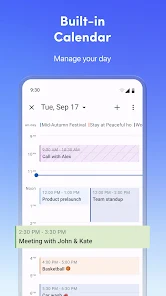
With seamless calendar integration, Spark Mail allows you to manage your schedule effortlessly alongside your emails. The AI features suggest optimal meeting times and automatically add events, making sure you never miss an important date or overlap commitments, all from one convenient place.

Collaborative Email Features

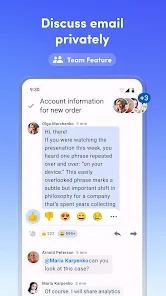
Spark Mail shines with its collaboration tools, enabling teams to easily share emails, leave comments, and assign tasks directly within the app. This feature fosters effective communication and enhances teamwork, ensuring everyone stays on the same page without losing track of important conversations.

Customizable Email Templates

Create and save personalized email templates in Spark Mail for quick responses to common inquiries. This feature not only saves you time but also helps maintain consistency in your communication style, allowing you to respond professionally and efficiently, whether you're in the office or on the go.

Smart Email Sorting

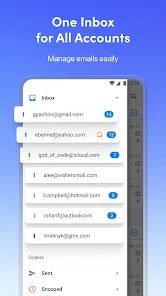
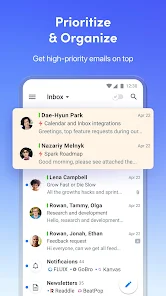
Spark Mail intelligently categorizes your emails, ensuring that important messages are prioritized while less urgent ones are neatly organized. This feature helps you focus on what matters most, reducing clutter and streamlining your inbox experience for maximum productivity.

Pros & Cons

Pros
  • Smart email organization saves time efficiently
  • Intelligent scheduling simplifies calendar management
  • AI-powered responses enhance communication speed
  • Customizable notifications keep you focused
  • Privacy-first design ensures data protection
Cons
  • Limited offline functionality can hinder productivity.
  • May not integrate well with all email providers.
  • Some users find the interface overwhelming at first.
  • AI features can misinterpret context occasionally.

Real Experience Using Spark Mail: AI Email, Calendar

Application Scenarios

Spark Mail is designed to streamline email management and enhance productivity in various scenarios. For professionals juggling multiple projects, the app's smart inbox feature prioritizes important emails, allowing users to focus on what truly matters. Whether you're coordinating with team members, responding to client inquiries, or managing personal communications, Spark Mail adapts to your needs. Its integration with calendars makes scheduling meetings seamless, enabling users to check availability and send invites without leaving the app. Additionally, it's ideal for those who travel frequently; the offline mode ensures access to important emails even without an internet connection. Spark Mail also shines in collaborative environments, where team members can share email threads and discuss them in real time, fostering better communication and efficiency.

User Experience

The user experience in Spark Mail is intuitive and visually appealing. The sleek interface is easy to navigate, ensuring that even those who are not tech-savvy can use the app effectively. Features like the email snooze function allow users to temporarily hide emails and revisit them later, which is a game changer for managing a busy inbox. The customizable email templates help save time on repetitive tasks, and the quick reply options are perfect for on-the-go responses. Furthermore, the app's AI capabilities enhance user experience by offering smart suggestions and organizing emails efficiently. Notifications are customizable and non-intrusive, allowing users to manage alerts without feeling overwhelmed. Overall, Spark Mail provides a pleasant and efficient experience for managing emails and calendars in one place.

Pricing

Spark Mail offers a freemium model, which is appealing for casual users and small teams. The basic version is free and provides essential email features along with limited integrations. However, for users seeking advanced functionalities such as team collaboration tools and unlimited integrations, Spark Mail offers a subscription plan. The premium pricing is competitive with other email management applications, making it an attractive option for businesses that require robust email solutions. Additionally, the app often runs promotions for new users or discounts for annual subscriptions, which can further enhance its value proposition.

Updates & Support

Regular updates are a strong point for Spark Mail, as the development team consistently rolls out new features and enhancements based on user feedback. This commitment to improvement ensures that the app remains relevant and user-friendly in a fast-evolving tech landscape. The support options are also commendable; users can access a comprehensive help center with articles and tutorials that cover various functionalities. For more personalized assistance, the customer support team is responsive and available through email, ensuring that users can resolve any issues promptly. Overall, the ongoing updates and robust support system make Spark Mail a reliable choice for email management.

verified Security & Privacy Review

When it comes to security and privacy, Spark Mail prioritizes the protection of user data through a combination of advanced encryption and robust privacy practices. The app employs end-to-end encryption for emails, ensuring that your messages are secure during transmission and storage. Spark does not store your email credentials, further enhancing user security. The app requests only essential permissions, which minimizes the risk of data exposure. Users have control over their data, with options to manage permissions and access settings. Spark Mail adheres to strict privacy policies, ensuring that personal information is not shared with third parties without explicit consent. Additionally, Spark offers the ability to use password protection for sensitive emails and provides options for two-factor authentication, adding an extra layer of security. Users can also customize their privacy settings to meet their individual needs, allowing for a tailored experience. Overall, Spark Mail demonstrates a strong commitment to maintaining user privacy and data security, making it a reliable choice for managing emails and calendars.

Reviews

4.1

“Intuitive interface makes email management a breeze”

“AI features enhance productivity significantly”

“Calendar integration is seamless and efficient”

“Customizable options cater to individual preferences”

“Great support and frequent updates keep it relevant”

Editor's Choice