This site uses cookies to enhance your user experience. By clicking any link on this site you are giving your consent to our cookie policy. Read more
Reject
Accept All
SnapBridge

SnapBridge

verified Verified App

Developer: Nikon Corporation

  • category

    Category: Photography

  • price

    Price: free

  • age rating

    Age Rating: Everyone

  • rating

    Rating: 4.2

  • download

    Downloads: 10,000,000+

  • version

    Version: 2.13.3

Screenshot 1
Screenshot 2
Screenshot 3
Screenshot 4
Screenshot 5
Screenshot 6

Features & Highlights

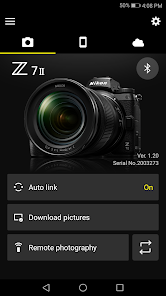
Automatic Photo Transfer

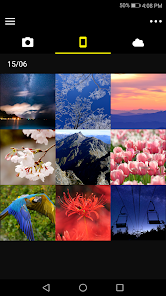
SnapBridge seamlessly transfers photos from your Nikon camera to your smartphone or tablet, allowing you to share your favorite moments instantly on social media. This feature makes it easy to access your images without the need for cumbersome cables or manual uploads, enhancing your photography experience.

Camera Settings Synchronization

SnapBridge enables you to synchronize your camera settings with your mobile device, ensuring that your configuration is always at your fingertips. This capability streamlines the setup process, allowing you to focus more on capturing great images rather than fiddling with settings in the field.

Firmware Updates Made Easy

Keep your Nikon camera up-to-date with SnapBridge's firmware update feature, which allows for hassle-free updates directly through your smartphone. This ensures that your camera benefits from the latest improvements and enhancements without the need for complicated processes, making it user-friendly and efficient.

Remote Camera Control

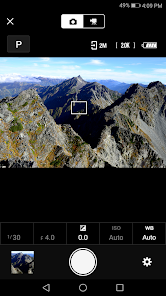
With SnapBridge, you can control your Nikon camera remotely via your smartphone, giving you the flexibility to capture shots from various angles. Whether you're setting up a group photo or taking self-portraits, this feature allows for creativity without having to rush back to your camera.

Pros & Cons

Pros
  • Seamless photo sharing to smartphones
  • Automatic image transfer for convenience
  • Remote camera control for creative shots
  • Easy backup of photos in the cloud
  • User-friendly interface for all skill levels
Cons
  • Limited compatibility with older camera models
  • Frequent connection issues during transfers
  • Slow image transfer speeds can be frustrating
  • User interface can be confusing for beginners

Real Experience Using SnapBridge

Application Scenarios

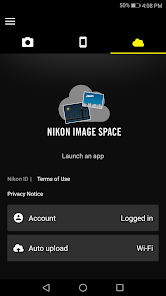
SnapBridge is an innovative application designed primarily for Nikon camera users, enabling seamless connectivity between their devices and cameras. It shines in various scenarios, particularly for photographers on the go. Whether you are capturing images at a family event, a wedding, or a picturesque landscape, SnapBridge allows you to transfer photos directly to your smartphone or tablet. This immediate sharing capability is invaluable for social media enthusiasts eager to post their work in real-time. Additionally, the app is beneficial for those who wish to control their camera remotely, enabling users to take group shots or selfies without needing someone behind the lens. SnapBridge also facilitates easy backup of images, ensuring that your precious memories are stored securely in the cloud.

User Experience

The user experience of SnapBridge is generally positive, with a straightforward interface that makes navigation easy for users of all skill levels. Upon launching the app, users are greeted with a clean layout that clearly displays options for connecting to their camera, managing images, and adjusting settings. The connection process is predominantly smooth, with Bluetooth technology ensuring a stable link between devices. Users appreciate the ability to customize settings to suit their shooting style, such as changing image quality and enabling automatic uploads. However, some users have reported occasional connectivity issues, particularly when trying to connect with older camera models. Overall, SnapBridge is user-friendly, and once set up, it enhances the photography experience significantly.

Pricing

SnapBridge is available for free, which makes it an attractive option for Nikon camera owners. The application does not impose any hidden fees or subscription models, allowing users to access its features without financial commitment. This free model is especially appealing to amateur photographers and casual users who may not want to invest in expensive software. While some advanced features are limited to newer camera models, the core functionalities of SnapBridge provide sufficient value for most users. This approach aligns well with Nikon's strategy of fostering user engagement through accessible technology.

Updates & Support

The developers of SnapBridge regularly release updates to enhance functionality and fix any bugs that may arise. Users can expect new features and improvements in response to user feedback, which is indicative of a responsive development team. Support is readily available through Nikon's official channels, including detailed guides and troubleshooting tips on their website. Additionally, the app provides in-app support options, ensuring users can find assistance quickly. Overall, the commitment to regular updates and robust support reflects Nikon's dedication to improving the user experience and maintaining the app’s relevance in a fast-evolving technological landscape.

verified Security & Privacy Review

The SnapBridge app prioritizes user security and privacy through its comprehensive data handling practices. It requires minimal permissions, primarily focusing on Bluetooth access for device connectivity, which is essential for its core functionality. Users can easily manage these permissions within their device settings, ensuring that they have control over what data is shared. SnapBridge employs encryption standards to protect data transmitted between the app and connected devices, minimizing the risk of unauthorized access. Additionally, the app does not store any sensitive personal information on its servers, which further enhances user privacy. Instead, it allows users to retain control over their data, enabling them to delete any images or settings stored within the app at their convenience. While SnapBridge does collect some usage statistics to improve app performance, this data is anonymized and aggregated, ensuring individual user identities remain protected. Overall, SnapBridge demonstrates a commitment to maintaining robust security and privacy practices, making it a reliable choice for users concerned about data safety.

Reviews

4.2

“Easy to connect and sync photos quickly”

“User-friendly interface, love the instant sharing”

“Occasional connectivity issues, but overall reliable”

“Great for remote shooting with my Nikon camera”

“Perfect for transferring images on the go”

Editor's Choice