This site uses cookies to enhance your user experience. By clicking any link on this site you are giving your consent to our cookie policy. Read more
Reject
Accept All
SMS Backup & Restore

SMS Backup & Restore

verified Verified App

Developer: SyncTech Pty Ltd

  • category

    Category: Tools

  • price

    Price: free

  • age rating

    Age Rating: Everyone

  • rating

    Rating: 3.8

  • download

    Downloads: 10,000,000+

  • version

    Version: 10.24.003

Screenshot 1
Screenshot 2
Screenshot 3
Screenshot 4
Screenshot 5
Screenshot 6
Screenshot 7
Screenshot 8

Features & Highlights

Backup Messages

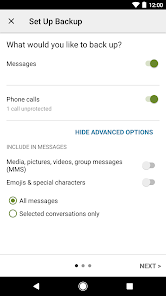
Easily back up your SMS and MMS messages to your preferred cloud storage or local device. This feature ensures that your important conversations are securely saved and can be restored whenever needed, giving you peace of mind knowing that your messages are safe.

Export Conversations

Easily export your SMS and MMS conversations in XML or standard text formats. This capability allows you to keep a personal record of important chats or share them with others, making it a versatile tool for both personal and professional use.

Restore Messages

Seamlessly restore your messages from a previous backup with just a few taps. Whether you’ve switched devices or accidentally deleted a message, this feature allows you to recover your valuable conversations, making it simple to get back on track without losing any important information.

Scheduled Backups

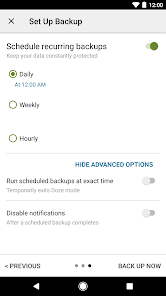
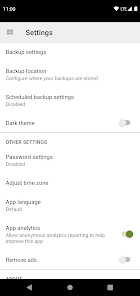
Set up automatic backups to ensure your messages are regularly saved without any hassle. You can customize the frequency to fit your needs, so you can focus on your day-to-day life while knowing your messages are consistently protected.

Pros & Cons

Pros
  • Easily backup your texts and calls with one click
  • Restore messages seamlessly on new devices
  • Schedule automatic backups for peace of mind
  • Supports various cloud storage options for flexibility
  • User-friendly interface for effortless navigation
Cons
  • Limited support for non-standard messaging apps
  • Backup size can be excessive over time
  • Restoration process can be complicated
  • May not guarantee complete data recovery

Real Experience Using SMS Backup & Restore

Application Scenarios

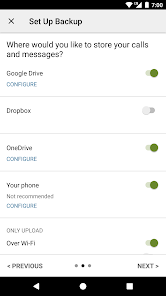
SMS Backup & Restore is an invaluable tool for anyone looking to manage their text messages and call logs efficiently. Whether you are switching to a new phone, upgrading your device, or simply wanting to keep your messages safe, this app offers a seamless solution. Users can back up their SMS, MMS, and call logs to various platforms, including Google Drive and Dropbox, ensuring that important conversations are not lost during transitions. Additionally, this app is perfect for individuals who want to declutter their messaging apps but still retain the ability to access old messages when needed. With its straightforward interface, SMS Backup & Restore caters to both tech-savvy users and those who might be less familiar with technology.

User Experience

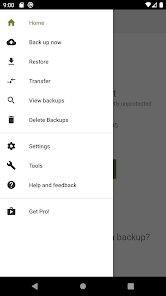
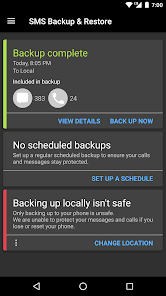
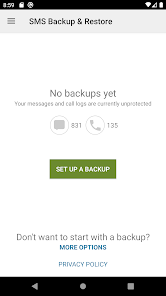
The user experience of SMS Backup & Restore is designed to be intuitive and user-friendly. Upon launching the app, users are greeted with a clean and organized interface that makes navigation effortless. The backup process is straightforward, requiring just a few taps to initiate. Users can customize their backups by selecting specific conversations or logs, ensuring they only keep what is necessary. Restoring messages is equally simple, allowing users to retrieve their data without hassle. The app also provides clear prompts and instructions, making it accessible for users of all ages. One notable feature is the ability to schedule automatic backups, giving users peace of mind that their data is consistently protected without additional effort.

Pricing

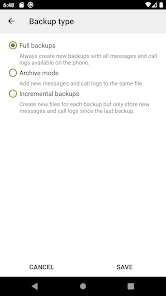
SMS Backup & Restore is available as a free app, providing users with essential backup and restore functionalities without any upfront costs. However, there is a pro version available for those who want to unlock additional features, such as advanced scheduling options and a more extensive range of backup formats. The pricing model is reasonably competitive, considering the value it offers in safeguarding important information. Users can choose to make a one-time purchase for the pro version, making it accessible for users who want to enhance their experience without committing to a subscription model. Overall, the pricing structure reflects the app's commitment to providing a valuable service while remaining budget-friendly.

Updates & Support

The developers of SMS Backup & Restore are committed to providing regular updates to enhance functionality and ensure compatibility with the latest devices and operating systems. Users can expect periodic improvements and bug fixes, which contribute to a stable and efficient app experience. In terms of support, the app offers a comprehensive FAQ section and community forums, where users can find answers to common questions or troubleshoot issues. For more personalized assistance, users can reach out to the support team via email, ensuring that help is readily available. This commitment to customer support and ongoing development significantly adds to the reliability and user satisfaction of SMS Backup & Restore.

verified Security & Privacy Review

The SMS Backup & Restore app prioritizes user privacy and data security, implementing several essential practices to protect sensitive information. The app operates by creating backups of SMS and call logs, which are stored locally on the device or can be uploaded to cloud services like Google Drive or Dropbox. This flexibility allows users to choose where their data is stored, enhancing control over personal information. To ensure security during data transfer, the app utilizes encryption protocols, safeguarding backups from unauthorized access. However, users should remain cautious, as the app requires permissions to access SMS, call logs, and storage. While these permissions are necessary for functionality, they underscore the importance of only downloading the app from trusted sources. Furthermore, SMS Backup & Restore does not collect personal data for advertising purposes, aligning with best practices in user privacy. Users are encouraged to regularly review and manage their backup settings to maintain optimal privacy. Overall, the app demonstrates a commitment to protecting user data while offering a reliable solution for message backup and restoration.

Reviews

3.8

“Easy to use and reliable for backups”

“Restores messages flawlessly without issues”

“User-friendly interface, very intuitive”

“Great for keeping SMS history safe”

“Fast and efficient backup process”

Editor's Choice