This site uses cookies to enhance your user experience. By clicking any link on this site you are giving your consent to our cookie policy. Read more
Reject
Accept All

Advertiser and Editorial Disclosures

SideQuest ( BETA )

SideQuest ( BETA )

verified

SideQuest Ltd

3.1
Rating
500,000+ Downloads
1.11 Version
  • category

    Category: Tools

  • price

    Price: free

  • age rating

    Age Rating: Teen

  • rating

    Rating: 3.1

  • available on

    Available on: /

  • updated on

    Updated on: Aug 11, 2022

Screenshot 1
Screenshot 2
Screenshot 3
Screenshot 4
Screenshot 5
Screenshot 6
Screenshot 7
Screenshot 8
Screenshot 9
Screenshot 10
Screenshot 11
Screenshot 12
Screenshot 13
Screenshot 14
Screenshot 15
Screenshot 16
Screenshot 17
Screenshot 18
Screenshot 19
Screenshot 20
Screenshot 21

Features & Highlights

Developer Support Tools

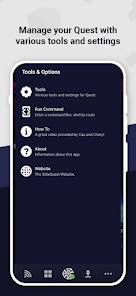
For creators, SideQuest (BETA) provides robust tools and resources to help you build, test, and share your VR projects. The platform encourages innovation by allowing developers easy access to user feedback and community support, fostering an environment of collaboration and creativity.

Diverse Content Library

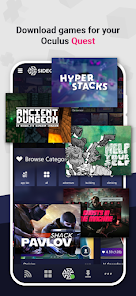
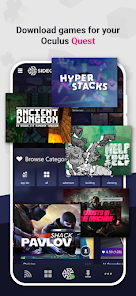
Explore a vast array of applications, games, and experiences that extend the capabilities of your VR headset. SideQuest (BETA) offers a unique collection of both popular and indie titles, ensuring that there’s always something fresh and exciting to try out for every type of user.

Regular Updates and Community Engagement

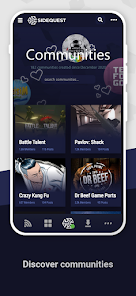
Stay connected with a vibrant community that thrives on sharing new ideas and updates. SideQuest (BETA) frequently rolls out updates, ensuring that users benefit from the latest features and improvements while also providing a platform for community discussions and feedback.

User-Friendly Interface

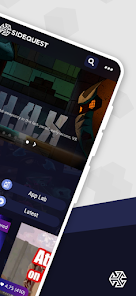
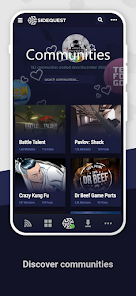
SideQuest (BETA) boasts a streamlined and intuitive interface, making it easy for users of all experience levels to navigate and discover new content. Whether you’re a VR novice or a seasoned developer, accessing apps and games is just a few clicks away, enhancing your overall experience.

Pros & Cons

Pros
  • Access a vast library of VR content
  • Easily sideload apps without technical knowledge
  • Discover unique indie games and experiences
  • User-friendly interface for quick navigation
  • Regular updates with new features and improvements
Cons
  • Limited app compatibility with mainstream VR titles
  • Requires manual installation for updates
  • Performance issues on lower-end devices
  • User interface can be confusing for newcomers

Real Experience Using SideQuest ( BETA )

Application Scenarios

SideQuest (BETA) is designed primarily for VR enthusiasts looking to expand their Oculus Quest library beyond the official offerings. The app serves as a bridge, allowing users to access a plethora of unofficial games, apps, and experiences that have been developed by independent creators. This is particularly useful for those who want to experiment with new titles or explore innovative applications that may not yet be available on the main Oculus store. Whether you're seeking unique gaming experiences, educational apps, or immersive simulations, SideQuest opens up a world of possibilities, catering to a variety of interests and preferences. Additionally, it allows developers to showcase their work to a wider audience, making it a valuable platform for both gamers and creators alike.

User Experience

The user experience on SideQuest is generally intuitive, with a clean and user-friendly interface that makes navigation straightforward. Upon launching the app, users are greeted with a well-organized library that categorizes available content into various genres and popularity ratings. The installation process for new apps is seamless, often requiring just a few clicks. Users appreciate the ability to sideload apps onto their devices with relative ease, though some may encounter occasional technical hiccups, especially if they are new to the concept of sideloading. Overall, the community aspect of SideQuest enhances the experience, as users can share insights, reviews, and recommendations, fostering a sense of camaraderie among VR enthusiasts.

Pricing

SideQuest (BETA) is free to download and use, offering users access to a vast library of apps without any upfront costs. This makes it an attractive option for those on a budget or who are hesitant to invest in expensive VR titles without first trying them out. While the majority of content is free, some developers may offer premium apps or in-app purchases, allowing users to support creators directly. This pricing model is particularly appealing, as it encourages exploration and experimentation without financial risk, enabling users to discover new favorites at no cost.

Updates & Support

The developers of SideQuest are committed to providing regular updates, ensuring that the app stays relevant and functional as new VR content emerges. Users can expect frequent enhancements, bug fixes, and new features that improve the overall experience. Support is also readily available through community forums and social media channels, where users can seek assistance or share feedback. The active community and developer responsiveness contribute to a positive user experience, giving users confidence that any issues will be addressed promptly. This level of support, combined with continuous updates, makes SideQuest a reliable companion for VR enthusiasts looking to enhance their virtual reality journey.

verified Security & Privacy Review

Security and privacy are paramount in today's digital landscape, and SideQuest (BETA) takes these concerns seriously. The app employs robust encryption protocols to safeguard user data during transmission, ensuring that sensitive information remains protected against unauthorized access. Additionally, SideQuest adheres to strict data handling practices, limiting the collection of personal information to what is necessary for functionality. When it comes to permissions, SideQuest requests access to specific device features, such as storage and network connectivity, which are essential for its operation. Users are encouraged to review these permissions carefully and only grant access that aligns with their comfort levels. The app also provides clear privacy policies that outline how data is collected, used, and shared, promoting transparency. While SideQuest does not share user data with third parties without consent, users should remain vigilant and familiarize themselves with the privacy settings available within the app. Overall, SideQuest (BETA) demonstrates a commitment to security and privacy, making it a reliable choice for users seeking to explore new digital experiences with confidence.

User Reviews

  • Dorrian Ford
    2023/06/26

    I gave this a three star. As a user of this for 1 month, I've experienced a while wait while connecting, or "you may need accept a prompt on your target device" it's either stuck on that, or when I turn on dev mode, it still takes up to 10 minutes for it to actually connect. It sounds like I'm extra, but 10 minutes is a while. Other than that the app is not good, I get stuck on the same loading page, it's getting REALLY annoying. I stopped using this app

  • Garrett Soldon
    2021/11/20

    App does not work in the slightest. Stuck on "you may need to accept a promp on the target device" regardless of how many times i accept it or what USB settings I change. Far cry from what the PC application is. Would not recommend at all. Use a laptop if you have one. edit: Trying to connect via IP does not work either. I've tried several times.

  • Nakon Warrior
    2023/07/20

    Doesn't work. (As of now). Using the correct USB, even the same one shown in the Gif. You can allow files on the QUEST 2, and you can allow it on your mobile device. But then you are met with a pop-up that practically disables any user interactions. You cannot actually use the app. It soft-locks you. And to make things more annoying, the alternate ways to connect your QUEST 2 to your mobile device, such as the IP address does NOT work. I have tried this with TWO DIFFERENT PHONES. Nothing works.

  • Lloyd Kun
    2022/06/05

    Okay, so for anyone reading about connection issues, let me preface and say, it's Meta's fault. Whenever they moved to add applab, the took it as an excuse to rehaul their developer mode. To fix that, just add you phone # to their site. Do that, fiddle with the settings to allow developer mode and you'll be good. As for SQ's end of things, it's ridiculous to have wifi only transfers. Just let me download apps and homes with 5g then transfer the file to my quest.

  • Joshua Allen
    2023/09/12

    Used this app on the past, worked like a charm, but not so much now. When I connect the cable, the headset asks me to allow, which I do, but that's as far as I can get, the app doesn't do anything to connect, and manually entering the headset IP does nothing as well. I was able to load my APK. Plugged in my phone without the app, selected "file transfer" on my phone, selected the APK from within my phone files. It brings up an explorer on the headset with this.

Review Source: Google Play store public user reviews.

FAQ

1

Does SideQuest ( BETA ) collect my personal data?

SideQuest ( BETA ) does not collect personal data in a way that would compromise user privacy. However, users should review the privacy policy for specific details on data handling practices.

2

Does SideQuest ( BETA ) offer a free trial or free version?

Yes, SideQuest ( BETA ) offers a free version that allows users to access a wide range of content without any cost. There are also premium features available through subscription plans.

3

Does SideQuest ( BETA ) require an internet connection?

While an internet connection is necessary for downloading apps and content through SideQuest ( BETA ), once installed, many applications can be used offline, depending on their specific requirements.

4

How can I contact support or send feedback for SideQuest ( BETA )?

Users can contact support or send feedback for SideQuest ( BETA ) through the support section on their official website, where they can find contact forms and additional resources for assistance.

5

How do I manage or cancel my SideQuest ( BETA ) subscription?

To manage or cancel your SideQuest ( BETA ) subscription, you can log into your account on the SideQuest website and navigate to the subscription management section, where options for cancellation and changes to your plan are available.

How to use SideQuest ( BETA )

1

Can I change my login information for SideQuest (BETA)?

Yes, you can change your login information in the account settings within the app.

2

How can I contact customer service for issues with SideQuest (BETA)?

You can contact customer service through their website's support section or by emailing their support team.

3

How do I activate my account on SideQuest (BETA) if prompted?

Follow the instructions sent to your email after registration; activation is usually done through a confirmation link.

4

How do I create a new account on SideQuest (BETA)?

Open the app and select "Sign Up," then follow the prompts to create a new account.

5

How do I log in to the SideQuest (BETA) app?

To log in, open the app and enter your credentials, or create a new account if you haven't registered yet.

Editor's Choice