This site uses cookies to enhance your user experience. By clicking any link on this site you are giving your consent to our cookie policy. Read more
Reject
Accept All
SanDisk Memory Zone

SanDisk Memory Zone

verified Verified App

Developer: © Western Digital Corporation or its affiliates.

  • category

    Category: Productivity

  • price

    Price:

  • age rating

    Age Rating: /

  • rating

    Rating: 4.5

  • download

    Downloads: 10M+

  • version

    Version: 4.2.5

Screenshot 1
Screenshot 2
Screenshot 3
Screenshot 4
Screenshot 5
Screenshot 6

Features & Highlights

Automatic File Backup

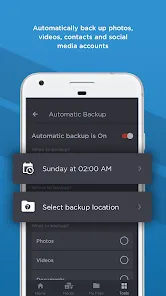
SanDisk Memory Zone simplifies your life by automatically backing up your photos, videos, and documents. With just a few taps, you can ensure your important files are safe and secure, freeing you from the worry of losing precious memories or critical data due to device failure.

Cloud Storage Integration

SanDisk Memory Zone seamlessly integrates with popular cloud storage services, giving you the flexibility to access your files anywhere. This feature ensures that even if you switch devices, your data remains at your disposal, enhancing your overall productivity and convenience.

File Organization Made Easy

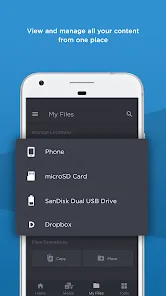
This app excels in organizing your files effortlessly. It allows users to categorize and store items in a structured manner, making it easy to locate specific files quickly. Say goodbye to the clutter and enjoy a streamlined digital experience at your fingertips.

Secure File Sharing

With built-in secure sharing options, users can effortlessly share files with friends and family without compromising privacy. This feature allows you to control who accesses your files, ensuring peace of mind while sharing those cherished memories or important documents.

Pros & Cons

Pros
  • Simplifies file management on Android devices
  • Automatically backs up important files
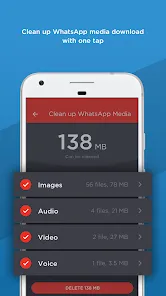
  • Free up storage space efficiently
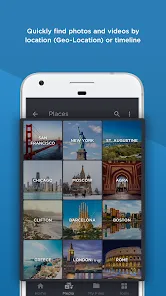
  • Organizes media files for easy access
  • User-friendly interface enhances usability
Cons
  • Limited compatibility with non-SanDisk devices
  • Frequent ads can disrupt user experience
  • Backup features may be unreliable
  • User interface can feel confusing at times

Real Experience Using SanDisk Memory Zone

Application Scenarios

SanDisk Memory Zone is a versatile application designed to enhance the management of storage across various devices. Users often employ this app to streamline their photo and video organization, especially when they are capturing memories on their smartphones or tablets. For instance, photographers can use Memory Zone to easily transfer images from their mobile device to a SanDisk memory card, ensuring that their device's internal storage is not overwhelmed. Moreover, it is an excellent tool for users who frequently download large files, such as movies or music. With the app, they can quickly identify and transfer these files to external storage, freeing up valuable internal space and allowing for smoother device performance. Additionally, students and professionals can utilize the app to back up important documents and files, making it a go-to solution for anyone seeking to maintain order amidst their digital clutter.

User Experience

The user experience with SanDisk Memory Zone is generally positive, highlighted by its intuitive interface and user-friendly design. Upon launching the app, users are greeted with a clear layout that allows for easy navigation between files and settings. The app provides a seamless experience when transferring files between devices and external storage, often completing tasks quickly without any major hiccups. Users appreciate the built-in file management tools, which enable them to categorize and search for files effortlessly. However, some users have occasionally reported minor bugs, particularly during the initial setup. Despite these issues, the app's overall functionality and reliability make it a valuable tool for data management. Additionally, the ability to access and manage files from multiple cloud services further enhances the user experience, as it consolidates various storage solutions into one app.

Pricing

SanDisk Memory Zone is available for free, making it an accessible option for all users. The app provides basic functionalities without any hidden fees or subscription models, which is a significant advantage over some competing applications. However, users should be aware that while the app itself is free, they may still need to purchase a SanDisk memory card or external storage device to fully utilize its capabilities. This pricing structure allows users to maximize their storage solutions without upfront costs for the software. Overall, the free model coupled with optional hardware purchases makes it a cost-effective choice for those looking to enhance their storage management.

Updates & Support

SanDisk Memory Zone is regularly updated, ensuring that users benefit from the latest features and improvements. The development team actively addresses bugs and user feedback, which reflects their commitment to enhancing the user experience. For support, the app offers a comprehensive help section that includes FAQs and troubleshooting guides. Users can also reach out to customer support for more complex issues, and many have reported timely and helpful responses. Overall, the combination of regular updates and robust support contributes to a reliable experience for users, making SanDisk Memory Zone a trustworthy companion for managing storage.

verified Security & Privacy Review

The SanDisk Memory Zone app takes user security and privacy seriously, implementing several measures to safeguard personal data. The app requires permissions to access device storage, which is essential for its functionality in managing files and optimizing storage. However, it is crucial for users to review these permissions and ensure they are comfortable with the level of access granted. Data handled by the app is protected through encryption protocols, ensuring that sensitive information remains secure during transfer and storage. The app does not collect unnecessary personal information, focusing solely on the data required for performance enhancement and file management. SanDisk also adheres to industry standards for data privacy, providing clear guidelines on how user data is processed and stored. Additionally, users have control over their data, with options to manage and delete files easily within the app. Overall, the SanDisk Memory Zone app demonstrates a strong commitment to user security and privacy, making it a reliable choice for managing mobile storage.

Reviews

4.5

“User-friendly interface for easy file management.”

“Great for organizing and backing up photos.”

“Reliable performance, never lost a file.”

“Syncs seamlessly with my devices.”

“Perfect for freeing up phone storage.”

Editor's Choice