This site uses cookies to enhance your user experience. By clicking any link on this site you are giving your consent to our cookie policy. Read more
Reject
Accept All
Samsung Flow

Samsung Flow

verified Verified App

Developer: Samsung Electronics Co., Ltd.

  • category

    Category: Productivity

  • price

    Price: free

  • age rating

    Age Rating: Everyone

  • rating

    Rating: 3.4

  • download

    Downloads: 50,000,000+

  • version

    Version: /

Screenshot 1
Screenshot 2
Screenshot 3
Screenshot 4
Screenshot 5
Screenshot 6

Features & Highlights

Content Sharing Made Easy

With Samsung Flow, sharing content like images, documents, and links is as simple as a few taps. You can quickly send files between connected devices, eliminating the need for email or cloud storage, which saves you time and keeps your workflow uninterrupted.

Seamless Device Connection

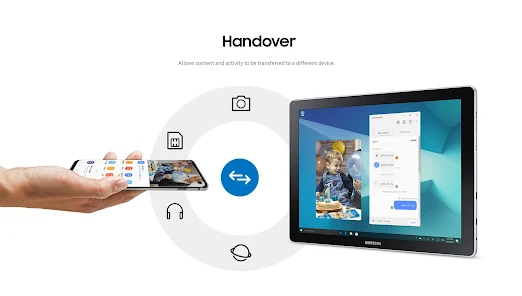
Samsung Flow allows you to connect multiple devices effortlessly, enabling a smooth transition between your smartphone, tablet, and PC. This feature ensures that your notifications, messages, and app activities follow you wherever you go, making multitasking a breeze without missing a beat.

Secure Transfer and Sync

Samsung Flow prioritizes your security by ensuring that all data transfers between devices are encrypted. This feature not only protects your sensitive information but also allows seamless syncing of apps and content, giving you peace of mind while staying connected.

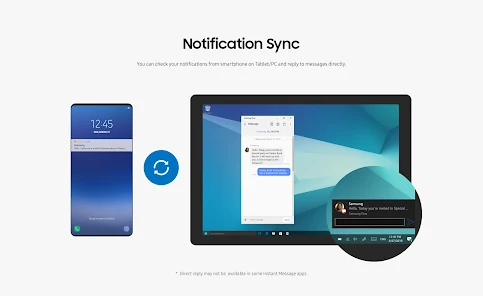
Unified Notification Management

Stay on top of your notifications with Samsung Flow's unified management system. This feature consolidates alerts from your connected devices, allowing you to view and respond to messages and updates in one place, so you can focus on what truly matters without distractions.

Pros & Cons

Pros
  • Seamless device connectivity enhances productivity.
  • Effortlessly share files between devices.
  • Sync notifications for better multitasking.
  • Instantly unlock devices using nearby smartphones.
  • Cross-platform compatibility simplifies user experience.
Cons
  • Limited device compatibility restricts user access
  • Connection instability can disrupt workflow
  • Features may vary between devices inconsistently
  • Requires Samsung account for full functionality

Real Experience Using Samsung Flow

Application Scenarios

Samsung Flow is designed to enhance productivity by creating a seamless connection between your Samsung devices. Whether you're working on a smartphone, tablet, or laptop, Flow enables you to share content effortlessly. For instance, you can start an email on your smartphone and finish it on your laptop without losing context. Additionally, Samsung Flow is perfect for multitasking; you can receive notifications on your tablet while working on your phone. The app also supports file transfers, making it easy to share documents and images across devices. This is especially useful for individuals who frequently switch between devices in their daily routines, such as students juggling between their phones and laptops for assignments or professionals managing projects across multiple devices.

User Experience

The user experience of Samsung Flow is generally positive, with a clean and intuitive interface that makes navigation simple. The setup process is straightforward; users just need to download the app on all their devices and log in with their Samsung account. Once connected, the app offers a smooth transition between devices. Users appreciate features like the ability to mirror notifications and receive calls on their tablets or laptops. The drag-and-drop functionality for file transfers is also a highlight, providing a hassle-free way to manage documents. However, some users have reported occasional connectivity issues, particularly when devices are not on the same Wi-Fi network. Overall, the app successfully fulfills its purpose of creating a cohesive ecosystem for Samsung users.

Pricing

Samsung Flow is available for free, which is a significant advantage for users looking for a cost-effective solution to connect their devices. The app does not require a subscription or any in-app purchases, making it accessible to anyone with compatible Samsung devices. This pricing model encourages widespread adoption, allowing users to maximize the functionality of their devices without financial barriers. However, it is worth noting that the app’s full potential is best realized when used within the Samsung ecosystem, which may lead some users to invest in other Samsung products for an enhanced experience.

Updates & Support

Samsung regularly updates Flow to improve functionality and enhance user experience. The updates often include bug fixes, performance enhancements, and new features that keep the app relevant in a rapidly changing tech landscape. Users can access support through Samsung's official website or the app itself, where they can find FAQs and troubleshooting guides. While some users have noted that response times for support can vary, the availability of extensive online resources helps mitigate potential issues. Overall, Samsung Flow benefits from a solid support system that helps users make the most of their experience.

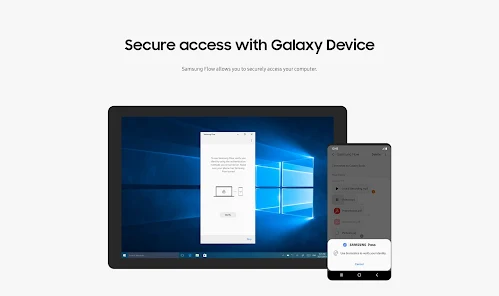
verified Security & Privacy Review

Samsung Flow emphasizes user security and privacy by implementing robust encryption protocols to safeguard data transmission between connected devices. The app utilizes end-to-end encryption, ensuring that sensitive information remains protected during sync operations. Additionally, Samsung Flow requires user authentication to establish connections, further enhancing security measures. In terms of permissions, the app requests access to various features such as notifications, contacts, and location services. Users are informed of these permissions upfront, allowing them to make informed decisions about their data sharing. Samsung Flow adheres to best practices in data handling by minimizing the collection of personal information and focusing primarily on functionality. Samsung also commits to transparency regarding its data privacy policies, providing users with clear guidelines on how their information is used and stored. Regular updates and security patches are rolled out to address any vulnerabilities promptly, reinforcing the app's dedication to maintaining a secure environment for its users. Overall, Samsung Flow demonstrates a strong commitment to protecting user data while offering seamless connectivity across devices.

Reviews

3.4

“Seamless device connectivity and easy file transfers.”

“Great for syncing notifications across devices.”

“User-friendly interface makes setup a breeze.”

“Reliable performance, but occasional connectivity issues.”

“Perfect for multitasking between phone and PC.”

Editor's Choice