This site uses cookies to enhance your user experience. By clicking any link on this site you are giving your consent to our cookie policy. Read more
Reject
Accept All

Advertiser and Editorial Disclosures

Samsara Driver

Samsara Driver

verified Verified App

Developer: Samsara

  • category

    Category: Tools

  • price

    Price: free

  • age rating

    Age Rating: Everyone

  • rating

    Rating: 4.7

  • download

    Downloads: 1,000,000+

  • version

    Version: 2542.100.17032

Screenshot 1
Screenshot 2
Screenshot 3
Screenshot 4
Screenshot 5
Screenshot 6
Screenshot 7
Screenshot 8
Screenshot 9
Screenshot 10
Screenshot 11
Screenshot 12
Screenshot 13
Screenshot 14
Screenshot 15

Features & Highlights

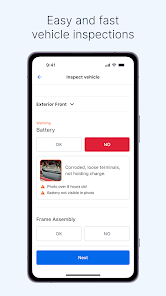
Automated Vehicle Inspections

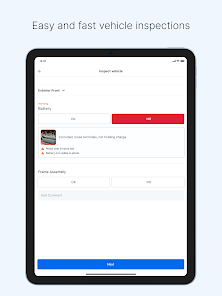
The app simplifies vehicle inspections through automated checklists and prompts, ensuring that all necessary maintenance tasks are completed on time. This feature not only keeps the fleet in optimal condition but also helps comply with regulatory requirements, reducing downtime and repair costs.

Driver Safety Alerts

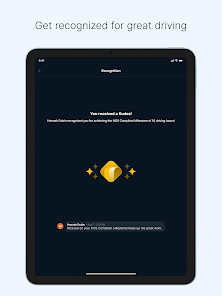
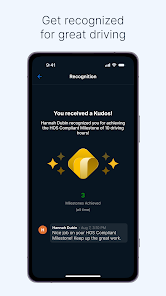
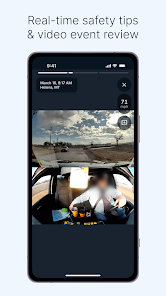
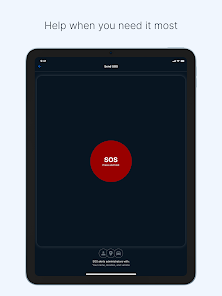
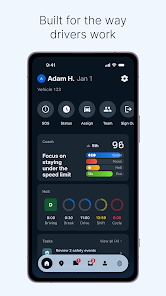
With proactive driver safety alerts, Samsara Driver notifies users about risky driving behaviors, such as speeding or harsh braking. This functionality helps promote safe driving practices and can lead to reduced accident rates, ultimately protecting both drivers and company assets.

Real-Time GPS Tracking

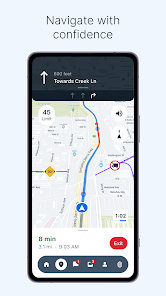
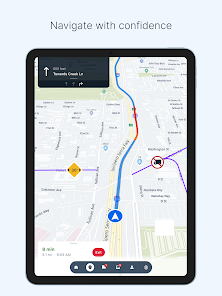
Samsara Driver provides real-time GPS tracking, allowing fleet managers to monitor vehicle locations instantly. This feature enhances route optimization and helps ensure timely deliveries, while also improving safety by enabling quick responses to any unexpected incidents on the road.

Seamless Trip Logging

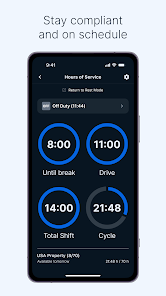
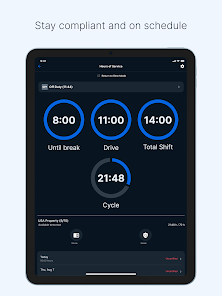
Samsara Driver offers seamless trip logging, making it easy for drivers to track their hours and mileage. This feature simplifies record-keeping for compliance with regulations, while also providing valuable data for fleet analysis and improving overall operational efficiency.

Pros & Cons

Pros
  • Improves driver safety and reduces accidents
  • Enhances route optimization for fuel efficiency
  • Real-time vehicle tracking for better oversight
  • Simplifies compliance with regulatory requirements
  • Boosts driver accountability and performance monitoring
Cons
  • Limited offline functionality for drivers
  • High subscription costs for small fleets
  • Steep learning curve for new users
  • Occasional GPS accuracy issues during navigation

Real Experience Using Samsara Driver

Application Scenarios

The Samsara Driver app is designed primarily for fleet management and logistics, catering to businesses that operate vehicles for transportation and delivery purposes. It excels in various scenarios, including real-time tracking of delivery routes, vehicle diagnostics, and driver safety monitoring. Companies can utilize this app to streamline operations, ensuring timely deliveries while maintaining compliance with regulations. Additionally, the app provides insights into fuel efficiency and driver performance, making it an invaluable tool for optimizing fleet operations. Whether you are managing a small delivery service or a large logistics company, Samsara Driver adapts seamlessly to meet specific operational needs.

User Experience

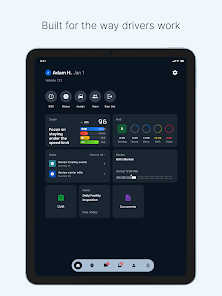
Users of the Samsara Driver app often highlight its intuitive interface and user-friendly design, which makes navigation straightforward even for those who may not be tech-savvy. The app's dashboard offers a comprehensive overview of key metrics such as vehicle location, speed, and idle time, which can be easily customized to suit individual preferences. Notifications and alerts enhance user experience by keeping drivers informed about important updates, such as traffic conditions or maintenance needs. Many drivers appreciate the app's ability to integrate with other tools and platforms, allowing for a unified approach to fleet management. Overall, feedback suggests that the app significantly improves communication between drivers and fleet managers, fostering a more efficient working environment.

Pricing

The pricing structure for the Samsara Driver app is competitive and varies based on the size of the fleet and the specific features chosen. Typically, businesses can opt for a subscription model that includes a range of plans tailored to different operational scales. While some might find the initial investment to be higher than basic tracking apps, users often report that the return on investment is significant due to the enhanced operational efficiency and reduced costs associated with better fleet management. Furthermore, the pricing includes access to ongoing updates and new features, ensuring that users always have the latest tools at their disposal without incurring additional costs.

Updates & Support

Samsara is committed to providing continuous updates to enhance the app's functionality and security. Users can expect regular feature enhancements and bug fixes that keep the app running smoothly. The customer support team is highly responsive, offering assistance through various channels, including live chat and email. Many users have praised the support team's expertise and willingness to help resolve any issues promptly. Additionally, the app includes a comprehensive help center filled with resources, tutorials, and FAQs to empower users to troubleshoot common problems on their own. This robust support system contributes to a positive overall experience for drivers and fleet managers alike.

verified Security & Privacy Review

The Samsara Driver app takes user security and privacy seriously, implementing robust measures to protect sensitive information. The app employs end-to-end encryption for data transmission, ensuring that personal and location data are securely transferred and stored. This level of encryption helps safeguard against unauthorized access and potential data breaches. Regarding permissions, the app requires access to location services, which is essential for its core functionalities such as route optimization and real-time tracking. Users are informed about the data being collected and have the option to manage these permissions, providing transparency in data handling practices. Samsara also adheres to industry standards for data protection, ensuring compliance with regulations such as GDPR. User data is used primarily to enhance the driving experience and improve fleet management. The app does not sell personal information to third parties, and users can request data deletion or access their information upon request. Overall, the Samsara Driver app demonstrates a commitment to maintaining user privacy while delivering valuable services.

Reviews

4.7

“User-friendly interface makes navigation a breeze.”

“Great for tracking vehicle performance and efficiency.”

“Reliable support team always ready to help.”

“Invaluable tool for fleet management and logistics.”

“Real-time updates keep drivers informed and connected.”

FAQ

1

Does Samsara Driver collect my personal data?

Samsara Driver may collect personal data such as location information and driving patterns to provide its services, but it adheres to privacy policies to protect user information.

2

Does Samsara Driver offer a free trial or free version?

Samsara Driver does not offer a free version, but potential users can inquire about a free trial to evaluate the service before committing to a subscription.

3

Does Samsara Driver require an internet connection?

Yes, Samsara Driver requires an internet connection to function effectively, as it relies on real-time data and cloud-based services for tracking and management.

4

How can I contact support or send feedback for Samsara Driver?

Support for Samsara Driver can be reached through the app's help section, by visiting the Samsara website, or by emailing their customer service team for feedback and inquiries.

5

How do I manage or cancel my Samsara Driver subscription?

You can manage or cancel your Samsara Driver subscription through your account settings within the app or by contacting customer support for assistance.

How to use Samsara Driver

1

How can I contact Samsara customer service?

You can reach Samsara customer service by calling their support number at 1-800-507-6250 or through the chat feature in the Samsara Driver app.

2

How do I activate my Samsara Driver app?

To activate, download the app, log in with your credentials, and follow the prompts to complete activation. Make sure your device is connected to the internet.

3

How do I log in to the Samsara Driver app?

To log in, open the app, enter your email and password, then tap "Log In." If you forget your password, use the "Forgot Password?" link.

4

What is the customer number for Samsara support?

The customer number for Samsara support is 1-800-507-6250. You can also find support options within the app.

Editor's Choice