This site uses cookies to enhance your user experience. By clicking any link on this site you are giving your consent to our cookie policy. Read more
Reject
Accept All

Advertiser and Editorial Disclosures

Rock Identifier: Stone ID

Rock Identifier: Stone ID

verified

Next Vision Limited

4.5
Rating
10,000,000+ Downloads
2.4.1 Version
  • category

    Category: Lifestyle

  • price

    Price: free

  • age rating

    Age Rating: Everyone

  • rating

    Rating: 4.5

  • available on

    Available on: /

  • updated on

    Updated on: Mar 4, 2026

Screenshot 1
Screenshot 2
Screenshot 3
Screenshot 4
Screenshot 5
Screenshot 6
Screenshot 7
Screenshot 8
Screenshot 9
Screenshot 10
Screenshot 11
Screenshot 12
Screenshot 13
Screenshot 14
Screenshot 15
Screenshot 16
Screenshot 17

Features & Highlights

Detailed Information

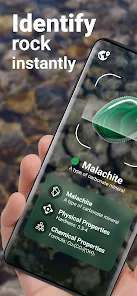
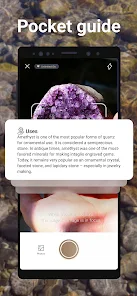
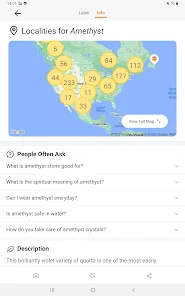
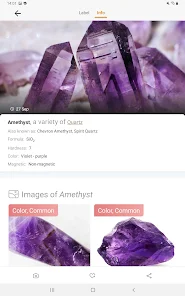
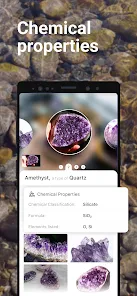
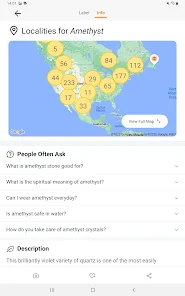
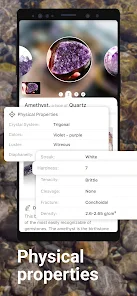
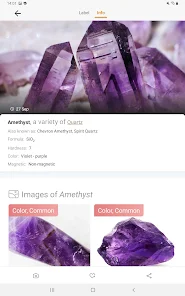
Once a rock is identified, the app provides comprehensive details including composition, formation, and common uses. This feature enriches your understanding and can serve as a handy reference for students, hobbyists, or anyone curious about the world of geology.

Instant Identification

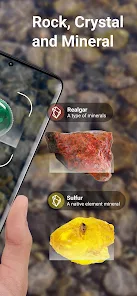
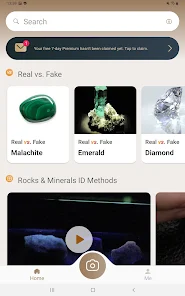
Rock Identifier: Stone ID allows users to quickly and accurately identify various types of rocks and minerals using their smartphone's camera. Just point, snap, and discover what lies beneath the surface with instant results that enhance your geological knowledge and appreciation for nature.

Offline Access

One of the standout features is its offline functionality, enabling users to identify rocks even in remote areas without internet connectivity. This ensures that your geological adventures are never hindered by a lack of signal, making it perfect for hiking and outdoor exploration.

User-Friendly Interface

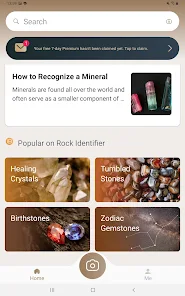
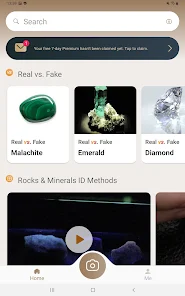
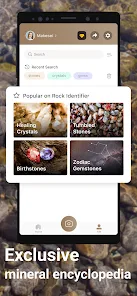
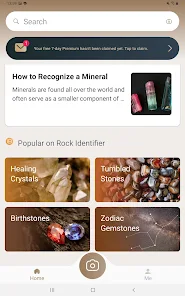
Rock Identifier: Stone ID boasts a sleek and intuitive design that makes navigation a breeze. Whether you're a seasoned geologist or a novice rock hound, the app's simple layout and easy-to-follow instructions ensure a smooth and enjoyable identification experience.

Pros & Cons

Pros
  • Easily identify various rock types with accuracy
  • User-friendly interface for all experience levels
  • Access detailed geological information instantly
  • Enhances outdoor learning and exploration experiences
  • Connect with a community of rock enthusiasts
Cons
  • Limited database for rare stone identification
  • Requires internet connection for full functionality
  • May misidentify stones without proper lighting
  • User interface can be confusing for beginners

Real Experience Using Rock Identifier: Stone ID

Application Scenarios

The Rock Identifier: Stone ID app serves as an essential tool for various users, ranging from geology enthusiasts to professionals in the field. Whether you're hiking in the mountains, exploring a beach, or simply curious about the rocks in your backyard, this app provides a convenient way to identify and learn about different stones. Students and educators can utilize it for hands-on learning experiences, making geology more accessible and engaging. Additionally, rock collectors can use the app to catalog their findings, while landscapers and builders can identify materials for construction projects. The versatility of the app makes it suitable for both casual users and those with a more serious interest in geology.

User Experience

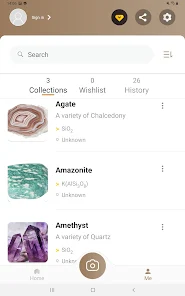
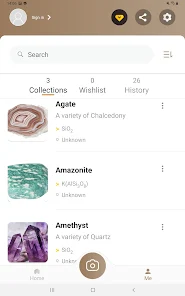
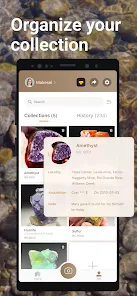
User experience is at the heart of Rock Identifier: Stone ID. The app features a sleek, intuitive interface that is easy to navigate, even for those who may not be tech-savvy. Users can simply take a photo of a rock, and the app employs advanced image recognition technology to provide instant identification. The app also offers detailed descriptions, including the rock's composition, formation, and typical locations. User feedback highlights the accuracy of the identifications and the wealth of information available about each stone. Moreover, the app allows users to save their favorite stones and create a personal collection, enhancing engagement and fostering a deeper connection with the subject matter.

Pricing

Updates & Support The developers of Rock Identifier: Stone ID are committed to providing regular updates to enhance user experience and expand the app's features. Recent updates have included improved image recognition algorithms and an expanded database of rocks and minerals, ensuring that users have access to the latest information. Customer support is readily available through the app, with a responsive team that addresses user inquiries and feedback promptly. This commitment to continuous improvement and user satisfaction makes Rock Identifier: Stone ID not just an app, but a community for rock enthusiasts.

verified Security & Privacy Review

Security and privacy are paramount in the Rock Identifier: Stone ID app, ensuring that users can confidently explore their geological interests without compromising their personal information. The app follows industry-standard security protocols to protect user data, employing encryption techniques for data transmission and storage. Regarding permissions, the app requires access to the device's camera for capturing images of stones, which is essential for its identification features. However, it does not request unnecessary permissions, minimizing potential privacy risks. Users are informed about the data collected and how it is utilized, fostering transparency and trust. Rock Identifier: Stone ID adheres to strict privacy policies, ensuring that personal information is not shared with third parties without explicit consent. Users can review and manage their data preferences within the app, allowing for better control over their information. Overall, the app demonstrates a strong commitment to user security and privacy, making it a reliable choice for rock enthusiasts.

User Reviews

  • Ryan
    2026/04/29

    Nice to have an easy, quick reference for interesting rocks. The database is extensive and good. it is really fun being able to immediately identify a rock out in the field. There is an incredible wealth of information on every rock identified. The app also organizes your finds for easy access and offers a perspective on the quality of your collection. The app is understandably not always consistent in its assessment of the same rock from different angles. Overall, I am enjoying the app.

  • Anthony Dana DiGeronimo
    2026/06/17

    So far so good... just got the app an hour ago or so. I believe it is pretty good at the identifications. had to get a new angle on a few of them to get a different opinion of them. Got really accurate and informative. app can teach you a lot more than you thought... Even easy to understand - Beginner or seasoned O.G.s....you just might learn something new..huh???🦴☠️ Fossils, petrified, etc..Gems?

  • J
    2026/06/11

    Be careful of extra charges I was charged almost $50 by this app and was denied a refund even though I didn't approve the purchase. I used this app on an old phone, and it was a good resource, not 100% accurate, but definitely has some great educational materials. But when I installed it on my new phone, I was somehow charged almost $50! I tried to get a refund and was denied. I thought it was a great tool when it was free, but I'm really disappointed that they charged me without me agreeing.

  • Addison
    2026/06/24

    So far, I've helped the apple for at least 5 hours and I haven't been able to open it once I open the app, and I try to press continue to completely open it up to where I can scan rocks and it doesn't work so I've tried restarting my phone checking. For updates and nothing works and unfortunately, I'm sure this app is very useful for other people who can log in, but at the moment I am unable to log in, which gives it one star.

  • Melissa Westgate
    2026/06/23

    If you sign up for the free trial, it charges you instantly for the whole year of service instead of waiting until the end of the trial period. I've submitted for a refund since I didn't find the app useful and did not want to continue after trying it out. The charge literally even says "free trial" in the statement from Google play.

Review Source: Google Play store public user reviews.

FAQ

1

Does Rock Identifier: Stone ID collect my personal data?

Rock Identifier: Stone ID prioritizes user privacy and does not collect personal data unless explicitly provided by the user for account creation or support purposes. Always check the app's privacy policy for detailed information.

2

Does Rock Identifier: Stone ID offer a free trial or free version?

Yes, Rock Identifier: Stone ID offers a free version with basic features, allowing users to try the app before considering a subscription for advanced functionalities.

3

Does Rock Identifier: Stone ID require an internet connection?

While Rock Identifier: Stone ID can function offline for previously identified rocks, an internet connection may be required for accessing the latest database updates and additional features.

4

How can I contact support or send feedback for Rock Identifier: Stone ID?

You can contact support or send feedback for Rock Identifier: Stone ID through the app's help section or by visiting the official website, where you can find contact information and support resources.

5

How do I manage or cancel my Rock Identifier: Stone ID subscription?

To manage or cancel your subscription for Rock Identifier: Stone ID, you can do so through the app store settings on your device (e.g., Apple App Store or Google Play Store), where you can view and modify your subscription preferences.

How to use Rock Identifier: Stone ID

1

How can I contact customer service for the Rock Identifier: Stone ID app?

You can reach customer service through the app's settings or visit their official website for support contact information.

2

How do I find the customer number for the Rock Identifier: Stone ID app?

The customer number is usually available in the app's help section or on your purchase receipt.

3

How do I log in to my account on the Rock Identifier: Stone ID app?

Open the app, tap on the login option, and enter your registered email and password.

4

Is there a way to activate the Rock Identifier: Stone ID app?

If activation is required, follow the instructions provided in the app after purchase or check the confirmation email for activation steps.

What's New

Improved identification accuracy. A few minor bugs have been fixed for smoother user experience.

Editor's Choice