This site uses cookies to enhance your user experience. By clicking any link on this site you are giving your consent to our cookie policy. Read more
Reject
Accept All

Advertiser and Editorial Disclosures

Resident Portal

Resident Portal

verified Verified App

Developer: Entrata, Inc

  • category

    Category: Lifestyle

  • price

    Price: free

  • age rating

    Age Rating: Everyone

  • rating

    Rating: 4.8

  • download

    Downloads: 1,000,000+

  • version

    Version: 5.63.0

Screenshot 1
Screenshot 2
Screenshot 3
Screenshot 4
Screenshot 5
Screenshot 6
Screenshot 7

Features & Highlights

Community Updates

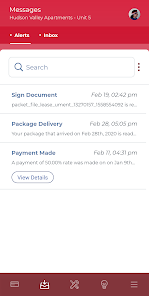
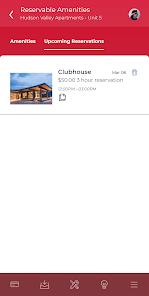
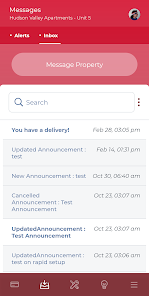
Stay informed about community events, announcements, and news through the Resident Portal. With a dedicated section for updates, you can connect with neighbors and participate in community activities, fostering a sense of belonging and engagement.

Document Access

Access important documents such as lease agreements, community guidelines, and payment history all in one place. The Resident Portal keeps everything organized and easily accessible, allowing you to find the information you need without any hassle.

Maintenance Requests

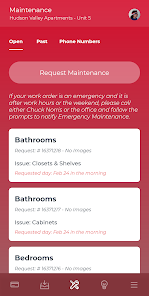
Submit maintenance requests directly through the portal at any time, ensuring your concerns are addressed promptly. Track the status of your requests in real-time and communicate with property management, making it easier to keep your living space in top shape.

Online Rent Payment

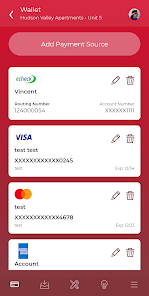
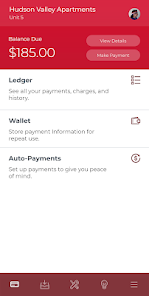
Easily manage your monthly rent payments through the secure online portal. With just a few clicks, you can set up recurring payments, view transaction history, and receive instant payment confirmations, making your financial management hassle-free and straightforward.

Pros & Cons

Pros
  • Streamlined communication between residents and management enhances responsiveness.
  • 24/7 access to important documents simplifies information retrieval.
  • Online payment options make rent transactions convenient and secure.
  • Maintenance requests can be submitted quickly, ensuring prompt service.
  • Community events and updates foster a sense of belonging among residents.
Cons
  • Limited access can frustrate residents needing immediate assistance
  • Technical issues may hinder user experience and accessibility
  • Over-reliance on digital platforms excludes residents without internet access

Real Experience Using Resident Portal

Application Scenarios

The Resident Portal app is designed to enhance the living experience for residents in various types of housing, including apartments, condominiums, and community living. It serves as a centralized hub for residents to access important information, communicate with management, and manage their living arrangements. Users can easily submit maintenance requests, make rent payments, and view community announcements all in one place. In addition, the app can be particularly useful during events such as lease renewals, move-ins, or community gatherings, where residents can conveniently find relevant information and updates. It also supports community engagement by allowing residents to connect with one another and participate in discussions, making it an essential tool for fostering a sense of belonging.

User Experience

The user experience of the Resident Portal app is notably intuitive and user-friendly. Upon opening the app, users are greeted with a clean interface that makes navigation a breeze. The layout is straightforward, with clear categories for different functions such as maintenance requests, payment options, and community news. Users appreciate the ability to quickly submit a maintenance request with just a few taps, as well as the option to track the status of their requests in real-time. The app’s notification feature keeps residents informed of important updates and deadlines, enhancing the overall experience. Feedback from users indicates that the app significantly reduces the hassle associated with property management, allowing residents to focus on enjoying their homes.

Pricing

Resident Portal operates on a subscription-based model, which varies depending on the size and type of property management company utilizing the platform. Most properties absorb the cost of the app into their management fees, meaning residents can often access the features at no additional charge. This pricing structure has been positively received, as many users find that the convenience and efficiency offered by the app outweigh any potential costs. For property managers, the app provides value by streamlining operations and enhancing tenant satisfaction, justifying the investment in the platform.

Updates & Support

The developers of Resident Portal regularly release updates to enhance functionality and improve user experience based on resident feedback. Users have noted that the app's performance has consistently improved over time, with new features being added that further simplify tasks such as online payments and communication with property management. Customer support is also readily available, with a dedicated team to assist residents with any issues or questions they may have. The support team is responsive and knowledgeable, ensuring that users can resolve any difficulties quickly, making the overall experience seamless and efficient.

verified Security & Privacy Review

The Resident Portal app prioritizes user security and privacy by implementing robust data protection measures. All sensitive information, such as personal identification and payment details, is encrypted during transmission and storage, ensuring that user data remains secure against unauthorized access. The app requests permissions that are essential for its functionality, including location services for community-specific features and notifications for important updates. Users are informed about the permissions required and can manage their preferences within the app settings, promoting transparency and control over personal data. In terms of privacy practices, the Resident Portal adheres to strict policies that limit data collection to what is necessary for providing services. User data is not shared with third parties without explicit consent, and the app complies with relevant data protection regulations, such as GDPR and CCPA. Regular audits and updates further enhance the app's security framework, ensuring that user information remains safe and private.

Reviews

4.8

“Easy to navigate and user-friendly interface.”

“Great for paying rent on time!”

“Customer support is responsive and helpful.”

“Helpful features for maintenance requests.”

“Smooth experience for managing my lease online.”

FAQ

1

Can I submit suggestions or feedback to Resident Portal?

Yes, users can submit suggestions or feedback through the app's feedback feature or by contacting customer support directly to share their thoughts and experiences.

2

Does Resident Portal collect my personal data?

Yes, Resident Portal collects personal data necessary for account creation and service delivery, but it adheres to privacy policies to protect your information.

3

Does Resident Portal support offline use?

Resident Portal primarily requires an internet connection to function, but some features may be accessible offline; however, full functionality is best experienced online.

4

How do I cancel my Resident Portal subscription?

To cancel your subscription, you can navigate to your account settings within the app and follow the cancellation instructions, or contact your property management office for assistance.

5

How much does a subscription to Resident Portal cost?

Resident Portal does not typically require a subscription fee for residents, but property management may have different pricing structures for their services.

How to use Resident Portal

1

Can I reset my password without contacting customer service?

Yes, you can reset your password by clicking the “Forgot Password?” link on the login page. Follow the prompts to create a new password.

2

How can I activate my Resident Portal account?

You can activate your account by following the link in the activation email sent to you. If you didn’t receive it, please check your spam folder or contact customer service.

3

How can I contact customer service for issues with my Resident Portal?

You can reach customer service through the support section on the portal or by calling the provided phone number. We’re here to help!

4

How do I log in to my Resident Portal?

To log in, enter your username and password on the portal's homepage. If you need help, click on the “Forgot Password” link.

5

How do I update my customer information in the Resident Portal?

To update your customer information, log in to your account and navigate to the profile settings. Make your changes and save.

Editor's Choice