This site uses cookies to enhance your user experience. By clicking any link on this site you are giving your consent to our cookie policy. Read more
Reject
Accept All

Advertiser and Editorial Disclosures

RentCafe Resident

RentCafe Resident

verified Verified App

Developer: Yardi Systems

  • category

    Category: Lifestyle

  • price

    Price: free

  • age rating

    Age Rating: Everyone

  • rating

    Rating: 4.7

  • download

    Downloads: 1,000,000+

  • version

    Version: 25.12.2

Screenshot 1
Screenshot 2
Screenshot 3
Screenshot 4
Screenshot 5
Screenshot 6

Features & Highlights

Community Engagement

RentCafe Resident fosters a sense of community by allowing residents to connect with neighbors and participate in local events. Engage in discussions, share recommendations, and stay informed about happenings in your building, enhancing your living experience beyond just an apartment.

Maintenance Requests

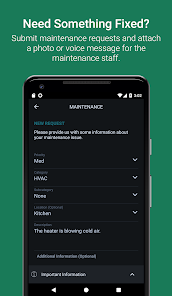
Easily submit maintenance requests through the app and track their status in real-time. This feature ensures that you can report issues promptly and have peace of mind knowing that they are being addressed without the hassle of phone calls or in-person visits.

Mobile Access

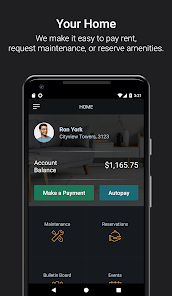
With RentCafe Resident, you can manage your apartment from anywhere using your smartphone. Check your balance, pay rent, and submit maintenance requests all in one user-friendly app, making it easier than ever to stay on top of your housing needs without being tied to a desktop computer.

Payment Options

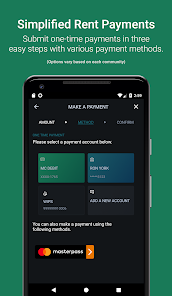
The app offers flexible payment options, including one-time payments and automated recurring payments. This convenience helps you manage your rent efficiently, ensuring you never miss a due date while allowing you to choose the method that works best for you.

Pros & Cons

Pros
  • Streamlined rent payments for convenience and reliability
  • Easy communication with property management at your fingertips
  • Access to community events and updates in real-time
  • Maintenance requests submitted and tracked effortlessly
  • Online lease management for hassle-free document access
Cons
  • Limited customer support options available
  • User interface can be confusing
  • Frequent app glitches disrupt usability
  • High fees for certain payment methods

Real Experience Using RentCafe Resident

Application Scenarios

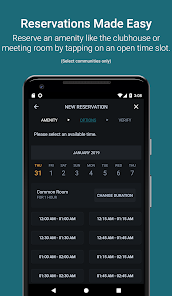
The RentCafe Resident app is designed for residents living in apartment communities that utilize RentCafe's property management services. It serves as a comprehensive platform for managing various aspects of apartment living. Users can pay rent, submit maintenance requests, and communicate with property management directly through the app. It is particularly useful for those who are busy and prefer handling their housing matters digitally. Whether you're at home, at work, or on the go, RentCafe Resident simplifies managing your living situation, making it easier to stay organized and connected with your community.

User Experience

The user experience of the RentCafe Resident app is generally positive, with a clean interface that is easy to navigate. New users can quickly set up their profiles and link their apartment information, allowing for seamless access to essential features. The app provides multiple payment options, including credit cards and ACH transfers, making it convenient for users to pay rent on time. The maintenance request feature allows residents to report issues effortlessly, complete with the ability to upload photos for better clarity. Notifications and reminders are another plus, helping residents stay informed about upcoming payments or community events. However, some users have reported occasional glitches and slow loading times, particularly during peak usage periods, which can affect overall satisfaction.

Pricing

RentCafe Resident is typically free for residents, as it is a service provided by apartment communities using RentCafe's management software. While there may be no direct cost for downloading and using the app, residents should be aware that their property management may implement service fees for certain transactions, such as credit card payments. Overall, the app provides a cost-effective solution for residents looking to manage their housing needs efficiently, especially when compared to the time and effort saved by having everything at their fingertips.

Updates & Support

RentCafe regularly updates the app to enhance functionality and address user feedback. These updates include bug fixes, performance improvements, and new features that aim to improve the overall user experience. Customer support is accessible through the app, allowing users to get assistance with any issues they may encounter. The support team is responsive and knowledgeable, often providing quick resolutions to common problems. However, users have noted that response times can vary, particularly during high-demand periods. Overall, the commitment to continuous improvement and user support contributes to a more satisfying experience for residents utilizing the RentCafe Resident app.

verified Security & Privacy Review

The RentCafe Resident app prioritizes user security and privacy by implementing robust data protection measures. The app employs encryption protocols to safeguard sensitive information, ensuring that personal data remains confidential during transmission. Users are required to create secure passwords and are encouraged to enable two-factor authentication for an added layer of security. In terms of permissions, the app requests access to essential features such as location, camera, and notifications, which are necessary for its functionality but may raise privacy concerns. Users are informed about what data is collected and how it is utilized, promoting transparency in data handling practices. RentCafe adheres to strict privacy policies, limiting the sharing of user data with third parties without explicit consent. Users can manage their privacy settings within the app, allowing them to control the data shared and the permissions granted. Overall, RentCafe Resident demonstrates a commitment to maintaining user trust through careful handling of personal information and transparent privacy practices.

Reviews

4.7

“User-friendly interface makes managing rent easy.”

“Great features for tracking maintenance requests.”

“Convenient payment options save me time.”

“Helpful customer service resolves issues quickly.”

“App crashes occasionally, needs improvement.”

FAQ

1

Does RentCafe Resident collect my personal data?

Yes, RentCafe Resident collects certain personal data to provide services effectively, such as your name, contact information, and payment details. However, it adheres to privacy regulations to protect your information.

2

Does RentCafe Resident offer a free trial or free version?

RentCafe Resident is available as a free app for residents, allowing them to use its features without a subscription fee. However, specific features may depend on your property management's offerings.

3

Does RentCafe Resident require an internet connection?

Yes, RentCafe Resident requires an internet connection to access its features and services, as it operates primarily through online connectivity.

4

How can I contact support or send feedback for RentCafe Resident?

You can contact support or send feedback for RentCafe Resident through the app's help section or by visiting the RentCafe website, where you can find contact information for customer support.

5

How do I manage or cancel my RentCafe Resident subscription?

Since RentCafe Resident is free to use, there is no subscription to manage or cancel. If you have any account-related inquiries, you can contact your property management for assistance.

How to use RentCafe Resident

1

How can I contact customer service for the RentCafe Resident app?

You can reach RentCafe customer service by calling their support number or through the help section in the app. Check the official website for the latest contact details.

2

How do I activate my RentCafe Resident app account?

If required, you can activate your account by following the link sent to your email during registration. Click the link and set your password to complete activation.

3

How do I log in to the RentCafe Resident app?

To log in, open the app and enter your registered email and password. If you don't have an account, you can create one through the app.

4

What is the customer number for RentCafe support?

The customer support number for RentCafe can typically be found on their website under the contact section. Make sure to check for the most current number.

Editor's Choice