This site uses cookies to enhance your user experience. By clicking any link on this site you are giving your consent to our cookie policy. Read more
Reject
Accept All
Prisma Art Effect Photo Editor

Prisma Art Effect Photo Editor

verified Verified App

Developer: Prisma Labs, Inc.

  • category

    Category: Photography

  • price

    Price: free

  • age rating

    Age Rating: Everyone

  • rating

    Rating: 4.5

  • download

    Downloads: 50,000,000+

  • version

    Version: 4.6.4.632

Screenshot 1
Screenshot 2
Screenshot 3
Screenshot 4
Screenshot 5
Screenshot 6
Screenshot 7
Screenshot 8

Features & Highlights

Artistic Filters

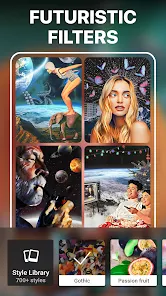
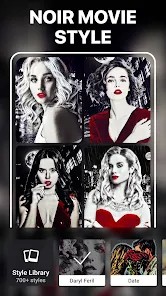
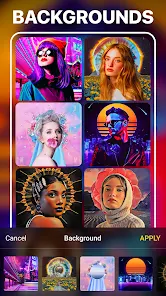
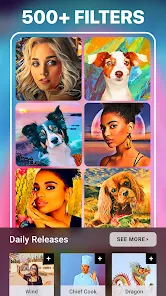
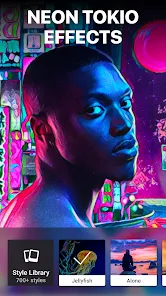
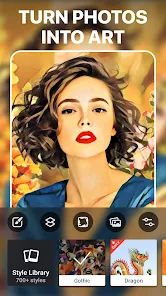
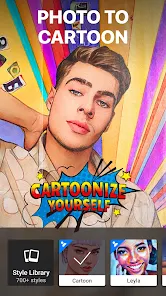
Prisma offers a stunning array of artistic filters that transform your photos into beautiful works of art. With styles inspired by famous artists and art movements, you can easily give your images a unique flair that stands out on social media or as part of your personal collection.

Customization Options

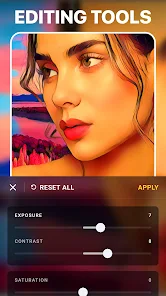
The app provides a variety of customization options, allowing you to fine-tune the intensity of each filter to match your personal style. You can adjust brightness, contrast, and saturation, ensuring your final creation is just as you envisioned it.

Social Sharing

Easily share your transformed images directly to social media platforms like Instagram and Facebook with just a few taps. Prisma integrates seamlessly with your favorite apps, helping you showcase your creativity and connect with friends and followers.

User-Friendly Interface

Prisma features a sleek, intuitive interface that makes it easy for users of all skill levels to navigate and apply effects. Whether you’re a seasoned photographer or a casual user, you’ll find the editing process enjoyable and straightforward.

Pros & Cons

Pros
  • Transforms photos into stunning artwork
  • Offers a variety of artistic styles
  • User-friendly interface for easy navigation
  • Quick processing for instant results
  • Share creations seamlessly on social media
Cons
  • Limited customization options for filters and effects
  • Can slow down older devices significantly
  • Watermark appears on unregistered versions
  • High subscription cost for premium features

Real Experience Using Prisma Art Effect Photo Editor

Application Scenarios

Prisma Art Effect Photo Editor is a versatile application that caters to a wide range of users, from casual photographers to professional artists. Whether you are looking to enhance your social media posts or create stunning artwork from your photos, Prisma offers a plethora of artistic filters and effects. The app is particularly popular among Instagram users, as it allows them to transform ordinary images into visually striking works of art. Additionally, it is an excellent tool for graphic designers and marketers who wish to create eye-catching visuals for campaigns. Users can effortlessly convert selfies, landscapes, and everyday moments into unique masterpieces that reflect their personal style and creativity.

User Experience

The user experience of Prisma is intuitive and engaging. Upon launching the app, users are greeted with a clean interface that makes navigation simple and straightforward. The selection of filters is extensive, ranging from classic art styles to contemporary designs, allowing for endless creativity. Users can adjust the intensity of each filter, providing them with the control to fine-tune their edits. The app also supports sharing directly to social media platforms, making it easy to showcase creations. Furthermore, the community feature allows users to explore and gain inspiration from the work of others, fostering a sense of connection among users. However, some users have noted occasional performance lags, especially when processing high-resolution images, but overall, the app maintains a smooth experience.

Pricing

Prisma offers a freemium model, allowing users to access a selection of filters and basic features at no charge. For those looking to unlock the full potential of the app, a subscription plan is available. The pricing is competitive, with options for monthly, quarterly, or annual subscriptions. This flexibility caters to different user needs, whether they wish to commit long-term or try the premium features for a shorter period. Users have found the investment worthwhile, especially considering the quality and variety of artistic filters that enhance their photos and provide a professional touch.

Updates & Support

Prisma is known for its regular updates that introduce new filters, features, and improvements based on user feedback. The development team is proactive in addressing bugs and enhancing app performance, ensuring a reliable user experience. Customer support is accessible, with a dedicated help section within the app, which includes FAQs and tutorials. Users can also reach out directly for assistance, and the response times are generally prompt. This commitment to user satisfaction reinforces Prisma's reputation as a leading photo editing app in the market.

verified Security & Privacy Review

The Prisma Art Effect Photo Editor prioritizes user privacy and data security by implementing robust measures to protect personal information. The app requires certain permissions to function effectively, including access to the camera and photo library. Users are informed about these permissions during the installation process, ensuring transparency regarding what data is accessible. Prisma's privacy policy outlines its commitment to safeguarding user data. It explicitly states that personal information is not sold to third parties, and data is used primarily to enhance user experience. The app employs encryption to protect data transmitted between the device and its servers, minimizing the risk of unauthorized access. Users have control over their data, with options to delete their account and associated information at any time. Regular updates to the app also include security enhancements, reflecting Prisma’s dedication to maintaining high standards of user privacy. Overall, Prisma Art Effect Photo Editor demonstrates a responsible approach to user data handling, making it a trustworthy choice for art enthusiasts seeking to transform their photos securely.

Reviews

4.5

“Amazing effects, transforms photos beautifully!”

“User-friendly interface, easy to create art!”

“Love the variety of filters available!”

“Perfect for enhancing selfies and portraits!”

“Great app for artistic photo editing!”

Editor's Choice