This site uses cookies to enhance your user experience. By clicking any link on this site you are giving your consent to our cookie policy. Read more
Reject
Accept All

Advertiser and Editorial Disclosures

PingID

PingID

verified

Ping Identity Corporation

2.8
Rating
5,000,000+ Downloads
3.5.0(13550) Version
  • category

    Category: Productivity

  • price

    Price: free

  • age rating

    Age Rating: Everyone

  • rating

    Rating: 2.8

  • available on

    Available on: /

  • updated on

    Updated on: May 24, 2026

Screenshot 1
Screenshot 2
Screenshot 3
Screenshot 4
Screenshot 5
Screenshot 6
Screenshot 7
Screenshot 8

Features & Highlights

Adaptive Authentication

PingID's adaptive authentication feature analyzes user behavior and contextual information to determine risk levels. This means that the app can tailor security measures based on how, where, and when users are accessing resources, striking a balance between security and convenience.

Integration Capabilities

PingID seamlessly integrates with a variety of applications and platforms, making it versatile for organizations of all sizes. This compatibility helps to streamline the authentication process and enhances overall security across different systems, allowing for a cohesive security strategy.

Multi-Factor Authentication

PingID offers robust multi-factor authentication to enhance security. By requiring multiple forms of verification, it ensures that only authorized users gain access to sensitive information, making it a vital tool for organizations looking to protect their data from unauthorized access.

User-Friendly Interface

With its intuitive design, PingID provides a seamless user experience. Users can easily navigate through the app for authentication, minimizing friction and ensuring that security measures do not hinder productivity or user satisfaction.

Pros & Cons

Pros
  • Enhances security with multi-factor authentication
  • User-friendly interface for easy access
  • Supports various devices for flexibility
  • Quick integration with existing systems
  • Real-time alerts for suspicious activity
Cons
  • User experience can be disrupted by frequent prompts
  • Limited offline access for authentication challenges
  • Potential delays in receiving notifications
  • Compatibility issues with some devices or applications

Real Experience Using PingID

Application Scenarios

PingID is primarily designed for organizations seeking to enhance their security protocols through multi-factor authentication (MFA). It's ideal for businesses that require secure access to sensitive data and applications, particularly in sectors like finance, healthcare, and technology. Users can utilize PingID for various scenarios, such as securing remote work environments, safeguarding customer transactions, and ensuring compliance with regulatory standards. The app seamlessly integrates with a wide range of enterprise applications, including cloud services and on-premises systems, making it a versatile choice for companies looking to bolster their cybersecurity measures. Whether accessing corporate emails, sensitive documents, or internal databases, PingID provides an added layer of protection that significantly reduces the risk of unauthorized access.

User Experience

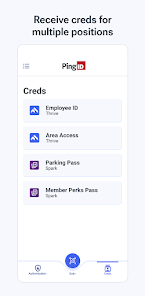
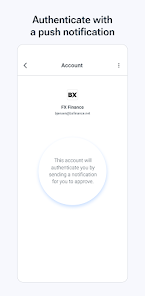
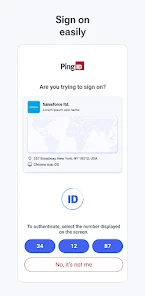
PingID boasts a user-friendly interface that simplifies the authentication process. Upon setup, users can choose their preferred method for receiving authentication codes, be it through push notifications, SMS, or voice calls. The app's push notification feature is particularly praised for its convenience, allowing users to approve login attempts with a single tap. The overall design is intuitive, making it easy for users of varying technical expertise to navigate through the app without confusion. Additionally, PingID supports biometric authentication, such as fingerprint and facial recognition, which enhances both security and user experience. Users have reported quick response times and high reliability during the authentication process, contributing to a seamless experience when accessing their accounts.

Pricing

PingID offers a competitive pricing model that caters to different organizational needs. While specific pricing details may vary based on the size of the organization and the features required, it generally follows a subscription-based model. This allows businesses to scale their usage according to their requirements. For smaller teams or startups, PingID may provide a free trial period that lets them explore the app's functionalities before committing to a paid plan. Larger enterprises can benefit from customized pricing packages that include advanced features and dedicated support services. Overall, PingID provides substantial value for its cost, especially for organizations prioritizing security.

Updates & Support

PingID is committed to continuous improvement, regularly releasing updates that enhance functionality, security, and user experience. The app's development team actively listens to user feedback, leading to timely fixes and the introduction of new features that address evolving security challenges. Additionally, PingID offers robust customer support through various channels, including email, live chat, and a comprehensive knowledge base. Users can access detailed documentation, troubleshooting guides, and FAQs, ensuring they can resolve any issues quickly. This dedication to support and updates reinforces PingID's reputation as a reliable and user-centric authentication solution.

verified Security & Privacy Review

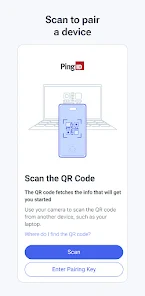
PingID prioritizes security and privacy, offering robust multi-factor authentication to safeguard user accounts. The app employs strong encryption protocols to protect data both in transit and at rest, ensuring that sensitive information remains secure against unauthorized access. In terms of privacy practices, PingID adheres to industry standards and regulations, providing transparency about data collection and usage. Users are informed about what data is collected, which typically includes device information and authentication logs, and how it is utilized to enhance security measures. Permissions requested by PingID are minimal and primarily focused on delivering its core functionalities, such as accessing the camera for QR code scanning and notifications for authentication prompts. Users maintain control over their data, as the app allows for easy management of privacy settings. Overall, PingID demonstrates a strong commitment to protecting user data and maintaining privacy, making it a reliable choice for individuals seeking secure authentication solutions.

User Reviews

  • Elizabeth Griffin
    2026/02/19

    Job forces me to use this. Now I can't log on to my mobile. It no longer allows texting. If I say yes it's me through the notification, it leads me to the app, I press the number, then I get an error because... I left the app. Update: I can't get into my job sites at all, whatsoever. I can't access my W2. My taxes. My pay stubs. You know, the important stuff. We should be able to un pair our devices ourselves, not jump through hoops just to have basic access to our own information.

  • A Google user
    2019/08/19

    Awful, just absolute garbage. Ever since the recent update, the swipe prompt fails to load, authentication times out and I'm I'm locked out of email. This is the worst app in existence. It's painfully unfriendly to install and pair and once you finally get it, it fails to prompt for a swipe so I can't connect regardless. I'm forced to use this to access work email, but since it refuses to work, I have no access at all. I'd give zero stars if possible.

  • Cameron Flora
    2024/05/28

    The biggest improvement I could get from this app is if my employer would stop using it. Gets hung up a lot super buggy. Just doesnt work a lot. Hate that it pings me to login even though I logged in less than a minute ago. Causes our diagnostic devices to freeze. Would be cool if these guys were getting paid to develop an app that made our lives easier instead of making it harder to complete our work.

  • Benigna Kodele
    2020/06/23

    I had to have two step verification. Out if the blue the Ping app stopped working and the Ping ID would not send me the code I needed to access my work account. I was locked out and couldn't access anything. This app was such a waste of time. Hours on the phone with IT. They asked me to uninstall the app so I did and then to reinstall it. When I tried to reinstall it, it said, " Waiting for download" and it never downloaded. SO FRUSTRATING. I would give this app zero stars if I could.

  • Jor-El
    2021/03/09

    Move the dropdown notification menu selections to the opposite positions for the pop-up notification. In other words move approve to the right side and deny to the left since most people are right handed and will favor actions that keep them from having to stretch out unnecessarily. I have denied several times due to anticipation of the approval to be in a more intuitive spot than it currently is.

Review Source: Google Play store public user reviews.

FAQ

1

Does PingID collect my personal data?

PingID may collect certain data to provide its services, but it is committed to user privacy and follows strict data protection regulations. Users can review the privacy policy for detailed information.

2

Does PingID offer a free trial or free version?

PingID typically does not offer a free version, but it may provide a free trial period for new users to explore its features before committing to a subscription.

3

Does PingID require an internet connection?

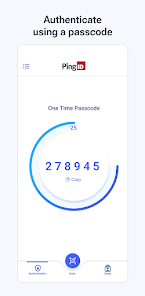
PingID generally requires an internet connection for real-time authentication; however, it can function offline for certain features like generating one-time passcodes if previously enabled.

4

How can I contact support or send feedback for PingID?

You can contact PingID support through their official support page, via email, or through the app, where you'll find options to submit feedback or request assistance.

5

How do I manage or cancel my PingID subscription?

You can manage or cancel your PingID subscription through the account settings on the PingID website or app, or by contacting customer support for assistance.

How to use PingID

1

How can I contact Customer Service for the PingID app?

You can reach PingID Customer Service by visiting their official website and using the support contact options provided there.

2

How do I activate the PingID app?

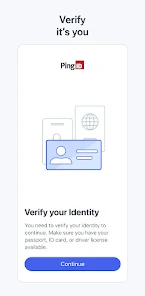
To activate PingID, download the app, open it, and follow the on-screen instructions to link it with your account by scanning the QR code provided by your organization.

3

How do I log in to the PingID app?

To log in, open the app, enter your credentials, and authenticate using the method you have set up (e.g., biometrics or PIN).

4

What is the customer support number for PingID?

The customer support number for PingID can be found on the official website under the support section.

What's New

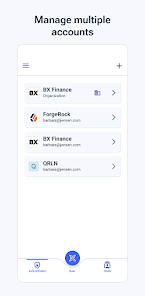
Fixed an issue that was causing some organizational accounts to remain listed in the Accounts list even after they were deleted.

Editor's Choice