This site uses cookies to enhance your user experience. By clicking any link on this site you are giving your consent to our cookie policy. Read more
Reject
Accept All
PicCollage: Photo Video Editor

PicCollage: Photo Video Editor

verified Verified App

Developer: Cardinal Blue Software, Inc.

  • category

    Category: Photography

  • price

    Price: free

  • age rating

    Age Rating: Everyone

  • rating

    Rating: 4.8

  • download

    Downloads: 100,000,000+

  • version

    Version: 7.22.10

Screenshot 1
Screenshot 2
Screenshot 3
Screenshot 4
Screenshot 5
Screenshot 6
Screenshot 7
Screenshot 8
Screenshot 9
Screenshot 10
Screenshot 11
Screenshot 12
Screenshot 13
Screenshot 14
Screenshot 15
Screenshot 16
Screenshot 17
Screenshot 18
Screenshot 19
Screenshot 20
Screenshot 21
Screenshot 22
Screenshot 23
Screenshot 24

Features & Highlights

Easy Sharing Options

Once you've crafted your masterpiece, sharing it is a breeze with PicCollage's easy sharing options. Post directly to social media platforms or save your creations to your device, making it simple to showcase your artistic flair.

Photo Collage Maker

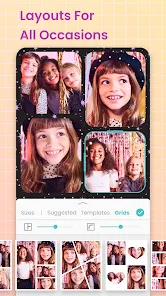
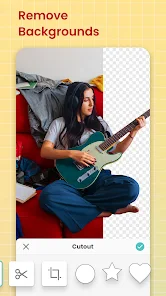
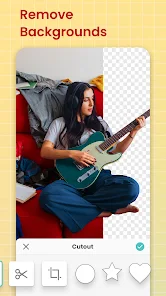
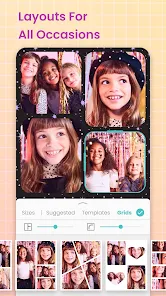
Easily create stunning photo collages by dragging and dropping images into customizable templates. With a variety of layouts and backgrounds, you can express your creativity and tell your story visually, whether for social media or personal keepsakes.

Stickers and Text

Enhance your collages with a wide selection of stickers and text options. Personalize your creations by adding fun graphics or heartfelt messages, ensuring each collage reflects your unique style and personality.

Video Editing Tools

Transform your photos into captivating videos with PicCollage's intuitive video editing tools. Add music, filters, and transitions to bring your memories to life, making it simple to share engaging content with friends and family.

Pros & Cons

Pros
  • User-friendly interface for easy navigation and creation
  • Wide range of templates for quick design options
  • Integrated video editing features for dynamic content
  • Extensive library of stickers and images for customization
  • Seamless sharing to social media platforms and apps
Cons
  • Limited free features hinder creative options
  • User interface can be confusing for newcomers
  • Ads disrupt the editing experience frequently
  • Export quality may not meet professional standards

Real Experience Using PicCollage: Photo Video Editor

Application Scenarios

PicCollage: Photo Video Editor serves a myriad of purposes tailored for both casual users and creative professionals. Whether it’s for personal use, such as creating a memorable collage for a birthday party or a wedding, or for professional endeavors like crafting promotional graphics for a small business, this app shines in versatility. Users can easily import photos from their device or social media accounts, allowing for quick and seamless integration of images. The app is particularly useful for educators and students who wish to create engaging presentations or visual aids. With a variety of templates and design elements, PicCollage enables users to express their creativity in numerous scenarios, be it for social media posts, invitations, or even mood boards.

User Experience

The user experience of PicCollage is characterized by its intuitive design and user-friendly interface. Upon opening the app, users are greeted with a clean layout that guides them effortlessly through the collage-making process. The drag-and-drop functionality simplifies the arrangement of images and stickers, making it accessible even for those who may not be tech-savvy. The diverse range of customization options—such as fonts, backgrounds, and borders—offers users the freedom to personalize their projects extensively. Moreover, the app includes a feature for adding text and stickers, enhancing the overall aesthetic of the collages. However, some users may find the occasional ads interruptive, which can detract from the otherwise smooth experience. Overall, the app strikes a balance between functionality and creativity, making it enjoyable to use.

Pricing

PicCollage adopts a freemium model, allowing users to access a variety of features at no cost. However, for those seeking advanced tools and a wider selection of templates, the premium subscription offers a more extensive library and an ad-free experience. The pricing is competitive, providing good value for users who frequently engage in collage-making. Subscriptions are available on a monthly or yearly basis, catering to different user preferences. The app often runs promotional offers, making it an attractive option for budget-conscious users wishing to unlock premium features without breaking the bank.

Updates & Support

Regular updates are a hallmark of PicCollage, ensuring that users benefit from new features and improvements consistently. The development team actively listens to user feedback, implementing changes that enhance usability and introduce fresh content. Support is readily available through the app’s help center, which includes FAQs and troubleshooting guides. For more personalized assistance, users can reach out via email, and the response time is generally quick. This commitment to ongoing support and updates fosters a sense of community among users, making them feel valued and heard.

verified Security & Privacy Review

The security and privacy practices of PicCollage: Photo Video Editor are designed to protect user data while enhancing the app experience. The app implements industry-standard encryption protocols to safeguard personal information during transmission and storage. Users are informed about the types of data collected, which may include photos, videos, and user-generated content. This data is primarily used to offer personalized features and improve app functionality. PicCollage requests specific permissions to access storage and camera functionalities, enabling users to create and edit collages seamlessly. However, it’s crucial for users to review these permissions and make informed choices about what to share. The app adheres to privacy regulations, ensuring that user data is not sold to third parties without explicit consent. Moreover, users can manage their privacy settings within the app, allowing them greater control over their personal information. Overall, PicCollage demonstrates a commitment to user privacy, emphasizing transparency in data handling practices and providing tools for users to protect their information effectively.

Reviews

4.8

“Easy to use with great features!”

“Perfect for creating fun collages.”

“Love the variety of stickers and backgrounds.”

“User-friendly interface makes editing enjoyable.”

“Great for both photos and videos!”

Editor's Choice