This site uses cookies to enhance your user experience. By clicking any link on this site you are giving your consent to our cookie policy. Read more
Reject
Accept All
Photo Translator - Translate

Photo Translator - Translate

verified Verified App

Developer: EVOLLY.APP

  • category

    Category: Tools

  • price

    Price: free

  • age rating

    Age Rating: Everyone

  • rating

    Rating: 3.9

  • download

    Downloads: 10,000,000+

  • version

    Version: 9.0.0

Screenshot 1
Screenshot 2
Screenshot 3
Screenshot 4
Screenshot 5
Screenshot 6

Features & Highlights

Instant Text Translation

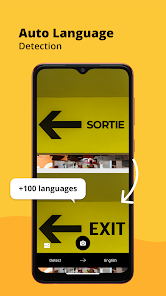
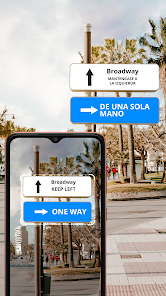
Photo Translator - Translate allows you to instantly translate text from images with just a quick snap. Simply capture the text you need translated, and the app will provide accurate translations in seconds, making it perfect for travel, studying, or business needs.

Multi-Language Support

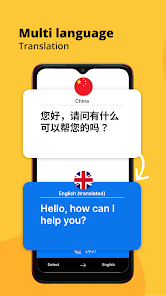
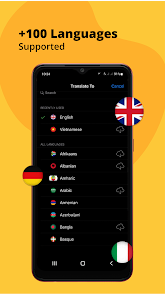
With support for over 100 languages, Photo Translator - Translate ensures you can communicate effectively no matter where you are. Whether you’re translating menus, signs, or documents, this app bridges the language gap effortlessly and keeps you connected to the world.

Offline Functionality

Never worry about losing your connection again! Photo Translator - Translate offers offline capabilities, allowing you to download language packs ahead of time. This feature ensures you can translate text anytime, anywhere, even when you're off the grid.

User-Friendly Interface

Designed with simplicity in mind, Photo Translator - Translate offers an intuitive interface that makes navigation a breeze. Users of all ages can easily access translation features without any technical knowledge, allowing for a smooth and enjoyable experience every time you need it.

Pros & Cons

Pros
  • Instantly translate text from images with ease
  • Supports multiple languages for global use
  • User-friendly interface for seamless navigation
  • Offline functionality for convenience anywhere
  • Accurate translations enhance communication effectiveness
Cons
  • Limited accuracy for complex texts
  • Requires good image quality
  • Slow processing for large images
  • May lack support for rare languages

Real Experience Using Photo Translator - Translate

Application Scenarios

Photo Translator - Translate is an incredibly versatile app designed for travelers, students, and professionals alike. Imagine you are in a foreign country, surrounded by menus, signs, and brochures in an unfamiliar language. With Photo Translator, you can simply take a picture of the text, and within moments, the app translates it into your preferred language. This feature is invaluable for anyone navigating new environments, making it easier to understand local cuisine, directions, or cultural information. Additionally, students can use the app to capture and translate text from books or notes, facilitating their learning process and enhancing their comprehension of foreign languages. Professionals working in international settings can also benefit from this tool, allowing for quick translations of important documents or signage without the need for extensive language training.

User Experience

The user experience of Photo Translator is designed to be intuitive and seamless. Upon launching the app, users are greeted with a clean interface that guides them through the translation process with ease. The camera function is responsive, allowing for quick captures, and the translation accuracy is impressive, even with complex texts. Users have reported that the app's ability to recognize different fonts and handwriting styles is particularly beneficial, though some may find limitations with certain languages or less common scripts. Overall, the app provides a smooth user experience, with minimal lag time between capturing the image and receiving the translation, making it a reliable companion for on-the-go translation needs.

Pricing

Photo Translator - Translate operates on a freemium model, allowing users to access basic features for free, which includes limited translations per day. For those who require more extensive use of the app or desire additional features such as offline translation or unlimited captures, a premium subscription is available. The pricing is competitive compared to other translation apps on the market, making it accessible for casual users and professionals alike. Users can opt for monthly or yearly subscription plans, with discounts often provided for long-term commitments, making it an economical choice for frequent travelers or language learners.

Updates & Support

The development team behind Photo Translator - Translate is committed to providing regular updates to enhance functionality and user experience. Users can expect periodic improvements, including new language support, enhanced translation algorithms, and bug fixes. The app also features an in-built feedback mechanism, allowing users to report issues or suggest improvements directly, which the team actively considers for future updates. Customer support is readily available through the app, offering timely assistance for any user inquiries or technical difficulties. Overall, the continuous commitment to updates and user support significantly enhances the app's reliability and user satisfaction.

verified Security & Privacy Review

The Photo Translator - Translate app prioritizes user security and privacy, implementing several measures to safeguard personal information. The app’s privacy policy clearly outlines the types of data collected, including images and translations, and how this data is used. Users can expect that their images are processed locally on their devices, minimizing the risk of data exposure to external servers. Regarding permissions, the app requires access to the camera and photo library to function effectively. Users are informed about these permissions upfront, ensuring transparency. The app does not ask for unnecessary permissions, which helps to limit potential privacy risks. Data encryption during transmission is a key feature, protecting user information from unauthorized access. The app also offers options to delete user data, allowing users to manage their information actively. Overall, Photo Translator - Translate demonstrates a strong commitment to data security and user privacy, making it a reliable choice for users seeking translation services without compromising their personal information.

Reviews

3.9

“Easy to use and very accurate translation!”

“Great for traveling and reading signs.”

“User-friendly interface with quick results.”

“Helpful for translating menus and documents.”

“Occasional errors, but overall a great tool.”

Editor's Choice