This site uses cookies to enhance your user experience. By clicking any link on this site you are giving your consent to our cookie policy. Read more
Reject
Accept All
Open Camera

Open Camera

verified Verified App

Developer: Mark Harman

  • category

    Category: Photography

  • price

    Price: free

  • age rating

    Age Rating: Everyone

  • rating

    Rating: 4.0

  • download

    Downloads: 100,000,000+

  • version

    Version: 1.55

Screenshot 1
Screenshot 2
Screenshot 3
Screenshot 4
Screenshot 5
Screenshot 6

Features & Highlights

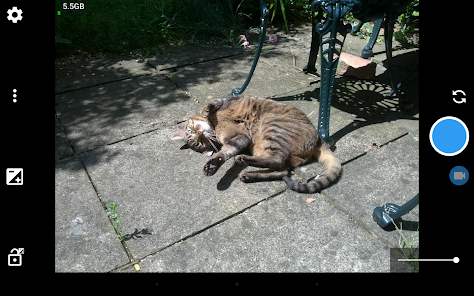
Customizable Interface

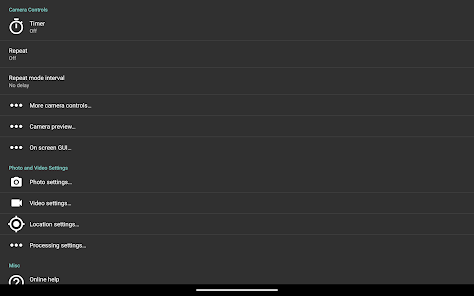
With Open Camera, you can tailor the user interface to your liking, rearranging buttons and toggles to suit your shooting style. This customization not only enhances usability but also makes it easier to access the features you use most, streamlining your photography experience.

Manual Controls

Open Camera puts you in the driver's seat with extensive manual controls, allowing for precise adjustments to exposure, focus, and white balance. This level of control empowers both amateur and professional photographers to capture images just the way they envision them, enhancing creative expression and technical quality.

Photo Modes

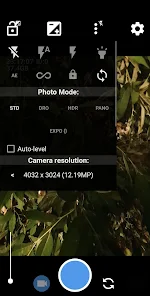
Explore a variety of photo modes including HDR, Night Mode, and Panorama to adapt to different shooting conditions. Each mode is designed to optimize your shots, ensuring stunning results whether you're shooting in low light or capturing expansive landscapes.

Video Recording Options

Open Camera offers robust video recording features, including support for various resolutions and frame rates. Whether you're filming a quick clip or capturing a full event, these options provide flexibility and quality, making it a great choice for videographers looking for an app that delivers.

Pros & Cons

Pros
  • User-friendly interface for easy navigation and control.
  • Supports manual controls for advanced photography techniques.
  • Offers a wide range of customizable settings and features.
  • Includes HDR mode for enhanced image quality.
  • Free and open-source, promoting community-driven improvements.
Cons
  • User interface can be overwhelming for beginners.
  • Limited advanced features compared to professional apps.
  • Performance can lag on older devices.
  • Occasional stability issues during long sessions.

Real Experience Using Open Camera

Application Scenarios

Open Camera is a versatile photography app that caters to a wide range of use cases, making it a valuable tool for both amateur and professional photographers. Whether you are capturing stunning landscapes, candid moments of friends and family, or detailed close-ups of nature, this app provides the necessary features to enhance your photography experience. Its usability extends to different scenarios, including outdoor adventures where you may need to adjust settings on the fly, or indoor settings where lighting can be a challenge. The app supports various shooting modes such as HDR, panorama, and time-lapse, allowing users to experiment and express their creativity. Additionally, the remote control feature enables users to take photos from a distance, making it ideal for group shots or wildlife photography without disturbing the subject.

User Experience

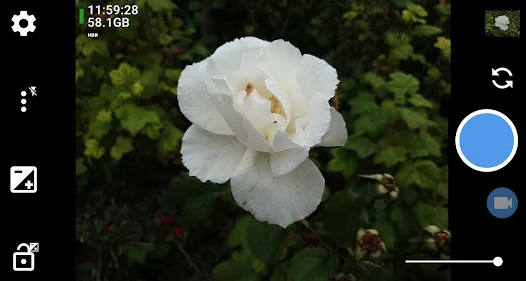
The user interface of Open Camera is intuitive and straightforward, ensuring that even those who are not tech-savvy can navigate through its myriad features with ease. The app is designed with accessibility in mind, featuring customizable settings that allow users to tailor their experience based on personal preferences. The layout is clean, with essential controls easily accessible, reducing the learning curve for new users. The app’s performance is impressive, boasting quick load times and minimal lag, which is crucial when you need to capture fleeting moments. Users have reported that the image quality produced is exceptional, with sharp details and vibrant colors, thanks to the app's advanced processing capabilities. Moreover, the ability to manually adjust settings such as ISO, focus, and exposure further enhances the user experience, allowing photographers to take full control of their shots.

Pricing

Open Camera stands out in the realm of photography apps with its completely free offering. There are no hidden costs or in-app purchases, making it an attractive choice for those who want quality photography tools without the financial commitment. This free model does not compromise on features; users have access to a rich set of functionalities that are often found in premium apps. The absence of ads enhances the user experience, ensuring that your photography sessions are uninterrupted and focused solely on capturing the perfect shot.

Updates & Support

The developers of Open Camera are committed to providing ongoing support and regular updates, which is essential for maintaining app performance and adding new features. Users benefit from a responsive support system that addresses queries and concerns effectively. The app's community is active, with forums and social media channels where users can share tips, tricks, and experiences. Regular updates ensure that the app stays compatible with the latest devices and operating systems, which is crucial in an ever-evolving digital landscape. Overall, the combination of excellent user support and frequent enhancements positions Open Camera as a reliable choice for photography enthusiasts.

verified Security & Privacy Review

Open Camera prioritizes user privacy and data security by adhering to strict permission guidelines. The app requires only essential permissions to function effectively, such as access to the camera and storage. Users are not asked for unnecessary permissions that could compromise their personal information. Data handling practices within Open Camera are transparent; the app does not collect or transmit user data to external servers. This means that photos and videos taken with Open Camera remain solely on the user's device, ensuring that private content is not shared without consent. Additionally, there are no advertisements that could potentially track user behavior or data. Users have control over their data, with options to manage settings related to location tagging and other features that may involve personal information. Overall, Open Camera demonstrates a commitment to maintaining user privacy and security, making it a reliable choice for those concerned about data protection.

Reviews

4.0

“Great features for a free camera app!”

“User-friendly interface, easy to navigate.”

“Excellent photo quality, highly customizable settings.”

“Perfect for amateur photographers looking to explore.”

“Stability issues on older devices, needs improvement.”

Editor's Choice