This site uses cookies to enhance your user experience. By clicking any link on this site you are giving your consent to our cookie policy. Read more
Reject
Accept All
Notion Calendar

Notion Calendar

verified Verified App

Developer: Notion Labs, Inc.

  • category

    Category: Productivity

  • price

    Price: free

  • age rating

    Age Rating: Everyone

  • rating

    Rating: 3.8

  • download

    Downloads: 1,000,000+

  • version

    Version: 1.41.0

Screenshot 1
Screenshot 2
Screenshot 3
Screenshot 4
Screenshot 5
Screenshot 6

Features & Highlights

Collaboration Features

With Notion Calendar, you can easily share your calendar with team members or collaborators. This makes scheduling meetings and coordinating group tasks effortless, as everyone stays on the same page and can contribute to event planning in real-time.

Customizable Views

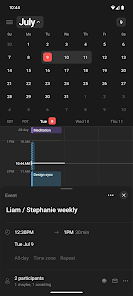
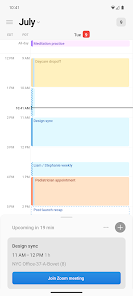
Notion Calendar offers multiple viewing options, including monthly, weekly, and daily layouts. This flexibility allows you to choose how you want to visualize your tasks and events, making it easy to find what you need at a glance and adapt to your personal planning style.

Reminders & Notifications

Set up reminders and notifications for your calendar events to ensure you never miss an important date. Whether it's a project deadline or a personal appointment, these alerts help you stay organized and on top of your commitments without any added hassle.

Seamless Integration

Integrate Notion Calendar with other Notion pages and databases for a cohesive experience. This feature enables you to link tasks, projects, and notes directly to your calendar events, streamlining your workflow and ensuring everything stays connected in one place.

Pros & Cons

Pros
  • Flexible scheduling for personal and team events
  • Seamless integration with other Notion tools
  • Customizable views for better organization
  • Collaboration features enhance team productivity
  • Visual timeline helps track project deadlines
Cons
  • Limited customization options for views and layouts
  • Syncing issues with external calendars
  • Steep learning curve for new users
  • Mobile app lacks some desktop features

Real Experience Using Notion Calendar

Application Scenarios

Notion Calendar is a versatile tool that caters to a variety of scheduling needs, making it ideal for professionals, students, and teams alike. For professionals, it serves as an excellent project management tool, allowing users to integrate tasks, deadlines, and meetings into a single, cohesive calendar view. Students can utilize the app to manage their academic schedules, track assignment due dates, and organize study sessions. Teams can benefit from collaborative features, enabling them to share calendars for project timelines, events, or even company-wide holiday schedules. Whether you are planning personal events, managing work tasks, or coordinating group projects, Notion Calendar adapts to your specific requirements seamlessly.

User Experience

The user experience of Notion Calendar is intuitive and engaging. The clean interface allows users to navigate effortlessly between different views, including day, week, and month layouts. Customization options enhance usability, enabling users to tailor their calendars with color-coded events, tags, and reminders. The drag-and-drop functionality simplifies the process of rescheduling tasks and events, making it user-friendly even for those who are not tech-savvy. Additionally, the integration with other Notion features, such as to-do lists and documents, fosters a holistic approach to productivity. The app also supports offline access, ensuring that users can keep track of their schedules without interruption, even in low-connectivity areas.

Pricing

Notion Calendar operates on a freemium model, which means that users can access a basic version of the app for free. This version provides essential features that are sufficient for casual users or those just starting to explore digital calendars. For more advanced functionalities, such as enhanced collaboration tools, greater storage options, and priority customer support, users can opt for a paid subscription. The pricing tiers are competitive compared to other calendar applications, making Notion Calendar an appealing choice for individuals and teams looking for a cost-effective solution without sacrificing quality or features.

Updates & Support

Notion consistently rolls out updates to enhance the user experience and introduce new features. Users can expect regular improvements based on feedback, ensuring that the app remains relevant in a fast-paced digital environment. The support system is robust, with an extensive knowledge base, user forums, and responsive customer service. Whether users encounter technical issues or have questions about functionality, they can easily find assistance. The active community surrounding Notion also offers a platform for users to share tips and best practices, further enriching the overall experience with the app.

verified Security & Privacy Review

The Notion Calendar app prioritizes user security and privacy, employing robust measures to protect sensitive information. All data is encrypted both in transit and at rest, ensuring that user content remains secure from unauthorized access. Notion adheres to stringent industry standards, including GDPR compliance, providing users with transparency regarding their data handling practices. When it comes to permissions, Notion Calendar requires minimal access to users’ devices, focusing solely on what is necessary for optimal functionality. Users are informed about the permissions requested during the app setup process, allowing for informed consent. This transparency helps build trust, as users can understand how their data will be utilized. Notion also offers users control over their data, allowing them to edit or delete information as needed. Privacy settings enable customization of data sharing preferences, ensuring users can manage who has access to their calendars. Overall, Notion Calendar demonstrates a strong commitment to maintaining user privacy and security, making it a reliable choice for individuals seeking a secure digital organization tool.

Reviews

3.8

“Intuitive interface, easy to customize.”

“Great for team collaboration and project management.”

“Syncs seamlessly with other Notion features.”

“Mobile app needs improvements for better usability.”

“Powerful tool, but can be overwhelming for beginners.”

Editor's Choice