This site uses cookies to enhance your user experience. By clicking any link on this site you are giving your consent to our cookie policy. Read more
Reject
Accept All

Advertiser and Editorial Disclosures

Notification History

Notification History

verified

Yotta Studio

3.7
Rating
5,000,000+ Downloads
1.9.4 Version
  • category

    Category: Tools

  • price

    Price: free

  • age rating

    Age Rating: Everyone

  • rating

    Rating: 3.7

  • available on

    Available on: /

  • updated on

    Updated on: Sep 23, 2023

Screenshot 1
Screenshot 2
Screenshot 3
Screenshot 4
Screenshot 5
Screenshot 6

Features & Highlights

Comprehensive Log

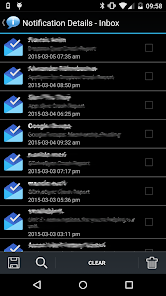
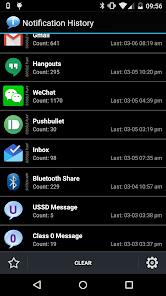
Notification History offers a complete log of all your notifications, ensuring you never miss an important message or alert. With a user-friendly interface, you can easily scroll through past notifications and find exactly what you need without the hassle of searching through your device's cluttered notification panel.

Custom Filters

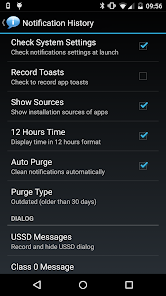
Easily categorize and filter your notifications to focus on what's most important to you. Whether you want to view only messages from specific apps or time frames, the custom filters make it simple to tailor your notification viewing experience, saving you time and effort.

Search Functionality

With a convenient search feature, finding specific notifications becomes a breeze. Just type in keywords related to the notification you need, and the app quickly retrieves the relevant entries, making it easy to track down missed updates or important reminders.

User-Friendly Interface

The intuitive design of Notification History makes navigation seamless and enjoyable. With clear visuals and organized layouts, users can effortlessly browse through their notifications, making it a breeze to stay on top of everything without feeling overwhelmed.

Pros & Cons

Pros
  • Easily track missed notifications anytime.
  • Quickly access important information from past alerts.
  • Stay organized by managing notification clutter.
  • Enhance productivity with timely reminders.
  • Avoid losing critical updates or messages.
Cons
  • Can become cluttered and overwhelming over time
  • May cause missed important notifications
  • Privacy concerns with sensitive information stored
  • Difficult to navigate for older notifications

Real Experience Using Notification History

Application Scenarios

The Notification History app serves a variety of practical purposes for users who often find themselves overwhelmed by the sheer volume of notifications received on their devices. This app is ideal for individuals who want to keep track of important messages, reminders, and alerts that may otherwise get lost in the noise of daily notifications. For instance, students can use it to monitor assignment deadlines and communication from their teachers, while professionals might find it beneficial for staying on top of work-related alerts, ensuring that no crucial information slips through the cracks. Additionally, the app can be a lifesaver for anyone who has ever accidentally dismissed an important notification, allowing users to retrieve and review notifications they may have overlooked. The versatility of the app makes it suitable for both personal and professional use, enhancing productivity and organization.

User Experience

The user experience of Notification History is both intuitive and user-friendly. Upon installation, users are greeted with a clean and organized interface that makes navigation a breeze. The app categorizes notifications by date and time, allowing users to easily scroll through past alerts without feeling overwhelmed. Customizable settings enable users to filter notifications based on their preferences, which enhances personalization and ensures that only the most relevant alerts are retained. Furthermore, the app offers a search function, enabling users to quickly find specific notifications without sifting through endless lists. Overall, users have reported a positive experience, praising the app's seamless integration with their device and its ability to significantly improve their notification management.

Pricing

Notification History adopts a freemium model, offering both a free version with basic features and a premium subscription that unlocks advanced functionalities. The free version allows users to access a limited history of notifications, which is sufficient for casual users who do not require extensive tracking. For those looking for enhanced capabilities, the premium subscription is affordably priced and includes features such as unlimited notification history, ad-free usage, and advanced filtering options. This tiered pricing strategy ensures that users can choose a plan that fits their needs, making the app accessible to a wide range of audiences.

Updates & Support

The developers of Notification History are committed to providing regular updates to enhance the app’s functionality and user experience. Feedback from users is actively sought and incorporated into new releases, ensuring that the app evolves in response to user needs. Additionally, the support team is responsive and helpful, offering assistance through various channels including email and in-app messaging. Users have noted that any issues are typically resolved promptly, which contributes to a positive overall impression of the app. With ongoing development and dedicated support, Notification History is positioned to remain a valuable tool for managing notifications effectively.

verified Security & Privacy Review

The Notification History app takes user security and privacy seriously, implementing robust measures to protect sensitive information. The app requires minimal permissions, primarily accessing notifications to provide its core functionality. Users can rest assured that their personal data, including messages and alerts, are not stored on external servers, as the app operates locally on the device. Data handling practices are transparent, with the app clearly informing users about what data is collected and how it is utilized. Users have full control over their notification history, with options to delete entries and manage what information is retained. Furthermore, the app does not share user data with third parties, ensuring that personal notifications remain confidential. Overall, Notification History prioritizes user privacy through careful data management and minimal permissions, making it a secure choice for individuals looking to track their notifications without compromising their personal information.

User Reviews

  • John L. Stanley
    2021/03/16

    Mostly works. But settings screen is white-on-white when phone is in dark theme. Also, would like to see a global option to limit the total number of notifications it saves. (I discovered this had recorded over 15000 notifications each for quite a few apps and seemed to be responsible for a serious phone sluggishness. Purging the log has helped, but shouldn't be needed.)

  • Skip In Perth
    2022/03/13

    After installing this app it will keep a log of FUTURE "notification shade" messages. All you people giving it low rating because you DO NOT UNDERSTAND that you are hurting the developer and showing yourselves to be stupid. Some messages will not be logged if you do not turn on access service AND notify access. Updated to pro: don't forget to import your logged data (see app settings). You can search and export subset of logged data to CSV file. Useful when you want to report app issues.

  • A Google user
    2020/04/19

    Hey! I got the problem everyone is facing! You just don't have to swipe it off your currently running apps. Let it run in background, lock it there. If you removed it mistakenly then it won't record notifications even if you reopen and keep it in recently opened apps. Then you will have have to disable the notification record permission and enable it again immediately. Now just let the app be there in the recently opened apps (access - left/right navigation button). It will surely help.

  • Zeg L.
    2022/03/17

    It runs well only if you do not ignore apps or too many apps. I just wanted to read the full notification for one app so I ignored the rest. Everytime I do so, the apps just stops functioning. Isn't it suppose to run more smoothly, not sure. It seems SUS because I feel the app just wants to look at personal information rather than caring about what the customers want to see.

  • Art Main
    2020/12/17

    Excellent and simple to use app. Really comes in handy when you're someone who likes to track down rogue apos you didn't know were on your system or apps that push ads or other intrusive behavior or just to be able to see notifications you may have clicked on (thus clearing from view). Why this ability to review history of notifications isn't automatically possible on Android systems I don't know. A great tool, thanks!

Review Source: Google Play store public user reviews.

FAQ

1

Does Notification History collect my personal data?

Notification History prioritizes user privacy and does not actively collect personal data. It may store notification data locally on your device but does not share this information with third parties.

2

Does Notification History offer a free trial or free version?

Yes, Notification History typically offers a free version with limited features, as well as a free trial of its premium features for users to explore before committing to a subscription.

3

Does Notification History require an internet connection?

No, Notification History does not require an internet connection to function, as it operates primarily on your device to collect and display notifications. However, some features may benefit from an internet connection.

4

How can I contact support or send feedback for Notification History?

You can contact support or send feedback for Notification History through the app's help section, which typically includes options for email support, FAQs, and user forums for additional assistance.

5

How do I manage or cancel my Notification History subscription?

You can manage or cancel your Notification History subscription through the app settings or your respective app store account settings, depending on how you subscribed. Detailed instructions are usually provided within the app.

How to use Notification History

1

How can I contact customer service for the Notification History app?

You can reach customer service through the app's settings or visit the official website for support options.

2

How do I activate the Notification History app?

Simply download and install the app, then follow the on-screen prompts to grant necessary permissions for it to function properly.

3

How do I log in to the Notification History app?

Open the app and enter your registered email and password. If you forgot your password, use the "Forgot Password" option.

4

What is the customer number for the Notification History app?

The customer number is typically found in the app's settings or help section. Check for any specific contact details provided.

What's New

* Bug fixes and performance improvements

Editor's Choice