This site uses cookies to enhance your user experience. By clicking any link on this site you are giving your consent to our cookie policy. Read more
Reject
Accept All
Notes

Notes

verified Verified App

Developer: Sea.Xiao

  • category

    Category: Tools

  • price

    Price: free

  • age rating

    Age Rating: Everyone

  • rating

    Rating: 4.5

  • download

    Downloads: 5,000,000+

  • version

    Version: 2.4.2

Screenshot 1
Screenshot 2
Screenshot 3
Screenshot 4
Screenshot 5
Screenshot 6

Features & Highlights

Collaboration Features

With Notes, you can easily share your documents with others for collaborative editing. This functionality allows multiple users to contribute and comment in real time, making it perfect for group projects or team brainstorming sessions, ensuring everyone stays on the same page.

Cross-Device Syncing

Notes effortlessly syncs across all your devices, so you can access your information wherever you are. Whether you’re on your phone, tablet, or computer, your notes are always up-to-date, providing you with the flexibility to jot down ideas anytime inspiration strikes.

Multimedia Integration

You can enhance your notes by adding images, audio recordings, and even sketches directly within the app. This feature helps capture ideas in multiple formats, making your notes more comprehensive and engaging, whether you’re brainstorming or documenting important information.

Rich Text Formatting

Notes allows you to customize your text with various formatting options like bold, italics, and bullet points. This makes it easy to structure your thoughts, highlight important information, and create visually appealing notes that are easy to read and refer back to later.

Pros & Cons

Pros
  • Enhances organization and clarity of thoughts
  • Facilitates quick information retrieval and review
  • Encourages creativity and idea generation
  • Promotes effective collaboration and sharing
  • Supports focused learning and retention of material
Cons
  • Limited formatting options reduce presentation quality
  • Difficult to organize extensive information effectively
  • Search function may not yield accurate results
  • Syncing issues can lead to data loss

Real Experience Using Notes

Application Scenarios

The Notes app shines in a variety of application scenarios, making it a versatile tool for both personal and professional use. Students can utilize it for taking lecture notes, brainstorming ideas for projects, and organizing study materials. The app's ability to create separate folders ensures that notes are easily accessible and categorized. For professionals, it serves as an efficient platform for meeting notes, project outlines, and to-do lists. The integration of voice notes allows users to capture ideas on the go, which is particularly beneficial during brainstorming sessions or when inspiration strikes unexpectedly. Additionally, the app is ideal for daily journaling or tracking personal goals, providing users with a seamless way to reflect on their progress over time.

User Experience

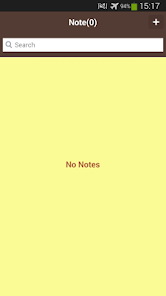
The user experience of the Notes app is intuitive and user-friendly, allowing users of all tech-savviness levels to navigate with ease. Upon opening the app, users are greeted with a clean interface that minimizes distractions. The organization features, such as tagging and color-coding notes, enhance usability, making it simple to locate specific entries when needed. The search function is robust, offering quick access to notes based on keywords or tags. Furthermore, the app supports multimedia elements, enabling users to embed images, audio clips, and even links, which enriches the note-taking experience. Syncing across devices is seamless, ensuring that users can access their notes from smartphones, tablets, or desktop computers without hassle. Overall, the user experience is designed to promote productivity and organization.

Pricing

The Notes app operates on a freemium model, providing users with a solid base of features at no cost. This includes core functionalities such as unlimited note creation, basic organization tools, and cloud syncing. For users seeking advanced features like enhanced collaboration options, premium templates, and additional storage, a subscription plan is available. The pricing is competitive compared to similar apps in the market, making it an attractive option for both casual users and professionals. Regular promotions and discounts can also be found, allowing users to explore premium features without breaking the bank.

Updates & Support

The developers of the Notes app are committed to delivering a continuously improving product. Regular updates are rolled out to introduce new features, enhance performance, and address user feedback. The app's support system is robust, offering multiple channels for assistance, including a comprehensive FAQ section, email support, and community forums. Users have reported positive experiences with the support team, noting quick response times and effective solutions to their queries. This dedication to user satisfaction ensures that the Notes app remains a reliable choice for anyone looking to enhance their note-taking experience.

verified Security & Privacy Review

The Notes app prioritizes user security and privacy, implementing robust encryption protocols to safeguard sensitive information. All notes are stored securely, with end-to-end encryption ensuring that only the user has access to their data. This feature is particularly important for users who may store personal or confidential information within the app. In terms of permissions, the app requires minimal access to device features, only requesting what is necessary for optimal functionality. Users are informed about the specific permissions required, allowing for informed consent. The app does not collect excessive data or track user behavior, aligning with best practices in privacy management. The Notes app also provides users with clear options to manage their data, including the ability to delete notes permanently and control sync settings across devices. Regular updates are rolled out to enhance security features, reflecting the developers' commitment to maintaining user trust. Overall, the Notes app demonstrates a strong dedication to protecting user privacy while providing a seamless note-taking experience.

Reviews

4.5

“Easy to use and intuitive interface!”

“Syncs perfectly across all devices.”

“Great for organizing my thoughts and tasks.”

“Love the collaboration features with friends.”

“Customizable templates enhance my note-taking experience.”

Editor's Choice