This site uses cookies to enhance your user experience. By clicking any link on this site you are giving your consent to our cookie policy. Read more
Reject
Accept All
Notepad

Notepad

verified Verified App

Developer: Notepad - Digital Notes Studios

  • category

    Category: Tools

  • price

    Price: free

  • age rating

    Age Rating: Everyone

  • rating

    Rating: 4.3

  • download

    Downloads: 50,000,000+

  • version

    Version: 4.4.2.18417

Screenshot 1
Screenshot 2
Screenshot 3
Screenshot 4
Screenshot 5
Screenshot 6
Screenshot 7
Screenshot 8

Features & Highlights

Quick Save Function

With the quick save feature, you can effortlessly save your work with just a click or a keyboard shortcut. This ensures that your thoughts are captured instantly, providing peace of mind as you write without the fear of losing your progress.

Search and Replace

Notepad includes a handy search and replace function, making it easy to find specific text or replace it with something new. This feature streamlines editing tasks, allowing users to efficiently manage their documents without hassle.

Simple Interface

Notepad boasts a clean and straightforward interface that allows users to focus solely on their writing. It eliminates distractions, making it perfect for jotting down quick notes or drafting ideas without the clutter of more complex word processors.

Text Formatting Options

While keeping things simple, Notepad offers essential text formatting options such as bold, italic, and underline. These features enhance your writing by allowing you to emphasize important points, ensuring clarity and impact in your notes.

Pros & Cons

Pros
  • Simple and intuitive user interface for easy navigation
  • Lightweight application ensures fast performance and low resource use
  • Supports various programming languages with syntax highlighting
  • Quickly saves files in multiple formats for versatility
  • Portable version allows use without installation on any device
Cons
  • Limited formatting options for text presentation
  • No support for images or multimedia content
  • Lacks advanced editing features for coding
  • Cannot handle large files efficiently

Real Experience Using Notepad

Application Scenarios

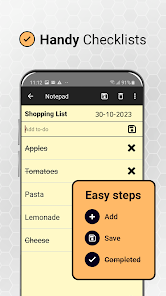
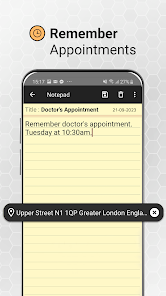
The Notepad app serves a variety of practical purposes, making it an essential tool for many users. Whether you are a student jotting down lecture notes, a professional drafting meeting minutes, or someone simply looking to keep a grocery list handy, Notepad fits the bill. Its simplicity allows for quick note-taking, while its flexibility enables users to organize thoughts on the go. Writers find it particularly useful for brainstorming ideas or drafting outlines without the distraction of formatting options. Additionally, the app is ideal for coding enthusiasts who need a lightweight editor for quick scripts or code snippets. Overall, Notepad excels in scenarios where speed and efficiency are prioritized, allowing users to focus on content rather than layout.

User Experience

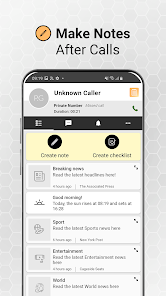
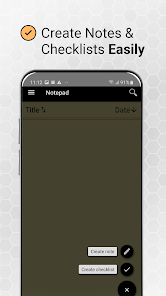
The user experience in Notepad is straightforward and intuitive. Upon launching the app, users are greeted with a clean interface that minimizes distractions. The layout is designed for seamless interaction, with essential features easily accessible. Users can easily create, edit, and delete notes with just a few taps. The app supports basic text formatting options, which adds a layer of versatility without overwhelming the user. Additionally, the search functionality allows for quick retrieval of notes, making it easy to find previously saved content. One of the standout features is its auto-save functionality, which ensures that users never lose their thoughts. However, some users may seek more advanced features, such as cloud synchronization, which may not be available in this version.

Pricing

Notepad offers a competitive pricing model that appeals to a wide range of users. The basic version is free, providing essential note-taking features without any hidden costs. This makes it accessible to students and casual users alike. For those looking for advanced capabilities, such as enhanced text formatting or premium support, a subscription plan is available at a reasonable monthly rate. This tier adds value for professionals who rely on the app for daily tasks and require additional tools to streamline their workflow. The pricing strategy is transparent, with no advertisements interrupting the user experience, which is a significant plus for many.

Updates & Support

The developers of Notepad are committed to maintaining the app's functionality through regular updates. Users can expect periodic enhancements that improve performance and introduce new features based on user feedback. The update process is seamless, ensuring that users always have access to the latest version without any hassle. Additionally, the support team is responsive and knowledgeable, providing assistance via email and an online help center. Users can easily report bugs or seek guidance on using various features. This level of support fosters a positive relationship between the developers and users, contributing to a continually improving app experience.

verified Security & Privacy Review

The Notepad app prioritizes user security and privacy, ensuring that personal data remains protected throughout its use. The app does not require excessive permissions, limiting access to only what is necessary for its core functionality, such as storage access for saving and retrieving notes. This minimal permission model reduces the risk of unauthorized access to sensitive information. Data handling practices within the Notepad app are designed with user privacy in mind. Notes created within the app are stored locally on the device, which means that no data is transmitted to external servers unless the user explicitly chooses to back up or share their notes. This local storage approach minimizes the risk of data breaches associated with cloud services. Additionally, the app employs encryption for any data that may be shared, ensuring that notes remain confidential during transmission. Users are encouraged to utilize device-level security features, such as passwords or biometric locks, to further enhance the protection of their notes. Overall, the Notepad app demonstrates a strong commitment to safeguarding user privacy and data security.

Reviews

4.3

“Simple and efficient for quick note-taking tasks”

“Love the minimalist design and ease of use”

“Perfect for distraction-free writing sessions”

“Wish it had more formatting options”

“Reliable and lightweight, great for everyday use”

FAQ

1

Can I submit suggestions or feedback to Notepad? Feedback can be submitted through the Windows Feedback Hub or relevant Microsoft support channels.

How to use Notepad

1

How can I contact customer service for the Notepad app?

You can reach customer service through the app's help section or visit the official website for support options.

2

How do I activate premium features in the Notepad app?

To activate premium features, go to the app's settings, select 'Upgrade', and follow the prompts to complete your purchase.

3

How do I log in to the Notepad app?

Open the app and select the login option, then enter your registered email and password to access your account.

4

Is activation required for the Notepad app?

The Notepad app is usually free and does not require activation, but premium features may need a subscription.

5

What is the customer number for Notepad app support?

The customer number can typically be found in the app's settings or on the official website under the support section.

Editor's Choice